# Set up Basic Emergency Calling
Basic emergency calling lets anyone on your phone system reach help fast when something goes wrong. You define an emergency number, decide which extensions may use it, and choose the trunks that carry the call out. This page walks you through that setup in Cloud Voice.
## Procedure
1. Sign in to the PBX (Private Branch Exchange, your phone system) web portal and go to **Call Control > Emergency Number**, then click **Add**.
2. In the **General** section, define the emergency number and who can dial it.
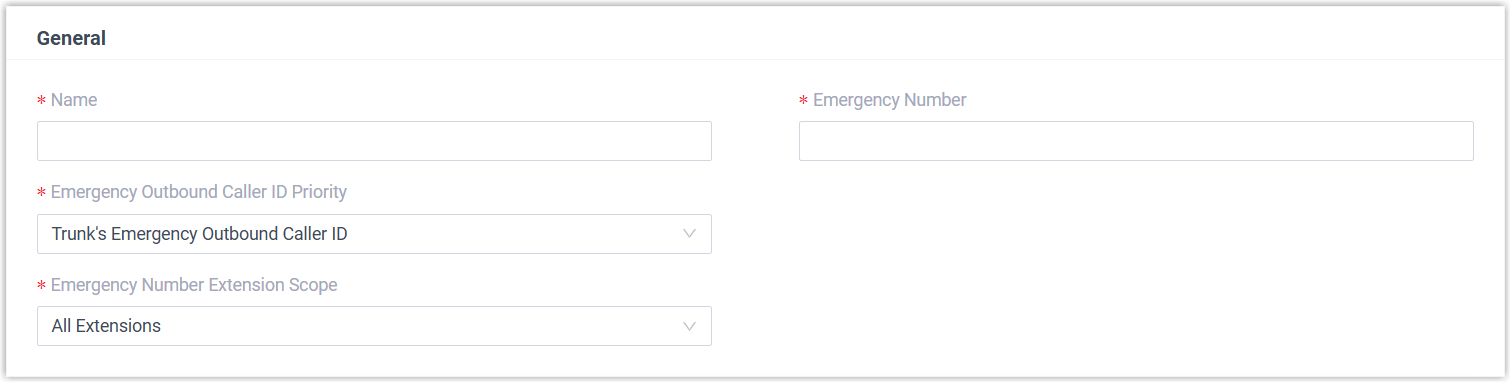
| Setting | Description |
|---------|-------------|
| **Name** | A label that helps you recognize this emergency number later. |
| **Emergency Number** | The number users dial to reach emergency services. |
| **Emergency Outbound Caller ID Priority** | Leave this at its default value. |
| **Emergency Number Extension Scope** | Controls which extensions may dial this number.
**All Extensions**: Every extension can place the call through any of the emergency trunks you define in the **Outbound Rules** section.
**Specific Extensions**: Only the extensions you name can place the call, and only through the matching emergency trunk in **Outbound Rules**. Choosing this option adds fields below where you select those extensions. |
:::note
- The **Emergency Outbound Caller ID Priority** setting applies to [enhanced emergency calling](/pbx/administrator-guide/emergency-calling-overview/#topic_xtn_hmf_nlb__section_p3l_1ht_wlb) and has no effect on basic emergency calls.
- For basic emergency calling, do not set an Emergency Outbound Caller ID on your extensions or trunks.
:::
:::note
On a hot desking phone, the virtual extension assigned to the device is exempt from the extension scope. But when a user signs in to that phone as a guest, their own extension follows the rule you set here.
:::
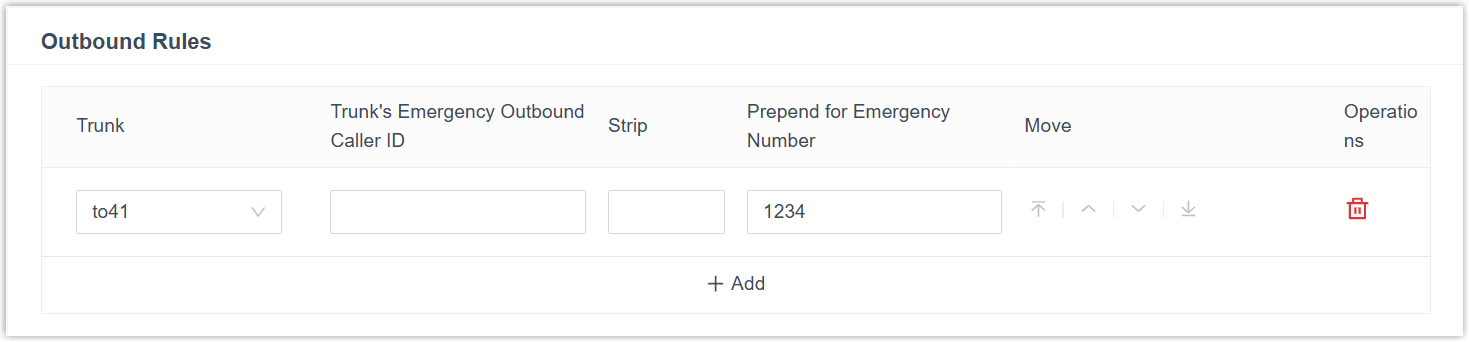
3. In the **Outbound Rules** section, choose the trunks that carry emergency calls.
:::caution
Emergency calls take precedence over everything else. If the trunk you select is already carrying a call, Cloud Voice drops that call to place the emergency call.
:::
a. Click **Add** and complete the trunk settings.
| Setting | Description |
|---------|-------------|
| **Trunk** | The trunk to route emergency calls through. |
| **Trunk's Emergency Outbound Caller ID** | Leave this at its default value. Setting an emergency outbound caller ID for basic emergency calling can cause calls to fail. |
| **Strip** | Optional. The number of digits to remove from the front of the dialed number. For example, set this to `1` so that when a user dials 8911, Cloud Voice strips the leading 8 and dials 911. |
| **Prepend for Emergency Number** | Optional. A prefix your ITSP (Internet Telephony Service Provider, the carrier that connects your outbound calls) requires for outbound calls. Cloud Voice adds it to the front of the dialed number. For example, set this to `1234` so that a dialed 911 goes out as 1234911. |
| **Extensions/Extension Groups** | Optional. When only certain extensions may use this number, select the extensions permitted to use this emergency trunk. |
:::danger
Only add a prefix in **Prepend for Emergency Number** if your ITSP requires one, and enter it exactly as specified. An incorrect prefix can stop emergency calls from connecting, leaving a caller unable to reach help in a real emergency.
:::
b. Repeat step a to add a second trunk. If the first trunk is unavailable, Cloud Voice falls back to the next one to place the call.
4. Click **Save**, then **Apply**.
## What to do next
With emergency calling in place, consider these follow-up tasks:
- [Set up a Route for PSAP Callbacks](/pbx/administrator-guide/set-up-a-route-for-psap-callbacks/), direct a return call from the PSAP (Public Safety Answering Point, the emergency call center that handles 911) to on-site staff when the original caller can't answer.
- [Add an Emergency Notification Contact](/pbx/administrator-guide/add-an-emergency-notification-contact/), alert designated people whenever someone dials an emergency number.