
System Security
System security is the first line of defense in a layered security strategy. It gives your phone system its baseline protection against known attacks and common breach techniques, and it is where hardening begins before you add network and account controls on top. Two practices carry most of the weight here: staying on current firmware and shutting off Secure Shell (SSH) access.
Keep firmware up to date
Section titled “Keep firmware up to date”Firmware is the low-level software that runs the phone system itself. Each firmware release closes bugs and patches vulnerabilities that have come to light since the previous build, so the newest version is almost always the most secure one available. Newer releases also add protection features that simply do not exist in older firmware. For both reasons, running current firmware is one of the most effective things you can do to keep the system safe.
The practical approach is to have Cloud Voice watch for new releases on a schedule and alert you, then apply the upgrade yourself when you are ready.
-
Go to Maintenance > Upgrade.
-
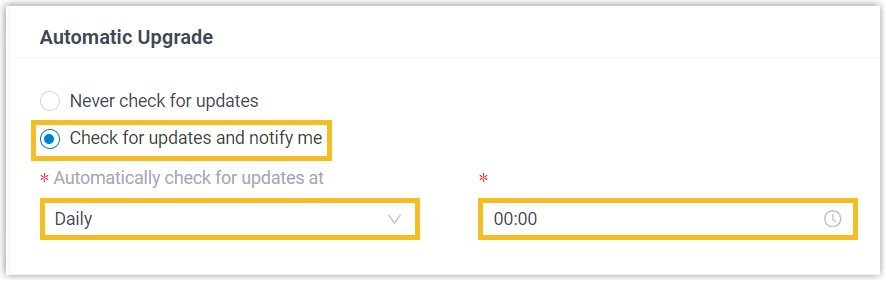
Under Automatic Upgrade, choose Check for updates and notify me, then set how often and at what time the system should look for new firmware.
-
Click Save, then Apply.
Once a notification tells you a newer build is available, apply the upgrade manually when it suits you.
Turn off SSH access
Section titled “Turn off SSH access”Secure Shell (SSH) is a remote command-line login into the system. Attackers routinely scan the internet for exposed SSH servers and hammer them with brute-force attacks: thousands of username and password guesses per second until something works. A successful login hands them a foothold they can use for toll fraud (placing expensive calls, often international, at your expense) or to harvest sensitive data. Because of this, the safest posture is to leave SSH disabled and only switch it on when you genuinely need it for troubleshooting.
To disable it, go to Security > Security Settings > Console/SSH Access and switch SSH Access off.

Question about this page?
Ask the AI assistant. It starts from this page, then searches the rest of the docs.
Ask Cloud Voice AI
Answers are AI-generated from the docs and may contain mistakes. Verify with the linked pages.