
IP Phone Configuration Guide Overview
Cloud Voice works with most IP phones that speak SIP (Session Initiation Protocol, the standard signaling language phones and the PBX use to set up calls), so you can bring almost any desk phone into your hosted phone system. There is usually more than one way to get a handset registered, and the best choice depends on how many phones you are deploying and what each model supports. This page explains the available connection methods and links to the step-by-step guide for each phone brand.
Configuration methods
Section titled “Configuration methods”Pick the method that fits your deployment and your hardware.
| Method | What it does | When to use it |
|---|---|---|
| Auto provisioning | Configures many identical phones at once, general preferences, codecs, and extension registration, and lets you manage them centrally from Cloud Voice. | Rolling out a batch of phones that support auto provisioning. |
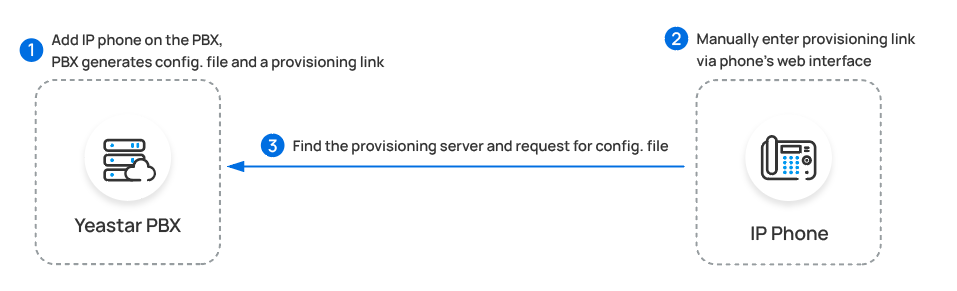
| Manual provisioning | Configures a single phone by pasting a Cloud Voice provisioning link into the phone’s web interface, which applies the same general settings and registers the extension. | Phones that do not support RPS auto provisioning. |
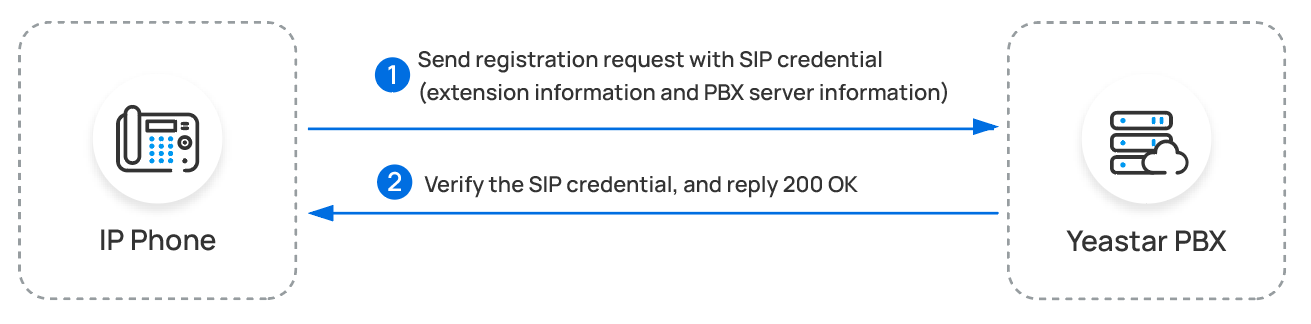
| Manual registration | Registers one or more extensions on a phone by entering the SIP credentials directly, with no further provisioning. | Any phone that supports the standard SIP protocol. |
Auto provisioning
Section titled “Auto provisioning”Auto provisioning is the fastest way to bring up a large number of matching handsets, and it keeps them under central management afterward. Cloud Voice can provision phones over two channels: RPS (Redirection and Provisioning Service) and DHCP (Dynamic Host Configuration Protocol, the service that hands out network settings to devices). Choose the one your phones support.
Through an on-site proxy
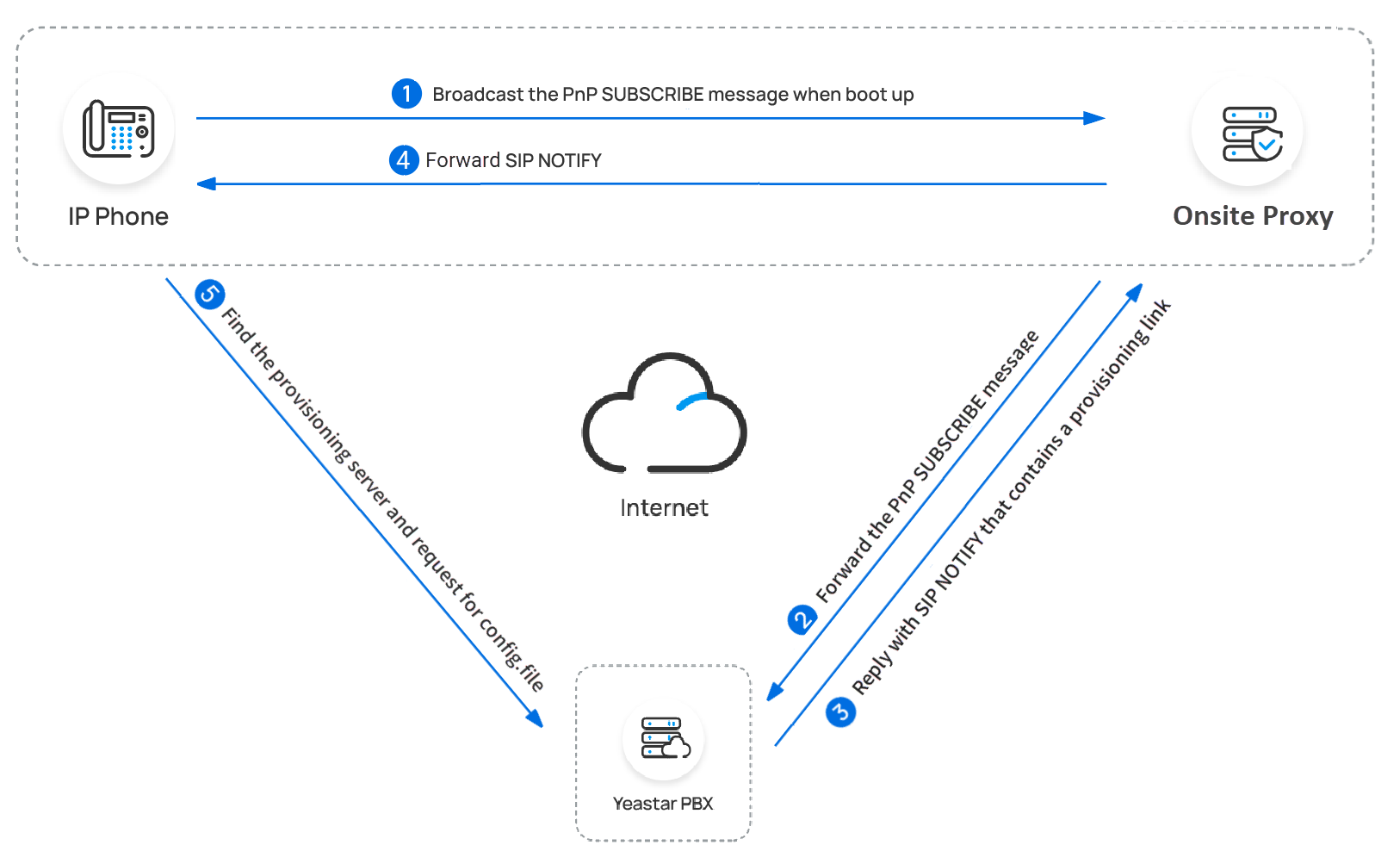
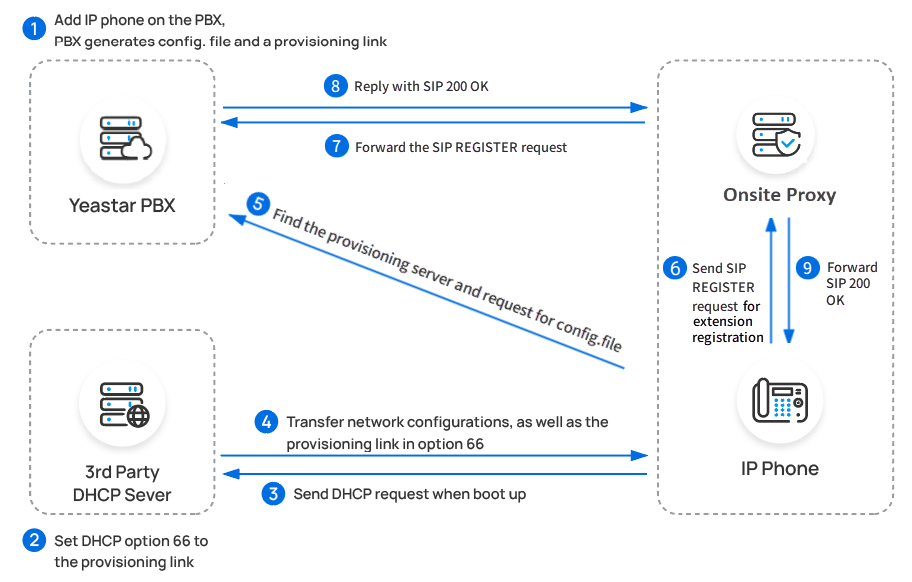
Section titled “Through an on-site proxy”When you run an on-site proxy on the local network, it can provision phones in two ways:
- For phones that support PnP (Plug and Play), the proxy discovers them and pushes their configuration automatically.
- For phones that do not support PnP, the proxy hands out the configuration through a DHCP server on the local network instead.
Through RPS
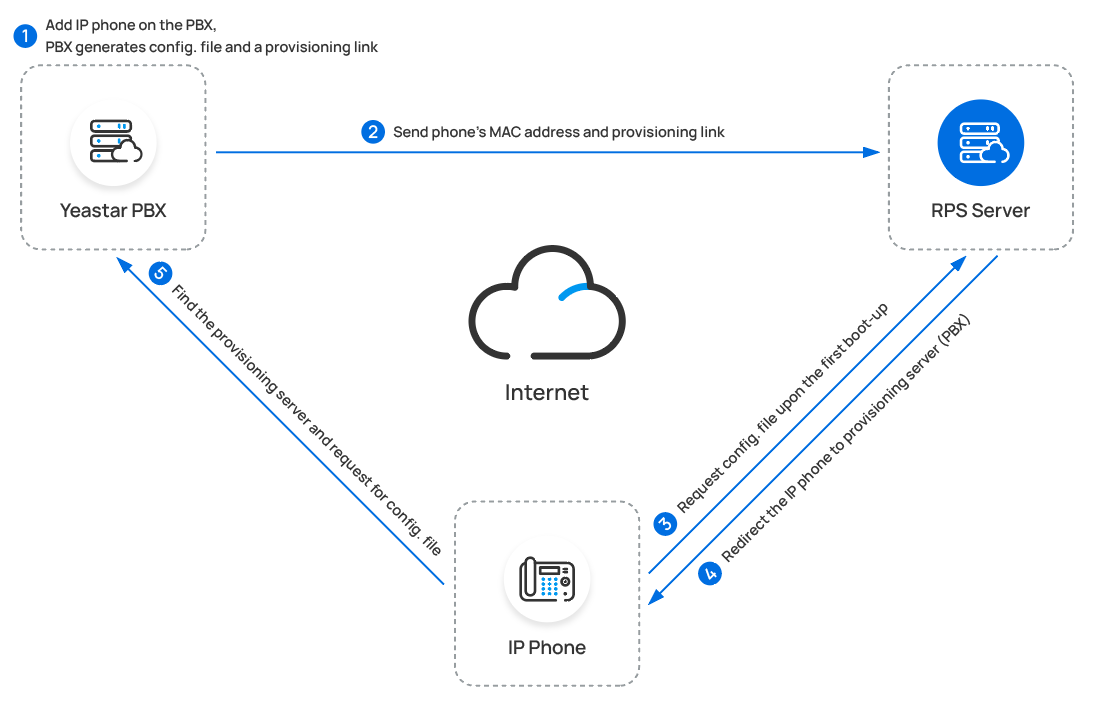
Section titled “Through RPS”RPS points a phone to Cloud Voice the first time it comes online, and the phone then pulls its configuration directly. This works even when the phone and the PBX are on different networks, because the phone vendor’s redirection service tells the handset where to look. The flow looks like this:
Through a DHCP server (no proxy)
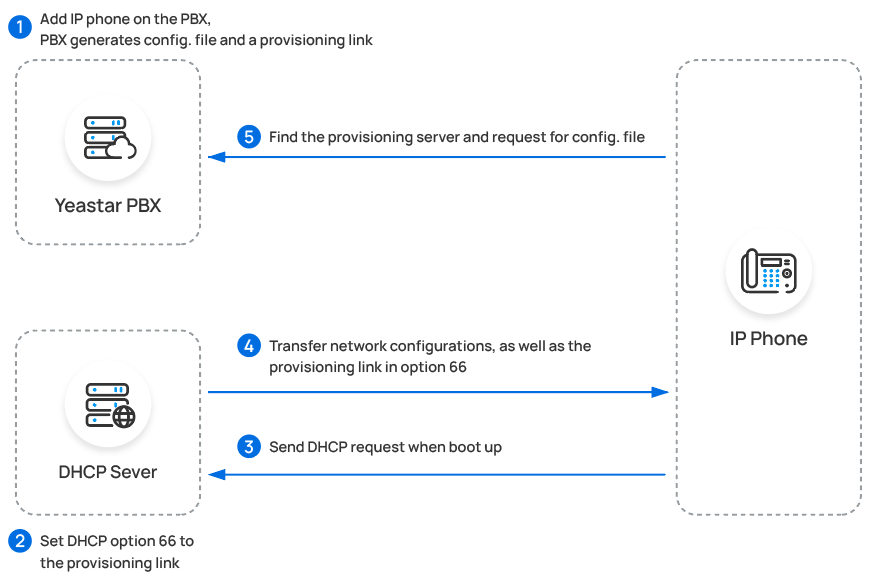
Section titled “Through a DHCP server (no proxy)”If you need to deploy many identical phones that do not support RPS, you can use DHCP option 66 to hand each phone a Cloud Voice provisioning link. The phones use that link to retrieve their configuration from the system:
Manual provisioning
Section titled “Manual provisioning”For a phone that does not support RPS provisioning, you can provision it by hand: paste the Cloud Voice provisioning link into the phone’s web interface, and the phone retrieves its configuration from that link.
Manual registration
Section titled “Manual registration”To register a phone without any provisioning, enter its SIP credentials, the extension details and the Cloud Voice server information, directly in the phone’s web interface.
Configuration guides
Section titled “Configuration guides”Find your phone brand below for a detailed walkthrough of each supported method.
| Phone brand | Setup guides |
|---|---|
| Yealink | Auto Provisioning · Manual Registration |
| Fanvil | Auto Provisioning · Manual Registration |
| Snom | Auto Provisioning · Manual Registration |
| Htek | Auto Provisioning · Manual Registration |
| Tiptel | Auto Provisioning · Manual Registration |
| Flyingvoice | Auto Provisioning · Manual Registration |
| Poly | Auto Provisioning · Manual Registration |
| Gigaset (DECT) | Auto Provisioning |
| Grandstream | Provisioning · Manual Registration |
| Alcatel-Lucent Enterprise (ALE) | Provisioning · Manual Registration |
| Mitel | Provisioning · Manual Registration |
| Wildix | Provisioning · Manual Registration |
| Avaya | Provisioning |
| NEC | Provisioning |
| Unify | Provisioning |
| Flat | Provisioning |
| Dinstar | Manual Registration |
Question about this page?
Ask the AI assistant. It starts from this page, then searches the rest of the docs.
Ask Cloud Voice AI
Answers are AI-generated from the docs and may contain mistakes. Verify with the linked pages.