
Provision an NEC IP Phone
Auto provisioning lets Cloud Voice hand a phone its full configuration from the server, so nothing has to be typed in by hand on the handset. NEC phones find that configuration through DHCP (Dynamic Host Configuration Protocol) option 66, which means provisioning has two parts: you add the phone in Cloud Voice, then point your DHCP server at the location where the phone should collect its files. The example below uses an NEC DT900 ITK-12D-1P (firmware 05.03.04.03); the same procedure applies to the other supported models.
Supported models and firmware
Section titled “Supported models and firmware”Check that both the phone and Cloud Voice meet the minimum firmware versions below before you begin.
| Model | Phone firmware | Cloud Voice version |
|---|---|---|
| DT700 ITL-2E-1P | 03.01.64.00 or later | 84.17.0.53 or later |
| DT700 ITL-6DE-1P | 03.01.64.00 or later | 84.17.0.53 or later |
| DT700 ITL-12D-1P | 03.01.64.00 or later | 84.17.0.53 or later |
| DT700 ITL-24D-1P | 03.01.64.00 or later | 84.17.0.53 or later |
| DT700 ITL-8LD-1P | 03.01.64.00 or later | 84.17.0.53 or later |
| DT700 ITL-8LDE-1P | 03.01.64.00 or later | 84.17.0.53 or later |
| DT700 ITL-12DG-3P | 03.01.64.00 or later | 84.17.0.53 or later |
| DT700 ITL-12CG-3P | 03.01.64.00 or later | 84.17.0.53 or later |
| DT820 ITY-6D-1P | 04.04.28.14 or later | 84.17.0.53 or later |
| DT820 ITY-8LDX-1P | 04.04.28.14 or later | 84.17.0.53 or later |
| DT820 ITY-8LCGX-1P | 04.04.28.14 or later | 84.17.0.53 or later |
| DT820 ITY-6DG-1P | 04.04.28.14 or later | 84.17.0.53 or later |
| DT820 ITY-32LDG-1P | 04.04.28.14 or later | 84.17.0.53 or later |
| DT820 ITY-32LCG-1P | 04.04.28.14 or later | 84.17.0.53 or later |
| DT900 ITK-6D-1P | 05.03.04.99 or later | 84.17.0.53 or later |
| DT900 ITK-12D-1P | 05.03.04.03 or later | 84.17.0.53 or later |
| DT900 ITK-8LCX-1P | 05.03.04.99 or later | 84.17.0.53 or later |
| DT900 ITK-8TCGX-1P | 05.03.04.99 or later | 84.17.0.53 or later |
| DT900 ITK-6DG-1P | 05.03.04.99 or later | 84.17.0.53 or later |
| DT900 ITK-12DG-1P | 05.03.04.99 or later | 84.17.0.53 or later |
| DT900 ITK-32LCG-1P | 05.03.04.99 or later | 84.17.0.53 or later |
| DT900 ITK-32TCG-1P | 05.03.04.99 or later | 84.17.0.53 or later |
| DT900S ITK-6DGS-1P | 05.03.04.99 or later | 84.17.0.53 or later |
| DT900S ITK-32LCGS-1P | 05.03.04.99 or later | 84.17.0.53 or later |
| DT900S ITK-32TCGS-1P | 05.03.04.99 or later | 84.17.0.53 or later |
Before you start
Section titled “Before you start”-
Have a DHCP server running on the same subnet as the phone so it can lease the phone an IP address.
-
If the phone has been used before, factory-reset it first.
-
Collect the phone’s details: vendor, model, and MAC (Media Access Control) address. The MAC address is the phone’s unique hardware ID, usually printed on a label on the underside of the handset.
-
Download the default auto provisioning template for your phone model. The templates live under Auto Provisioning > Resource Repository > Default Templates.
Step 1: Add the NEC phone in Cloud Voice
Section titled “Step 1: Add the NEC phone in Cloud Voice”Adding the phone generates a configuration file keyed to its MAC address.
-
Sign in to the Cloud Voice web portal and go to Auto Provisioning > Phones.
-
Click Add > Add.
-
In the IP Phone section, fill in the phone’s details.
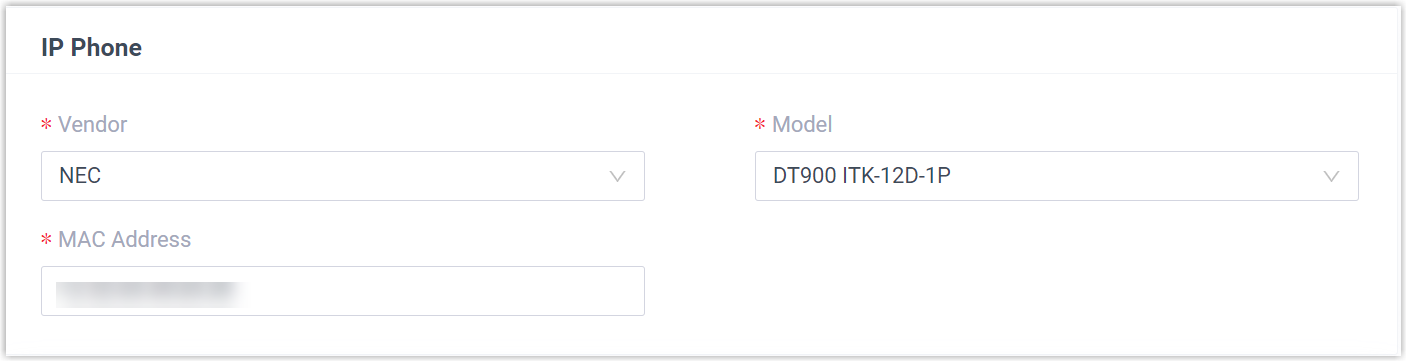
- Vendor: Choose NEC.
- Model: Pick your phone model. This example uses DT900 ITK-12D-1P.
- MAC Address: Type the phone’s MAC address.
-
In the Options section, set the following.

-
Template: Select a template from the drop-down list.
-
Provisioning Link: This link is generated automatically and points to where the phone’s configuration file is stored.
-
-
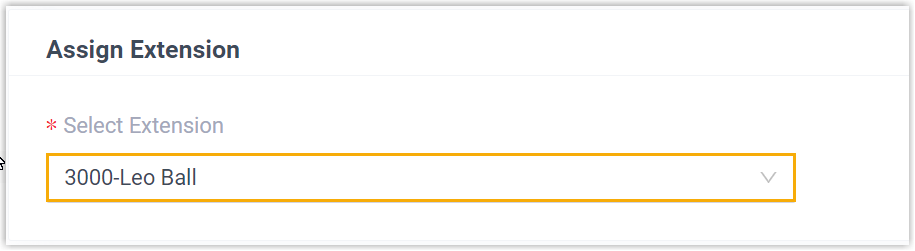
In the Assign Extension section, assign an extension to the phone.
-
Click Save. The phone now appears in the Auto Provisioning phone list.
Step 2: Configure DHCP option 66
Section titled “Step 2: Configure DHCP option 66”Option 66 tells the NEC phone where to reach Cloud Voice so it can retrieve its configuration files on its own. The steps below use the Tftpd64 DHCP server as an example.
-
In Tftpd64, go to Settings > DHCP > DHCP Options.
-
Set the following options.
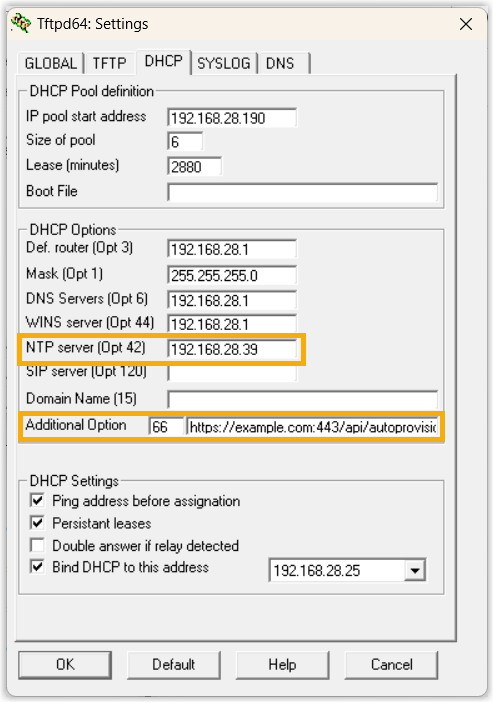
- NTP server (Opt 42): Enter the IP address of an NTP (Network Time Protocol) server, which keeps the phone’s clock accurate.
- Additional Option: Enter
66, then enter the provisioning link you noted in Step 1.
-
Click OK to save.
Result
Section titled “Result”-
When the phone reboots, it leases an IP address from the DHCP server, downloads its configuration from Cloud Voice over the provisioning link, and applies the settings automatically.
-
The extension registers successfully on the phone. To confirm, check the registration status under Auto Provisioning > Phones in the web portal.

Question about this page?
Ask the AI assistant. It starts from this page, then searches the rest of the docs.
Ask Cloud Voice AI
Answers are AI-generated from the docs and may contain mistakes. Verify with the linked pages.