
Auto Provision a Fanvil IP Phone
Auto provisioning lets Cloud Voice deliver a phone’s configuration to it over the network, so a Fanvil handset picks up its extension and settings on its own with nothing typed into the phone itself. The steps below use the Fanvil X6U-V2 (firmware 2.12.1) as a worked example; the same flow applies to any supported model.
Supported models and firmware
Section titled “Supported models and firmware”Locate your model in the table below and confirm the minimum versions before you begin.
| Model | Minimum phone firmware | Minimum PBX firmware |
|---|---|---|
| A10 | 2.12.4 or later | 84.11.0.22 or later |
| A10W | 2.12.4 or later | 84.11.0.22 or later |
| A12 | 2.12.49.6 or later | 84.14.0.26 or later |
| A12V | 2.12.50.1 or later | 84.14.0.26 or later |
| A201 | 2.12.49.6 or later | 84.14.0.26 or later |
| A212 | 2.12.49.6 or later | 84.14.0.26 or later |
| A233 | 2.12.49.6 or later | 84.14.0.26 or later |
| A308i | 2.6.10.1177 or later | 84.14.0.26 or later |
| A32 | 2.6.0.408 or later | 84.5.0.86 or later |
| A32i | 2.6.0.408 or later | 84.5.0.86 or later |
| A320 | 2.6.0.1402 or later | 84.11.0.22 or later |
| A320i | 2.6.0.1402 or later | 84.11.0.22 or later |
| FH-S01 | 2.12.8 or later | 84.9.0.20 or later |
| H1 | 2.12.1 or later | 84.10.0.32 or later |
| H1-2 Wire | 2.12.1 or later | 84.20.0.74 or later |
| H2U | 2.4.7 or later | 84.5.0.86 or later |
| H2U-V2 | 2.4.7.6 or later | 84.5.0.86 or later |
| H3 | 2.12.1.7334 or later | 84.5.0.86 or later |
| H3W | 2.4.4 or later | 84.5.0.86 or later |
| H4 | 1.0.8 or later | 84.14.0.26 or later |
| H4W | 1.0.8 or later | 84.14.0.26 or later |
| H5 | 2.12.1.7334 or later | 84.5.0.86 or later |
| H5W | 2.4.4 or later | 84.5.0.86 or later |
| H6 | 1.0.8 or later | 84.14.0.26 or later |
| H6W | 1.0.8 or later | 84.14.0.26 or later |
| H603W | 2.14.0.11 or later | 84.14.0.26 or later |
| i10 | 1.2.7 or later | 84.5.0.86 or later |
| i10D | 1.2.7 or later | 84.5.0.86 or later |
| i10S | 2.4.4 or later | 84.5.0.86 or later |
| i10SD | 2.4.4 or later | 84.5.0.86 or later |
| i10SV | 2.4.4 or later | 84.5.0.86 or later |
| i10V | 1.2.7 or later | 84.5.0.86 or later |
| i11S | 1.2.7 or later | 84.5.0.86 or later |
| i11SV | 2.4.4 or later | 84.5.0.86 or later |
| i12 | 2.8.2.7009 or later | 84.5.0.86 or later |
| i16V | 2.8.2.7009 or later | 84.5.0.86 or later |
| i16S | 2.4.4 or later | 84.5.0.86 or later |
| i16SV | 2.4.4 or later | 84.5.0.86 or later |
| i18S | 2.8.2.7009 or later | 84.5.0.86 or later |
| i20S | 2.8.2.7009 or later | 84.5.0.86 or later |
| i23S | 2.8.2.7009 or later | 84.5.0.86 or later |
| i30 | 2.8.2.7009 or later | 84.5.0.86 or later |
| i31S | 2.8.2.7009 or later | 84.5.0.86 or later |
| i32V | 2.8.2.7009 or later | 84.5.0.86 or later |
| i33V | 2.8.2.7009 or later | 84.5.0.86 or later |
| i33VF | 2.8.2.7009 or later | 84.5.0.86 or later |
| i504 | 2.12.43.13 or later | 84.6.0.24 or later |
| i505 | 2.6.6.391 or later | 84.11.0.22 or later |
| i506W | 2.12.43.13 or later | 84.6.0.24 or later |
| i507W | 2.6.6.394 or later | 84.11.0.22 or later |
| i51 | 2.8.13 or later | 84.5.0.86 or later |
| i51W | 2.8.13 or later | 84.5.0.86 or later |
| i52 | 2.8.13 or later | 84.5.0.86 or later |
| i52W | 2.8.13 or later | 84.5.0.86 or later |
| i53 | 2.8.13 or later | 84.5.0.86 or later |
| i53W | 2.8.13 or later | 84.5.0.86 or later |
| i55A | 1.0.0.45 or later | 84.8.0.25 or later |
| i56A | 0.3.0.21 or later | 84.5.0.86 or later |
| i57A | 1.0.0.46 or later | 84.8.0.25 or later |
| i60 | 2.12.50.16 or later | 84.6.0.24 or later |
| i61 | 2.4.0 or later | 84.6.0.24 or later |
| i62 | 2.4.0 or later | 84.6.0.24 or later |
| i63 | 2.4.0 or later | 84.6.0.24 or later |
| i64 | 2.4.0 or later | 84.6.0.24 or later |
| i67 | 2.12.50.5 or later | 84.8.0.25 or later |
| i68 | 2.8.40.22 or later | 84.8.0.25 or later |
| PA2 | 2.8.2.7009 or later | 84.5.0.86 or later |
| PA2S | 2.8.11 or later | 84.5.0.86 or later |
| PA3 | 2.4.4 or later | 84.5.0.86 or later |
| V50G | 2.12.23.5 or later | 84.14.0.26 or later |
| V50P | 2.12.20.4 or later | 84.14.0.26 or later |
| V60G | 2.12.20.34 or later | 84.14.0.26 or later |
| V60P | 2.12.20.3 or later | 84.14.0.26 or later |
| V60W | 2.12.20.3 or later | 84.14.0.26 or later |
| V61G | 2.12.18.8 or later | 84.14.0.26 or later |
| V61W | 2.12.18.8 or later | 84.14.0.26 or later |
| V62 | 2.4.10 or later | 84.6.0.24 or later |
| V62G | 2.12.18.8 or later | 84.14.0.26 or later |
| V62W | 2.12.18.8 or later | 84.14.0.26 or later |
| V62 Pro | 2.12.18.2 or later | 84.14.0.26 or later |
| V63 | 2.12.16.19 or later | 84.11.0.22 or later |
| V64 | 2.4.10 or later | 84.6.0.24 or later |
| V65 | 2.12.2.4 or later | 84.7.0.17 or later |
| V66 | 2.12.18.4 or later | 84.14.0.26 or later |
| V66 Pro | 2.12.18.4 or later | 84.14.0.26 or later |
| V67 | 2.6.0 or later | 84.6.0.24 or later |
| W610W | 2.12.0 or later | 84.11.0.22 or later |
| W611W | pvt-2.8 or later | 84.8.0.25 or later |
| W620W | 2.16.2 or later | 84.11.0.22 or later |
| W626W | 2.16.30 or later | 84.11.0.22 or later |
| W710D | 1.18.11 or later | 84.14.0.26 or later |
| W710H | 1.0.14.5 or later | 84.14.0.26 or later |
| X1S / X1SP | 2.2.12 or later | 84.5.0.86 or later |
| X1SG | 2.2.12 or later | 84.5.0.86 or later |
| X2 / X2P | 2.14.0.7386 or later | 84.5.0.86 or later |
| X2C / X2CP | 2.14.0.7386 or later | 84.5.0.86 or later |
| X210 | 2.2.11 or later | 84.5.0.86 or later |
| X210-V2 | 2.12.1.3 or later | 84.7.0.17 or later |
| X210i | 2.2.11 or later | 84.5.0.86 or later |
| X210i-V2 | 2.12.1.3 or later | 84.7.0.17 or later |
| X3SG | 2.2.12 or later | 84.5.0.86 or later |
| X3S / X3SP / X3G | 2.14.0.7386 or later | 84.5.0.86 or later |
| X3S Lite / X3SP Lite | 2.4.5 or later | 84.5.0.86 or later |
| X3S Pro / X3SP Pro | 2.4.5 or later | 84.5.0.86 or later |
| X3SW | 2.4.5 or later | 84.5.0.86 or later |
| X3SG Lite | 2.4.5 or later | 84.5.0.86 or later |
| X3SG Pro | 2.4.5 or later | 84.5.0.86 or later |
| X3U | 2.2.12 or later | 84.5.0.86 or later |
| X3U Pro | 2.4.5 or later | 84.5.0.86 or later |
| X301 | 2.12.2 or later | 84.8.0.25 or later |
| X301G | 2.12.2 or later | 84.8.0.25 or later |
| X301W | 2.12.2 or later | 84.8.0.25 or later |
| X303 | 2.12.2 or later | 84.8.0.25 or later |
| X303G | 2.12.2 or later | 84.8.0.25 or later |
| X303W | 2.12.2 or later | 84.8.0.25 or later |
| X303-2 Wire | 1.0.3 or later | 84.14.0.26 or later |
| X305 | 2.12.1.6 or later | 84.8.0.25 or later |
| X306 | 2.12.20.4 or later | 84.8.0.25 or later |
| X4 / X4G | 2.14.0.7386 or later | 84.5.0.86 or later |
| X4U | 2.2.11 or later | 84.5.0.86 or later |
| X4U-V2 | 2.12.1 or later | 84.6.0.24 or later |
| X5U | 2.2.11 or later | 84.5.0.86 or later |
| X5U-V2 | 2.12.1 or later | 84.6.0.24 or later |
| X5S | 2.2.1 or later | 84.5.0.86 or later |
| X6 | 2.2.1 or later | 84.5.0.86 or later |
| X6U | 2.2.11 or later | 84.5.0.86 or later |
| X6U-V2 | 2.12.1 or later | 84.6.0.24 or later |
| X7 | 2.2.11 or later | 84.5.0.86 or later |
| X7A | 2.2.0.229 or later | 84.5.0.86 or later |
| X7C | 2.2.11 or later | 84.5.0.86 or later |
| X7-V2 | 2.12.1.3 or later | 84.7.0.17 or later |
| X7C-V2 | 2.12.1.3 or later | 84.7.0.17 or later |
| Y501 | 2.12.4 or later | 84.11.0.22 or later |
| Y501W | 2.12.4 or later | 84.11.0.22 or later |
| Y501-Y | 2.12.4 or later | 84.11.0.22 or later |
| Y501W-Y | 2.12.4 or later | 84.11.0.22 or later |
Before you start
Section titled “Before you start”Have the following ready before you add the phone:
- Confirm that the provisioning template for your phone model has already been downloaded to the PBX. You manage these under Auto Provisioning > Resource Repository > Default Templates.
- If the handset has been used before, perform a factory reset so no stale configuration interferes with provisioning.
- Note the phone’s details: its vendor, model, and MAC address (Media Access Control, the unique hardware address printed on the label on the back or base of the phone). You enter all three when you add the device.
Step 1: Add the phone in the PBX
Section titled “Step 1: Add the phone in the PBX”-
Sign in to the PBX web portal and go to Auto Provisioning > Phones.
-
Click Add > Add.
-
In the IP Phone section, describe the device.
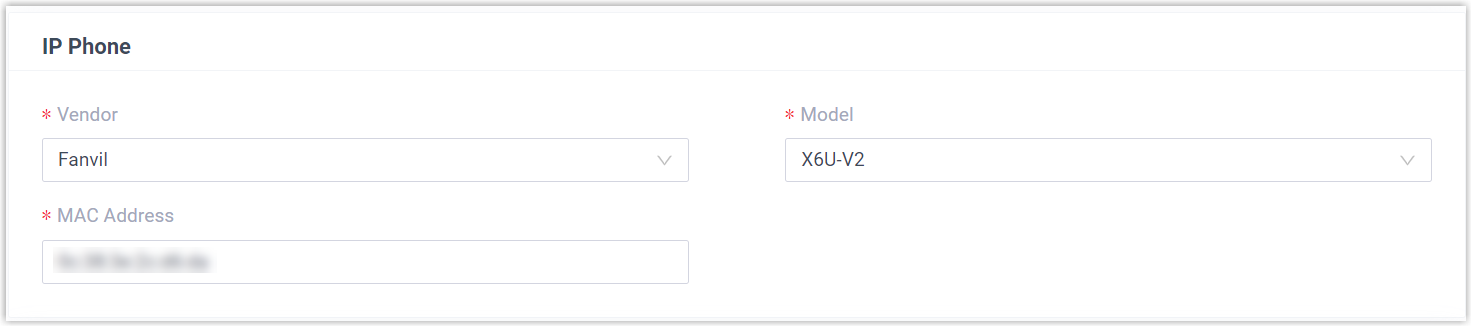
- Vendor: Choose Fanvil.
- Model: Choose your phone model. In this example, choose X6U-V2.
- MAC Address: Type the phone’s MAC address.
-
In the Options section, set the provisioning behavior.

-
Template: Pick a template from the drop-down list.
-
Provisioning Link: Generated for you automatically. It points to where the phone’s configuration file is stored.
-
Authentication for the First-time Auto Provisioning: When enabled, the phone prompts the user for credentials before it provisions for the first time.
-
-
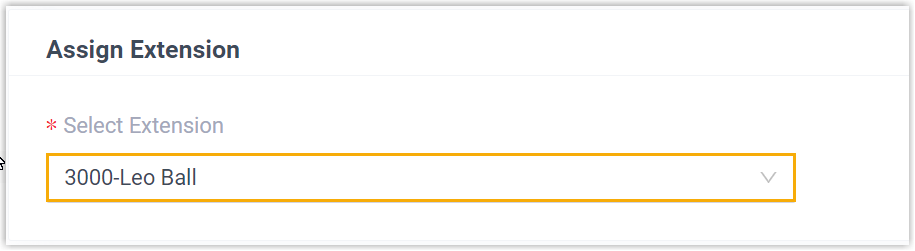
In the Assign Extension section, select the extension to bind to this phone.
-
Click Save.
The PBX raises the event notification RPS Request Success to confirm the device has been registered for provisioning. (RPS is the Redirection and Provisioning Service that tells the phone where to fetch its configuration.)
Step 2: Provision the phone
Section titled “Step 2: Provision the phone”-
Reboot the Fanvil phone.
-
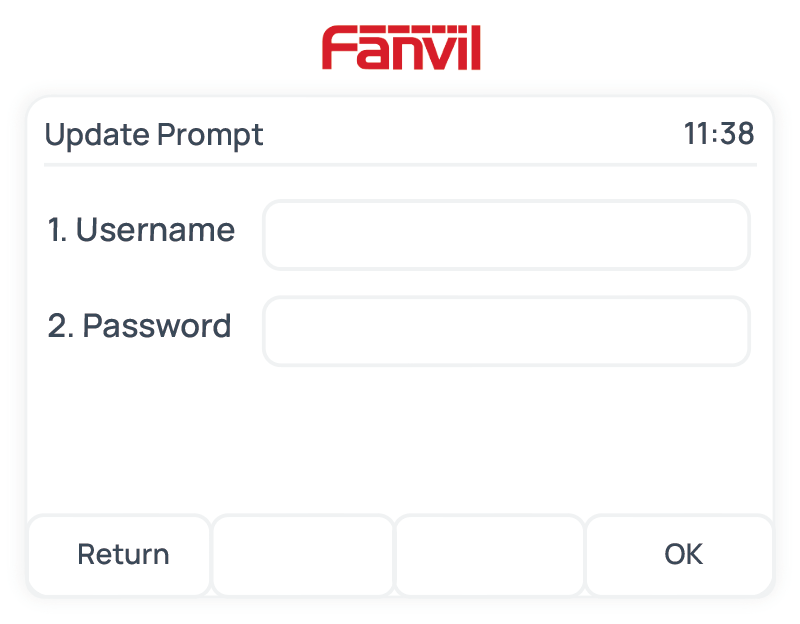
If you left Authentication for the First-time Auto Provisioning enabled, the phone asks for credentials. Enter them on the handset.
-
Username: The extension number assigned to the phone.
-
Password: The extension’s Voicemail Access PIN.
-
Result
Section titled “Result”The phone downloads its configuration from the PBX and applies the settings on its own, and the assigned extension registers on the handset. To confirm, open Auto Provisioning > Phones in the PBX web portal and check the registration status.

Question about this page?
Ask the AI assistant. It starts from this page, then searches the rest of the docs.
Ask Cloud Voice AI
Answers are AI-generated from the docs and may contain mistakes. Verify with the linked pages.