
Switch Group Members' Presences
Presence is a status that tells the phone system how to handle calls to an extension. Each presence (for example Available, Away, or Do Not Disturb) can point incoming calls at a different destination, such as voicemail, a mobile number, or another colleague. When you or a teammate steps away and can no longer take calls, you can switch to a presence that routes calls somewhere useful instead of ringing an empty desk. This page explains how to change your own presence and that of other members in your group from the Operator Panel.
Before you start
Section titled “Before you start”Changing another member’s presence requires the Switch group members’ presence permission.
Change a presence status
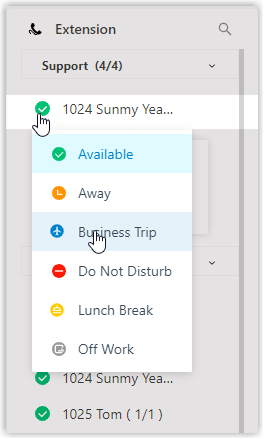
Section titled “Change a presence status”- On the Extension panel, point your mouse at the extension whose presence you want to change. This can be your own extension or another group member’s.
- Select the presence status icon. The icon shows the member’s current status, so confirm you are on the right extension before changing it.
- In the pop-up list that appears, choose the presence you want to apply.
What happens next
Section titled “What happens next”Once the new presence is set, any calls to that group member are redirected to the destination configured for that presence.
Question about this page?
Ask the AI assistant. It starts from this page, then searches the rest of the docs.
Ask Cloud Voice AI
Answers are AI-generated from the docs and may contain mistakes. Verify with the linked pages.