
Monitor a Call
Monitoring live calls lets you keep an ear on the conversations your team has with customers, so you can uphold quality standards and coach staff in real time. From the Operator Panel you can quietly listen in, speak privately to a group member, or step into the call directly.
An extension is the internal phone identity assigned to a user (their line on the phone system). You can only monitor the extensions that belong to a group you supervise.
When to use call monitoring
Section titled “When to use call monitoring”Reviewing active calls is a practical way to gauge call quality, sharpen efficiency, lift team performance, and shape your sales or marketing approach. The Operator Panel gives you three ways to sit in on a group member’s conversation:
- Listen: Silently follow the live call between a group member and a customer to confirm that your standards are being met. Neither party is aware you are on the line.
- Barge In: Join the call and talk to both the group member and the customer at once. Use this to jump in with immediate help and keep the customer satisfied.
- Whisper: Speak only to the group member during the call, offering guidance the customer cannot hear.
Before you begin
Section titled “Before you begin”Monitoring the calls of your extension group members requires the Call monitoring operations (Listen, Whisper, Barge In) permission.
Monitor an active call
Section titled “Monitor an active call”-
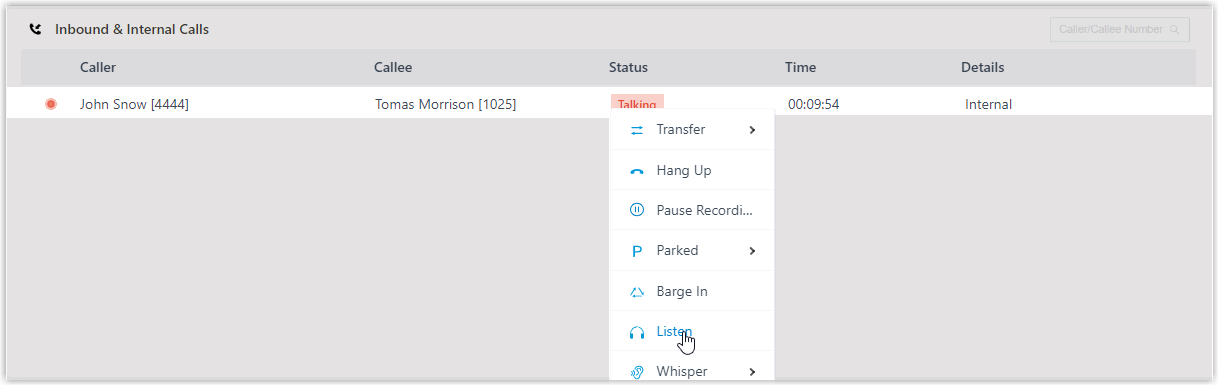
In the Inbound & Internal Calls panel or the Outbound Calls panel, move your pointer over the active call you want to monitor.
-
Right-click the call and choose a monitor mode: Barge In, Listen, or Whisper. Cloud Voice then rings your own extension.
-
Answer the incoming call to begin monitoring.
Question about this page?
Ask the AI assistant. It starts from this page, then searches the rest of the docs.
Ask Cloud Voice AI
Answers are AI-generated from the docs and may contain mistakes. Verify with the linked pages.