
Retain Configurations for Hot Desking Phones
On a Hot Desking phone, different users sign in and out of the same device throughout the day. By default, a phone’s settings reset when the guest logs off. If you would rather preserve the general device settings between sessions, you can enable a single option that retains them for the next person who signs in. This saves you from re-applying common settings on a shared phone every time a new user takes it over.
Before you begin
Section titled “Before you begin”The phone must be running firmware version 84.19.0.70 or higher for Cloud Voice to keep its configuration across Hot Desking sessions.
Turn on configuration retention
Section titled “Turn on configuration retention”-
Sign in to the PBX (Private Branch Exchange, the phone system) web portal and open Auto Provisioning > Phones.
-
Above the phone list, select Options.

-
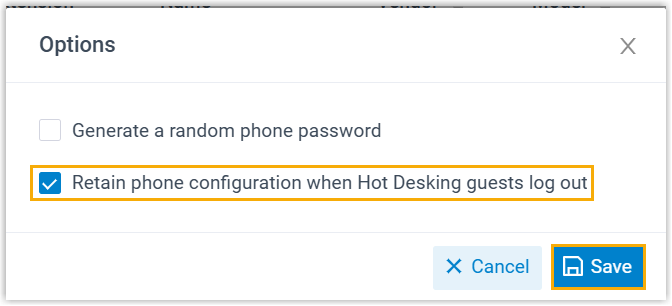
In the dialog that opens, tick Retain phone configuration when Hot Desking guests log out, then select Save.
What happens after a guest logs out
Section titled “What happens after a guest logs out”Once the option is enabled, a phone’s general settings stay in place when an extension user logs off a Hot Desking device.
Question about this page?
Ask the AI assistant. It starts from this page, then searches the rest of the docs.
Ask Cloud Voice AI
Answers are AI-generated from the docs and may contain mistakes. Verify with the linked pages.