
Allow Multiple Registrations for One Extension Number
An extension does not have to live on just one device. You can register the same extension number across several SIP endpoints and Cloud Voice App clients at the same time, so a user can answer and place calls from whichever device is convenient. This page shows how to raise the concurrent-registration limits for an extension.
How it works
Section titled “How it works”People who move between locations often want the same number everywhere: a desk phone in the office, a softphone on their laptop, and the Cloud Voice App on their mobile. When you allow more than one registration per extension, an incoming call can ring every registered device at once, and the user handles it from wherever they happen to be.
Each device family has its own limit, which you set independently.
Set the concurrent registration limits
Section titled “Set the concurrent registration limits”-
Sign in to the management portal and go to Extension and Trunk > Extension, then open the extension you want to change for editing.
-
In the Extension Information section, set a limit for each device type according to how the user works.
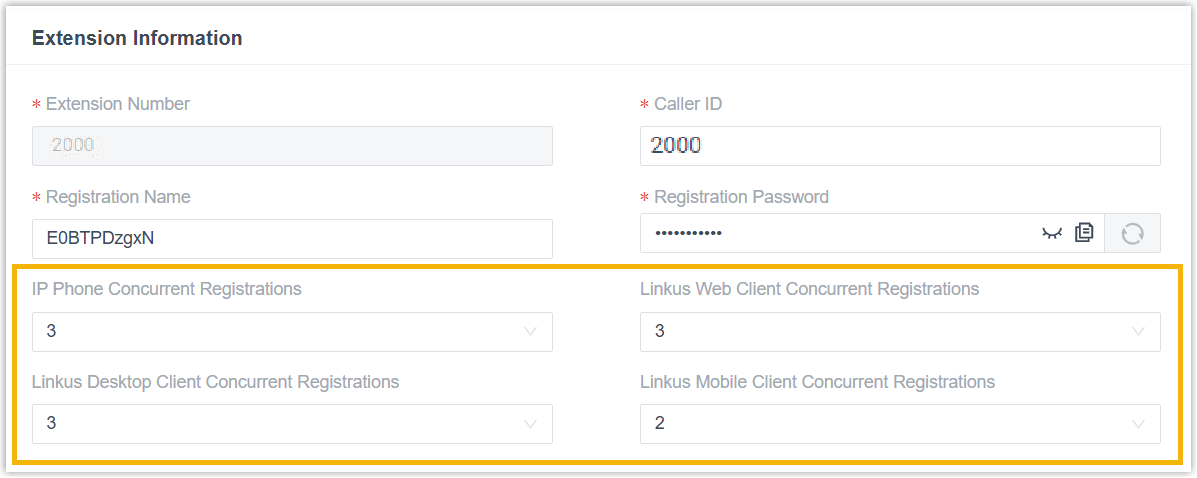
Setting What it controls IP Phone Concurrent Registrations How many SIP phones may be registered to the extension at once. Maximum: 5. This example uses 3. Cloud Voice App Web Client Concurrent Registrations How many Cloud Voice App web sessions may be signed in at once. Maximum: 3. This example uses 3. Cloud Voice App Desktop Client Concurrent Registrations How many Cloud Voice App desktop clients may be signed in at once. Maximum: 3. This example uses 3. Cloud Voice App Mobile Client Concurrent Registrations How many Cloud Voice App mobile clients may be signed in at once. Maximum: 3. This example uses 2. The values in each drop-down are capped at the maximums shown above, so you cannot set a limit higher than the system allows.
-
Click Save, then Apply.
Result
Section titled “Result”With the example values above, the extension can be signed in to 3 web clients, 3 desktop clients, and 2 mobile clients of the Cloud Voice App, and registered on up to 3 SIP phones, all at the same time.
When a call comes in, every signed-in Cloud Voice App client and every registered SIP phone rings according to the extension’s ring strategy, and the user can answer from any of them.
Question about this page?
Ask the AI assistant. It starts from this page, then searches the rest of the docs.
Ask Cloud Voice AI
Answers are AI-generated from the docs and may contain mistakes. Verify with the linked pages.