
Onsite Proxy Overview
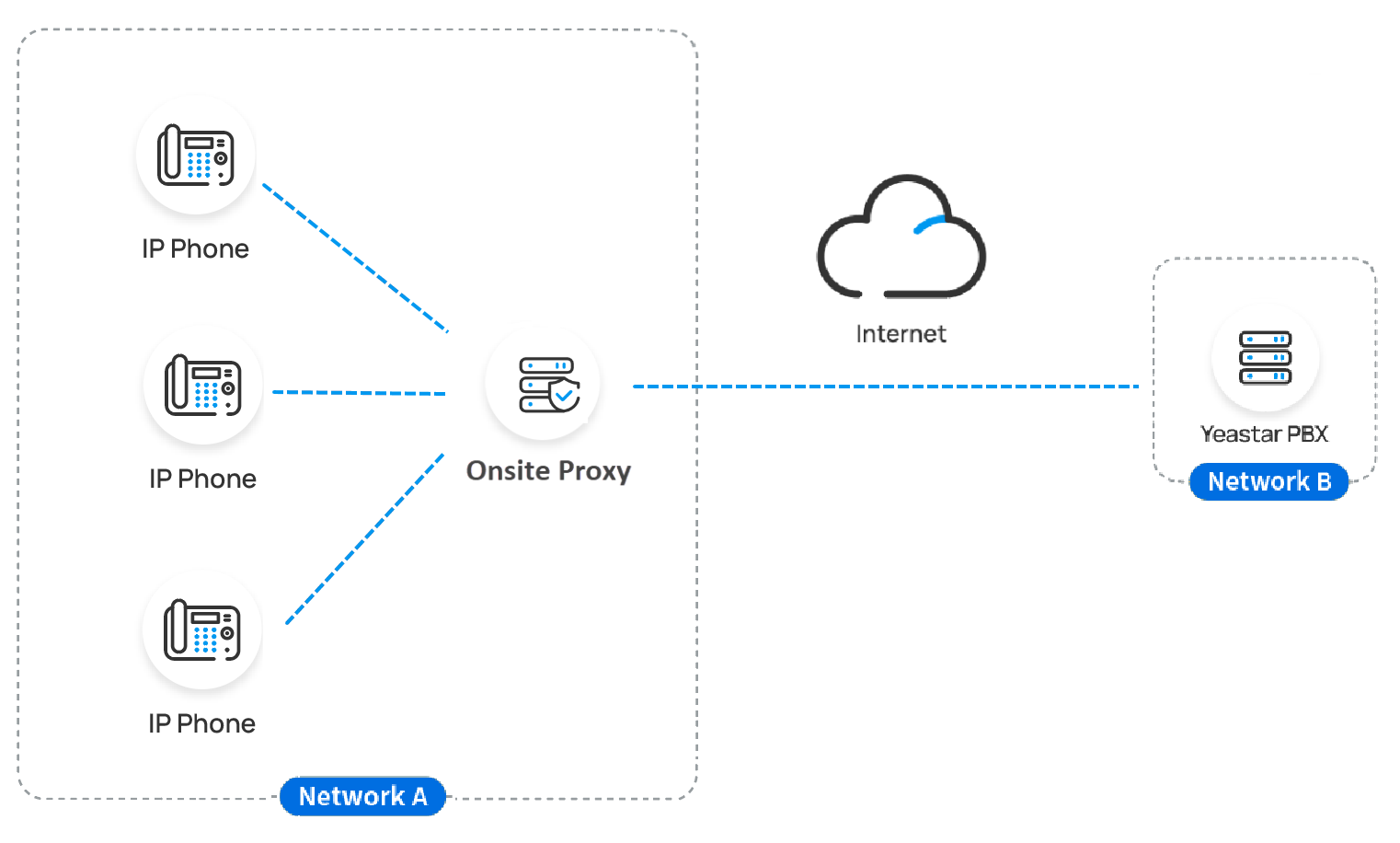
Onsite Proxy is a lightweight, command-line proxy application that bridges your Cloud Voice system and the IP phones on a local network. It works around the firewall and NAT (Network Address Translation) obstacles that normally complicate remote phone deployments.
How it works
Section titled “How it works”When several IP phones share a single subnet, you install Onsite Proxy on a host in that same subnet and connect only the proxy back to the Cloud Voice PBX (Private Branch Exchange, the phone system that manages your calls). Once the link is established, you provision the phones through the proxy, and it relays SIP and RTP traffic between the phones and the PBX. SIP (Session Initiation Protocol) is the signaling that sets up, changes, and ends calls; RTP (Real-time Transport Protocol) carries the live audio. To the PBX, the phones behave as though they sit on the same network.
Because one connection carries the traffic for every phone behind it, you no longer need to open per-phone port-forwarding or firewall rules for the remote network on the PBX side. Keeping media on this more direct path also cuts the latency and packet loss that traditional remote-access methods tend to introduce.
Requirements
Section titled “Requirements”Confirm the following before you deploy Onsite Proxy.
Cloud Voice PBX
- Running firmware version
84.23.0.24or later.
Onsite Proxy host
| Item | Requirement |
|---|---|
| Network | The host resides in the same subnet as the IP phones, and that subnet has network connectivity to the PBX server. |
| Operating system | The host runs one of the supported operating systems. |
| Hardware | The host meets the minimum hardware specifications. |
| Available port | UDP (User Datagram Protocol) port 5060 on the host is free. |
| IP address | The host has a static IP address. |
Key features
Section titled “Key features”Automatic phone discovery: Onsite Proxy uses PnP (Plug and Play) to find the IP phones on its subnet and reports each phone’s details to Cloud Voice, including MAC (Media Access Control hardware) address, IP address, vendor, and model.
Zero-touch provisioning: When you assign an extension to a PnP-discovered phone, the proxy forwards the PBX’s SIP NOTIFY message to that phone. The phone then downloads its configuration file and registers on its own, with no manual setup at the device.
SIP signaling relay: The proxy forwards registration requests to the PBX and maintains a stable registration. From then on it passes all SIP messages between the phones and the PBX, such as REGISTER, INVITE, and BYE, through a single UDP 5060 port on the host.
Audio RTP passthrough: When this option is enabled, phones registered through the same Onsite Proxy exchange their RTP audio streams directly, peer-to-peer, bypassing both the PBX and the proxy. This lowers latency, saves bandwidth, and noticeably improves call quality.
Get started
Section titled “Get started”Connect Onsite Proxy to Cloud Voice
Section titled “Connect Onsite Proxy to Cloud Voice”- Add an Onsite Proxy instance on the PBX to generate the connection details you will need during setup. See Add an Onsite Proxy Instance on Cloud Voice PBX.
- Install and configure Onsite Proxy on a host in the phones’ subnet, using those connection details to link it to the PBX. See Install Onsite Proxy.
Auto provision IP phones
Section titled “Auto provision IP phones”After the proxy is connected, provision the phones through it. See Auto Provision IP Phones Remotely with Proxy.
Question about this page?
Ask the AI assistant. It starts from this page, then searches the rest of the docs.
Ask Cloud Voice AI
Answers are AI-generated from the docs and may contain mistakes. Verify with the linked pages.