
Update Read Status of Inbound Faxes
Every fax that arrives at your extension shows up with an unread badge in the Cloud Voice App. Opening a preview or downloading the file clears that badge for you automatically, but you can also flip the read status yourself at any time. Whatever you set carries over to the web version of the Cloud Voice App as well.
Change the read status
Section titled “Change the read status”-
Sign in to the Cloud Voice App on your desktop and open Fax Management > Fax.
-
(Optional) To narrow the list to received faxes only, set the Fax Direction filter at the top of the list to Receive.

-
Tick the checkbox next to each fax you want to update, click Mark as, and choose the read status you want to apply.
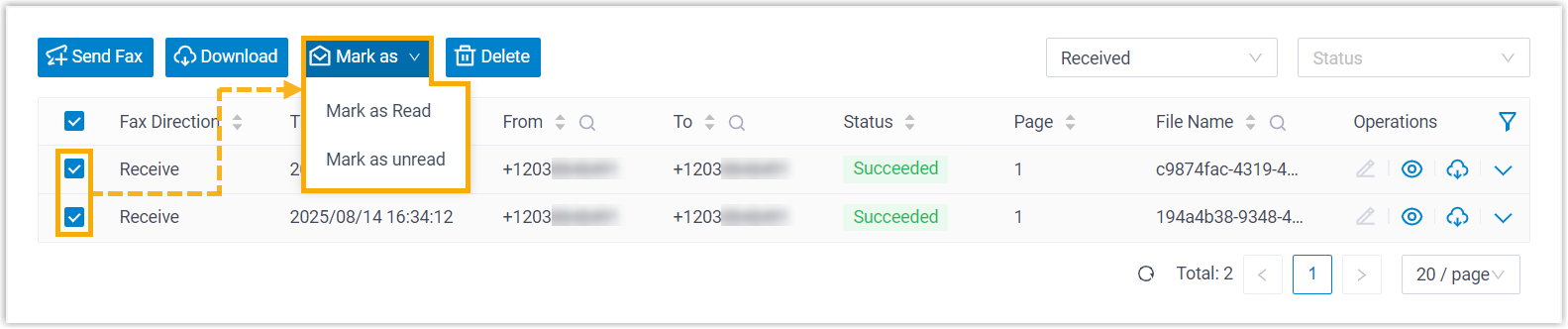
The faxes you selected immediately take on the new read status, and the change is reflected wherever you use the Cloud Voice App.
Question about this page?
Ask the AI assistant. It starts from this page, then searches the rest of the docs.
Ask Cloud Voice AI
Answers are AI-generated from the docs and may contain mistakes. Verify with the linked pages.