
Cloud Voice App Web Client Overview
The Cloud Voice App Web Client is a web-based client that runs entirely in your browser, so you can call, chat, and stay connected with your team without installing anything. It brings your calling, messaging, contacts, and meeting tools together in a single window, which makes it a quick way to get a user working without deploying desktop software.
The interface at a glance
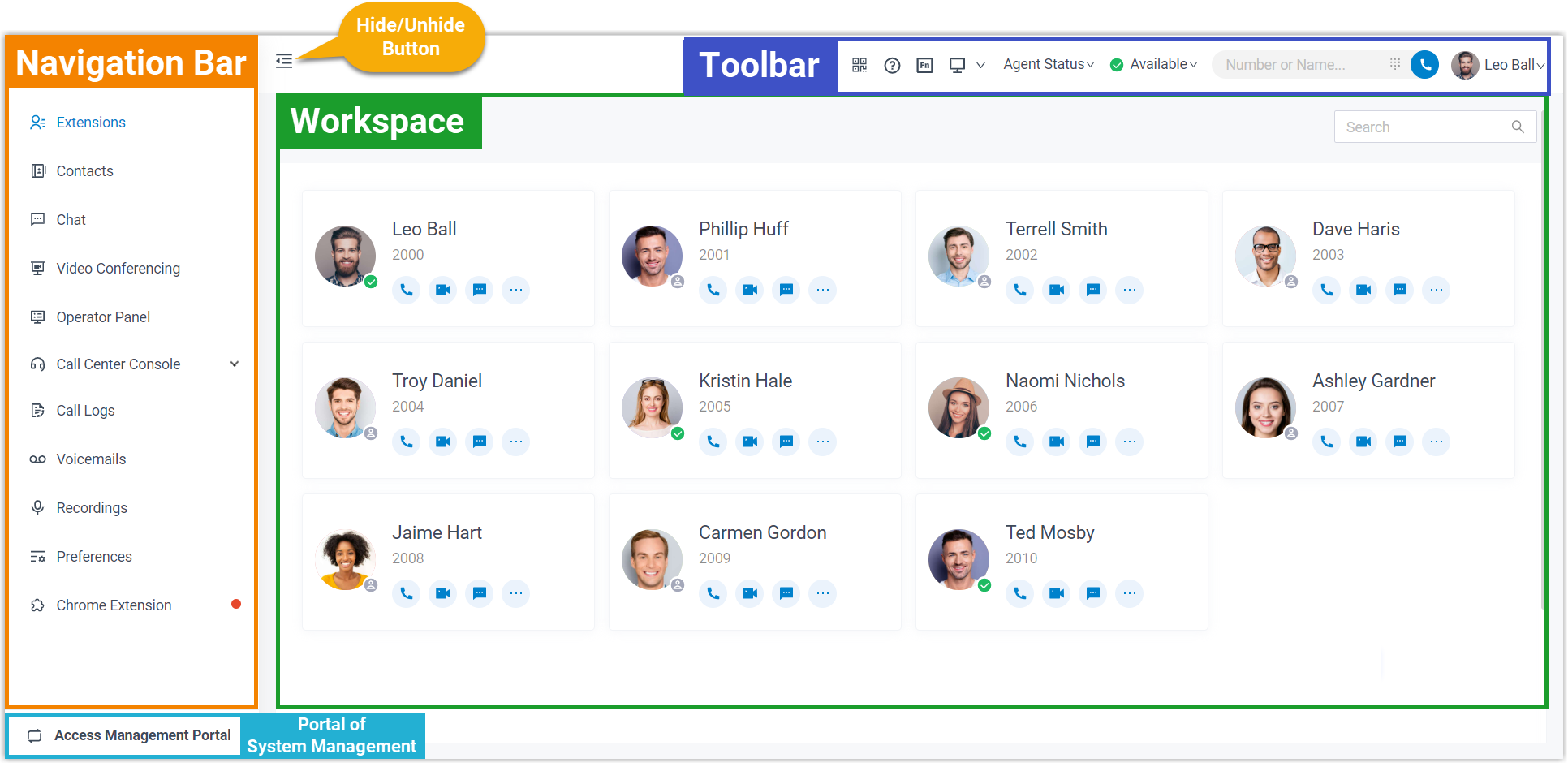
Section titled “The interface at a glance”The web client groups everything a user needs into one workspace. The image below shows the overall layout so you can get oriented before you start working.
What you can do
Section titled “What you can do”From the web client a user can:
- Talk to coworkers and outside contacts in real time over audio or video calls.
- Message people one-on-one or in group chats, and share files right inside the conversation.
- Reach both the company’s shared directory and their own personal contacts from one place.
- Launch a browser-based video meeting in a single click for fast, secure, face-to-face collaboration.
- Use the console to see who is available at a glance and route incoming calls without delay.
- Handle high call volumes efficiently, keeping response times short and customers satisfied.
Question about this page?
Ask the AI assistant. It starts from this page, then searches the rest of the docs.
Ask Cloud Voice AI
About
Answers are AI-generated from the docs and may contain mistakes. Verify with the linked pages.