
Log in to the Mobile App with a Login Link
When your account is set up, Cloud Voice sends a welcome email that includes a personal login link. That link is tied to your extension account (your personal line and sign-in identity on the phone system). Opening the link on your phone lets you sign in to the Cloud Voice App without entering your server address, username, or password by hand.
Before you begin
Section titled “Before you begin”- Install the Cloud Voice App on the phone you plan to use.
- Make sure the welcome email has arrived in your inbox.
Sign in
Section titled “Sign in”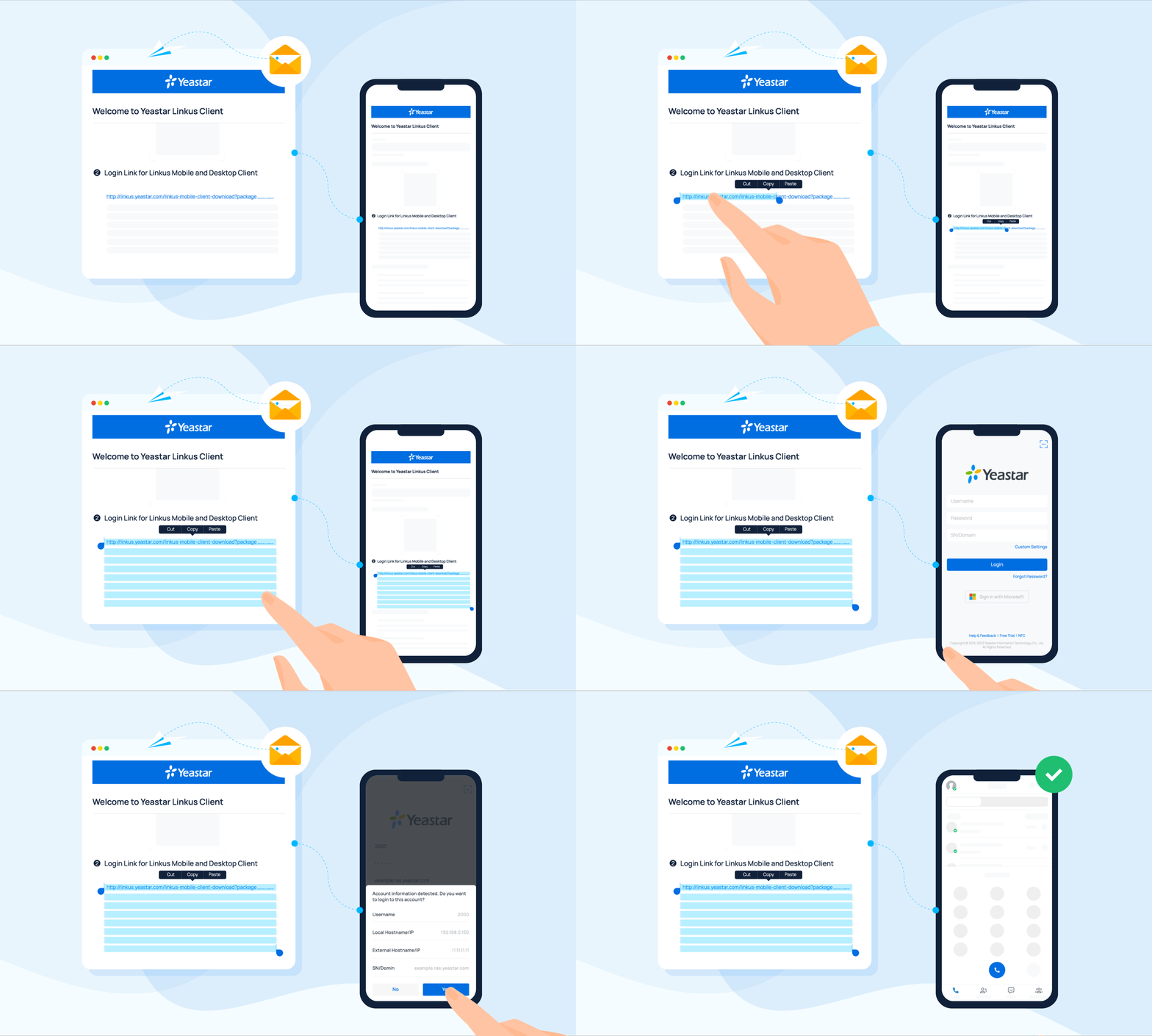
- On your phone, open the welcome email and copy the login link.
- Launch the Cloud Voice App. It reads the copied link, recognizes your account, and prompts you to sign in with it.
- When the confirmation dialog appears, tap Yes.
Question about this page?
Ask the AI assistant. It starts from this page, then searches the rest of the docs.
Ask Cloud Voice AI
About
Answers are AI-generated from the docs and may contain mistakes. Verify with the linked pages.