
Stop Rejected Calls from Ringing Other Endpoints
The same extension can be signed in on more than one place at once. Each of those places is an endpoint: a desk phone, the mobile app, the desktop app, or the web client where your extension is currently registered. When a call comes in, it normally rings every endpoint together.
By default, declining that call on one endpoint does not stop the others: the call keeps ringing everywhere else you are signed in until someone answers or the caller gives up. Turning on the setting below changes that, so a rejection on any single endpoint clears the call from all of them at once.
Turn on all-reject mode
Section titled “Turn on all-reject mode”-
Sign in to the Cloud Voice App Web Client and open Preferences > Features.
-
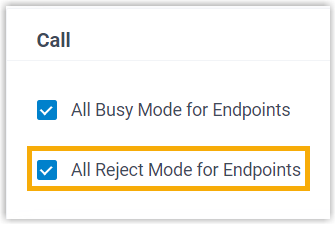
Find the Call section and tick All Reject Mode for Endpoints.
-
Select Save. The change takes effect on the next incoming call; there is no need to sign the other endpoints out.
What changes
Section titled “What changes”After this is enabled, rejecting an incoming call on one endpoint stops every other endpoint from ringing. The caller is then sent to whatever you have defined as your When Busy destination, found under Preferences > Presence > Call Forwarding.
Question about this page?
Ask the AI assistant. It starts from this page, then searches the rest of the docs.
Ask Cloud Voice AI
Answers are AI-generated from the docs and may contain mistakes. Verify with the linked pages.