
Set up Auto Answer for Non-paging/Intercom Calls
Auto Answer lets the Cloud Voice App accept incoming calls for you, so you no longer have to click to pick up each one. Because callers connect without waiting on you, hold times drop. You can add a short delay and an alert tone to suit how you work.
This setting applies to standard calls only. Paging calls (a one-way announcement broadcast to a group of devices) and intercom calls (a quick two-way call the system opens on the recipient’s device) are handled separately, which is why this feature is described as covering “non-paging/intercom” calls.
Set it up
Section titled “Set it up”-
Sign in to the Cloud Voice App (Web), then open Preferences > Features.
-
Under Call, tick Auto Answer and adjust the options below to match your needs.
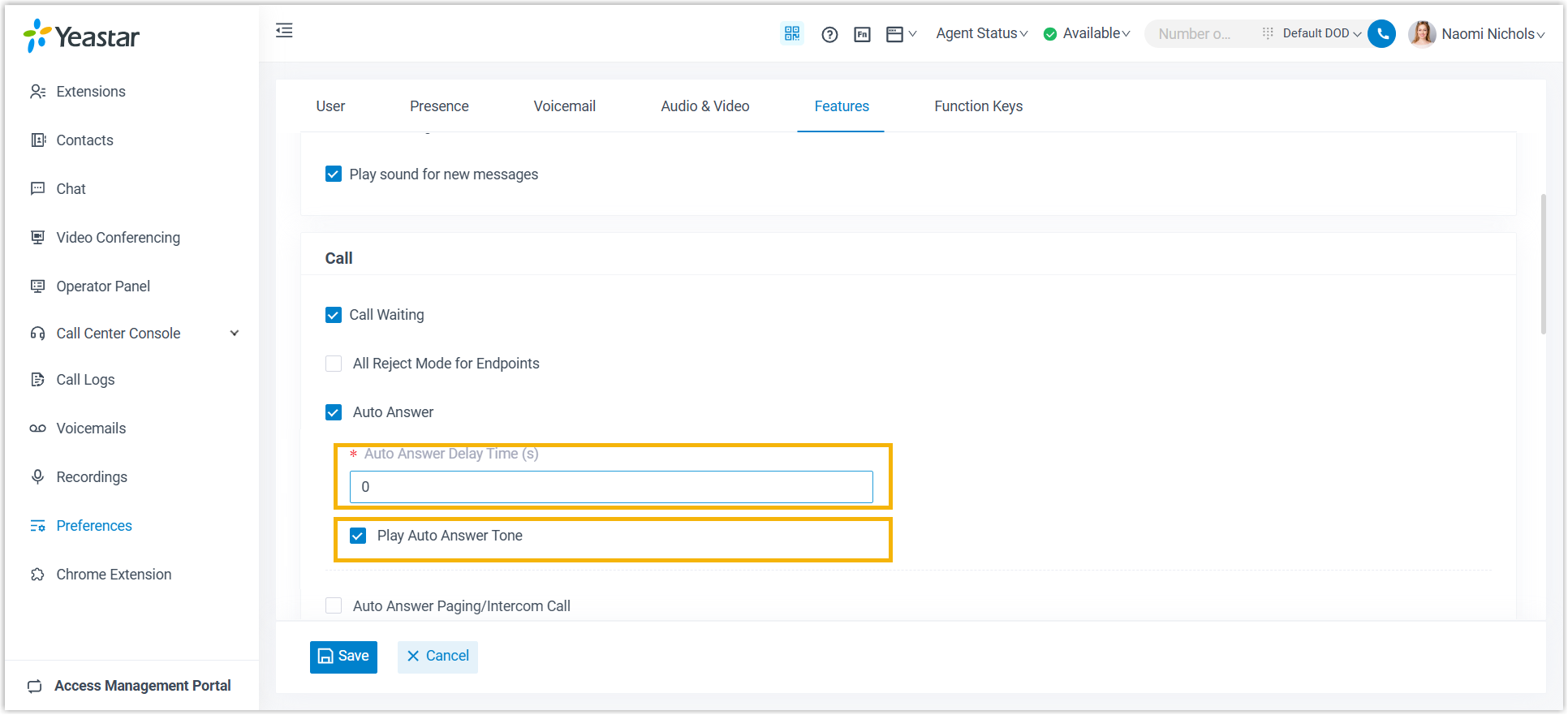
- Auto Answer Delay Time(s): The number of seconds a caller waits before a non-paging/intercom call is answered automatically. Enter a value from 0 to 60. A value of 0 answers incoming calls right away.
- Play Auto Answer Tone: Turn this on to hear a short beep whenever a non-paging/intercom call is answered for you.
-
Click Save.
What happens next
Section titled “What happens next”Incoming non-paging/intercom calls are answered automatically after the delay you set.
Question about this page?
Ask the AI assistant. It starts from this page, then searches the rest of the docs.
Ask Cloud Voice AI
Answers are AI-generated from the docs and may contain mistakes. Verify with the linked pages.