
Access the Call Quality Monitoring Report
The Call Quality Monitoring Report gives you a single quality rating for a call along with the underlying audio measurements that produced it. You open the report straight from your call history in the Cloud Voice App, which makes it a quick way to find out why a particular conversation sounded rough (choppy audio, dropouts, or delay) instead of guessing.
Open the report
Section titled “Open the report”-
Sign in to the Cloud Voice App and go to Call Logs > Personal Logs.
-
Find the call you want to inspect, click the
 arrow next to it, and choose Call Quality Monitoring Report from the menu.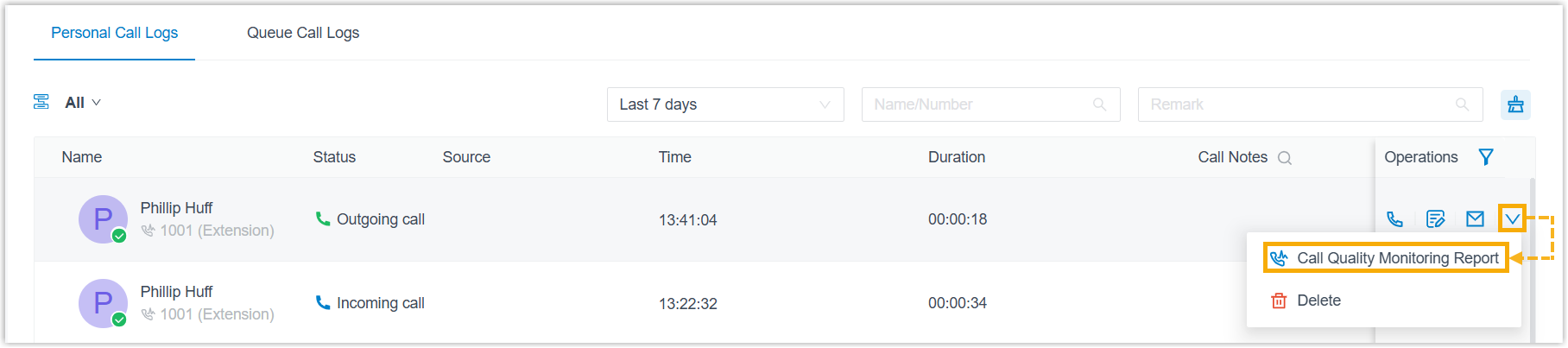
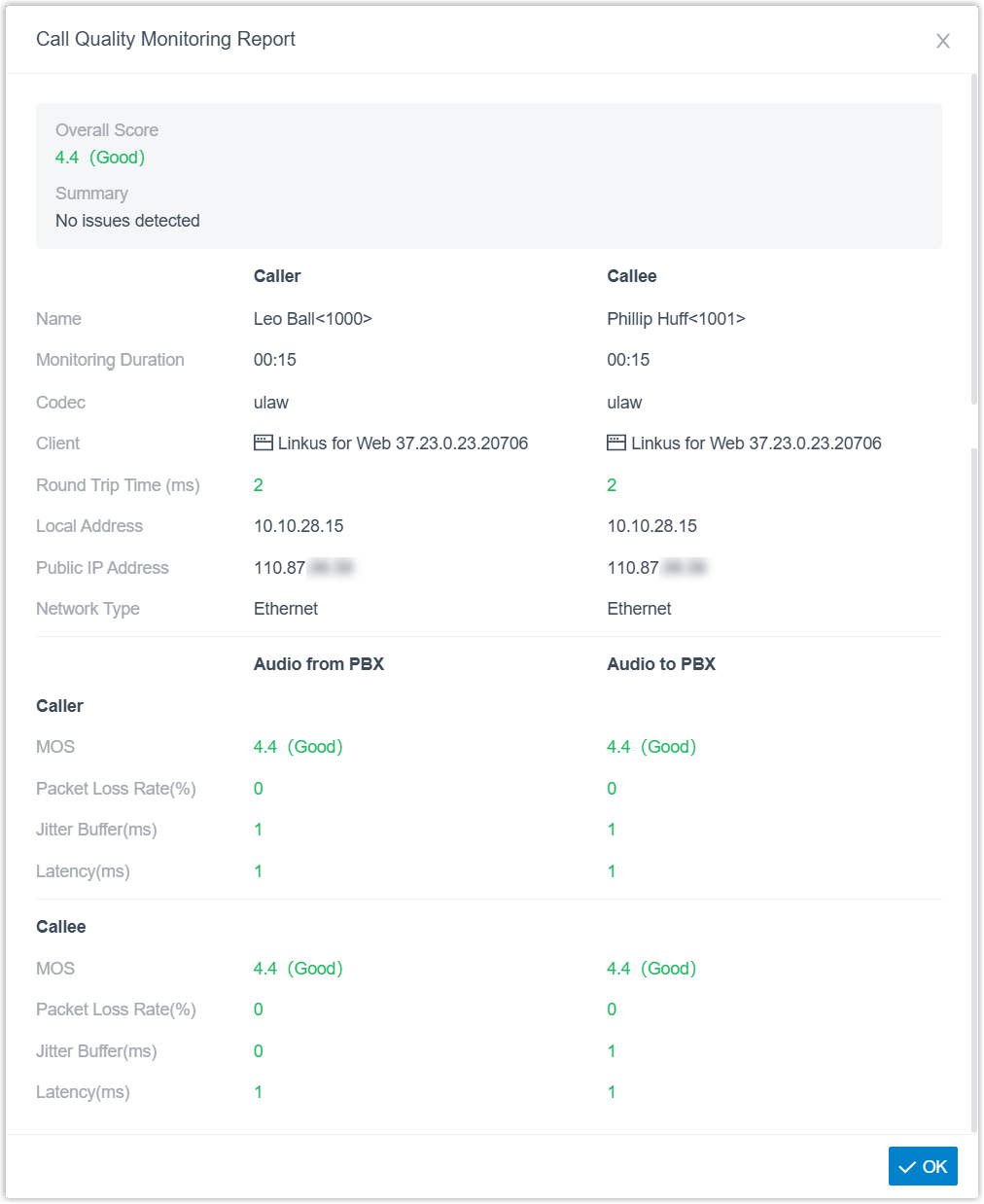
The report opens in a pop-up window.
Understand the metrics
Section titled “Understand the metrics”The report is grouped into three parts: an overall assessment, endpoint details for each party (Caller and Callee), and separate audio measurements for each direction of the call.
PBX stands for Private Branch Exchange, the phone system that switches your calls. Because the two audio directions are measured separately, you can tell which leg of the call was degraded:
- Audio from PBX is the audio your client received (the download direction).
- Audio to PBX is the audio your client sent (the upload direction).
| Metric | What it tells you |
|---|---|
| Overall Score | The combined quality score for the call, with its rating. |
| Summary | A short, plain-language assessment of how the call performed. |
| Caller & Callee | |
| Name | The party’s display name and phone number. |
| Monitoring Duration | How long call quality was measured. |
| Codec | The audio codec (coder/decoder) negotiated for the call, which sets how the audio is compressed. |
| Client | The client application that handled the call. |
| Round Trip Time (ms) | The time, in milliseconds (ms), for an audio packet to travel to the far end and back. Lower is better. |
| Local Address | The private IP (Internet Protocol) address the client used inside its own network. |
| Public IP Address | The public IP address the client presented to the internet. When it differs from the Local Address, the client is behind NAT (Network Address Translation, where a router maps private addresses to one public address). |
| Network Type | The kind of network connection the client was on, such as Wi-Fi or wired. |
| Audio from PBX & Audio to PBX | |
| MOS | Mean Opinion Score, a 1-to-5 rating of audio quality for that direction. Higher is better: below 3.5 is poor, 3.5 to under 4.0 is moderate, and 4.0 to 5.0 is good. |
| Packet Loss Rate (%) | The share of audio packets that never arrived. Even a few percent can cause audible gaps. |
| Jitter Buffer (ms) | The buffer, in milliseconds, used to smooth out variation in packet arrival timing. |
| Latency (ms) | The one-way network transmission delay, in milliseconds. |
Question about this page?
Ask the AI assistant. It starts from this page, then searches the rest of the docs.
Ask Cloud Voice AI
Answers are AI-generated from the docs and may contain mistakes. Verify with the linked pages.