
Integrate an SMS Service Using the SMS API
Cloud Voice can hand message delivery off to an outside SMS (Short Message Service) provider through a generic SMS API. An API (Application Programming Interface) is an agreed set of web requests that lets two systems exchange data. The provider plugs its own messaging platform into your phone system: Cloud Voice calls the provider’s API to send outbound text and picture (MMS, Multimedia Messaging Service) messages, and the provider posts inbound messages back to Cloud Voice through a webhook (an automatic HTTP request the provider sends to a Cloud Voice URL whenever a new message arrives). This page describes what each side must implement, the request and response formats involved, and how an administrator adds the resulting SMS channel in Cloud Voice.
Requirements
Section titled “Requirements”Both Cloud Voice and your SMS service provider must meet the following conditions before the integration will work.
Cloud Voice
- Firmware: version
84.23.0.24or later. - Domain name: the system domain must not contain any underscore characters. An underscore causes the channel to fail authentication or to stop receiving messages.
- Domain certificate: a valid domain certificate must be installed.
SMS service provider
- API: the provider exposes an HTTPS REST endpoint (a standard web address that accepts requests over a secure connection) for sending messages, and, if it wants Cloud Voice to prove its identity, an optional HTTPS endpoint for verifying authentication.
- Customer portal: the provider’s portal issues an API key to authenticate requests from Cloud Voice, optionally a Secret for signing webhook requests, and a way to configure the webhook.
- Number format: phone numbers follow the E.164 format (the international standard of a plus sign, the country code, then the national number, for example
+14102161183).
Authenticate requests
Section titled “Authenticate requests”Because the integration is a two-way API exchange, the provider issues two credentials: an API key and, optionally, a Secret.
API key
Section titled “API key”The API key authenticates the requests that Cloud Voice sends to the provider. Cloud Voice includes it in the Authorization header of every request:
Authorization: Bearer {api_key}When a request arrives, the provider checks the key. A valid key means the provider carries out the requested action; an invalid key fails the request. The key is used both in the connectivity check and in the outbound-message request described below.
Secret
Section titled “Secret”The Secret authenticates the webhook requests that the provider sends to Cloud Voice. It is only needed when the provider signs its webhook requests.
For each webhook request, the provider uses the Secret with the SHA256 algorithm to produce a signature over the request body, and passes it in the X-Signature-256 header:
X-Signature-256: sha256={signature}On receipt, Cloud Voice recomputes the signature from the body using the same Secret and algorithm, then compares it with the value in the header. If they match, the request is genuine and Cloud Voice delivers the message; otherwise it rejects the request. See Receive messages from the provider below.
Verify channel connectivity (optional)
Section titled “Verify channel connectivity (optional)”Once the SMS channel exists in Cloud Voice, the system periodically calls the provider’s API address for verifying authentication, using the API key, to confirm the channel is still reachable.
How it works
Section titled “How it works”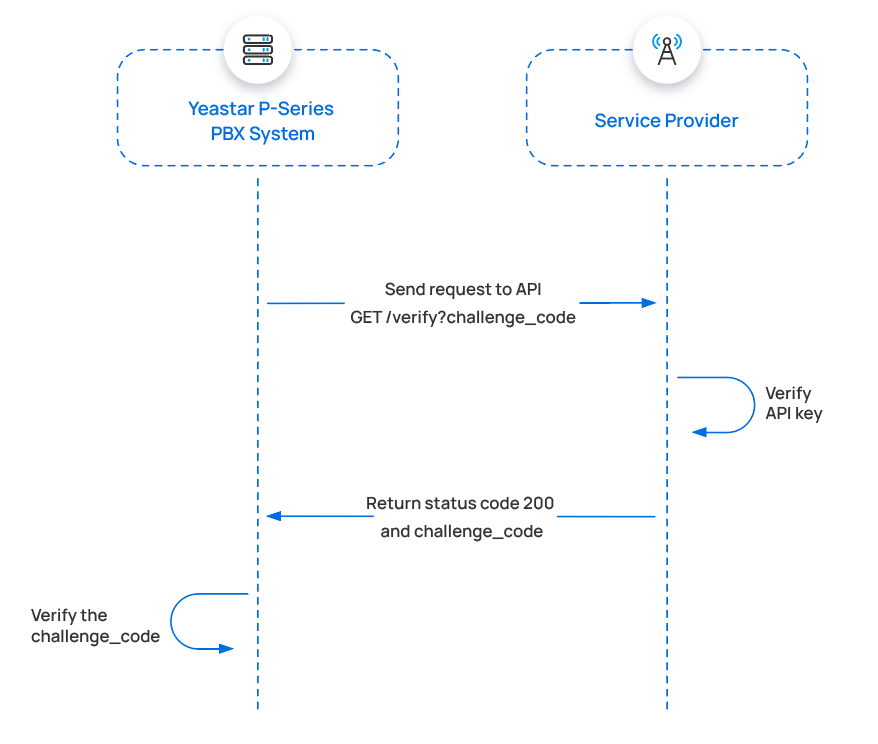
- Cloud Voice sends an API request containing a randomly generated challenge code.
- The provider validates the API key.
- If the key is valid, the provider responds with status code
200and echoes the challenge code in the response body. - Cloud Voice compares the returned challenge code with the one it sent. A match means the channel is connected.
Request sent by Cloud Voice
Section titled “Request sent by Cloud Voice”-
Method:
GET -
URL: the API address for verifying authentication, for example
https://service-provider.example.com/verify -
Header:
Parameter Type Description Authorization String The API key, in the format Bearer {api_key}. -
Query parameter:
Parameter Type Description challenge String A random string generated by Cloud Voice.
Example:
GET /verify?challenge=mAWpGnyeTZgguOPYlWitGPlRJYIhoLMy HTTP/1.1Host: service-provider.example.comAuthorization: Bearer {api_key}Response returned by the provider
Section titled “Response returned by the provider”The provider replies in JSON.
Success: return status 200 and the same challenge code:
HTTP/1.1 200 OKBody: mAWpGnyeTZgguOPYlWitGPlRJYIhoLMyWhen the echoed challenge code matches the one that was sent, the channel connects and its status in Cloud Voice shows as  (Connected).
Failure: return the error in this format:
| Parameter | Type | Description |
|---|---|---|
| code | String | Error code. |
| title | String | Error type (you define this). |
| detail | String | Error detail (you define this). |
For example:
HTTP/1.1 401 Unauthorized{ "errors": [ { "code": "10004", "title": "Authentication failed", "detail": "No key found matching the ID with the provided secret." } ]}Troubleshooting
Section titled “Troubleshooting”When the check fails, the channel shows an abnormal status. Use the error code and response body to find the cause.
Error codes defined by Cloud Voice:
| Error code | Error message | Description |
|---|---|---|
| 10001 | channel.ErrInvalidPhoneNumber | Invalid phone number. |
| 10002 | channel.ErrInvalidParam | Invalid parameter in the request. |
| 10003 | channel.ErrUnsupportMedia | Resource type not supported (MMS). |
| 10004 | channel.ErrAuthFail | Authentication failed. |
| 10005 | channel.ErrAuthFail | No permission. |
| 10006 | channel.ErrTooManyRequest | Too many requests. |
| 10007 | channel.ErrServiceUnavailable | Service unavailable on the recipient’s platform. |
| 10008 | channel.ErrExceedsSizeLimit | File size exceeds the limit. |
Channel status and what triggers it:
| Channel status | Trigger |
|---|---|
| Unauthorized | Authentication fails and the provider returns 401, 403, or 404; or the returned challenge code does not match the one sent. |
| Services of the recipient platform are unavailable | The provider returns 500. |
| Unknown | The provider returns a status code other than 401/403/404/500 and includes error details in the format above. |
| Request Failed | The provider returns no status code (for example, a TCP problem or a non-existent domain); or it returns a code other than 401/403/404/500 with no body, or a body that is not valid JSON. |
Send messages through the provider
Section titled “Send messages through the provider”When a Cloud Voice user sends a message, Cloud Voice calls the provider’s send-message API with the API key so the provider can deliver it to the external recipient.
How it works
Section titled “How it works”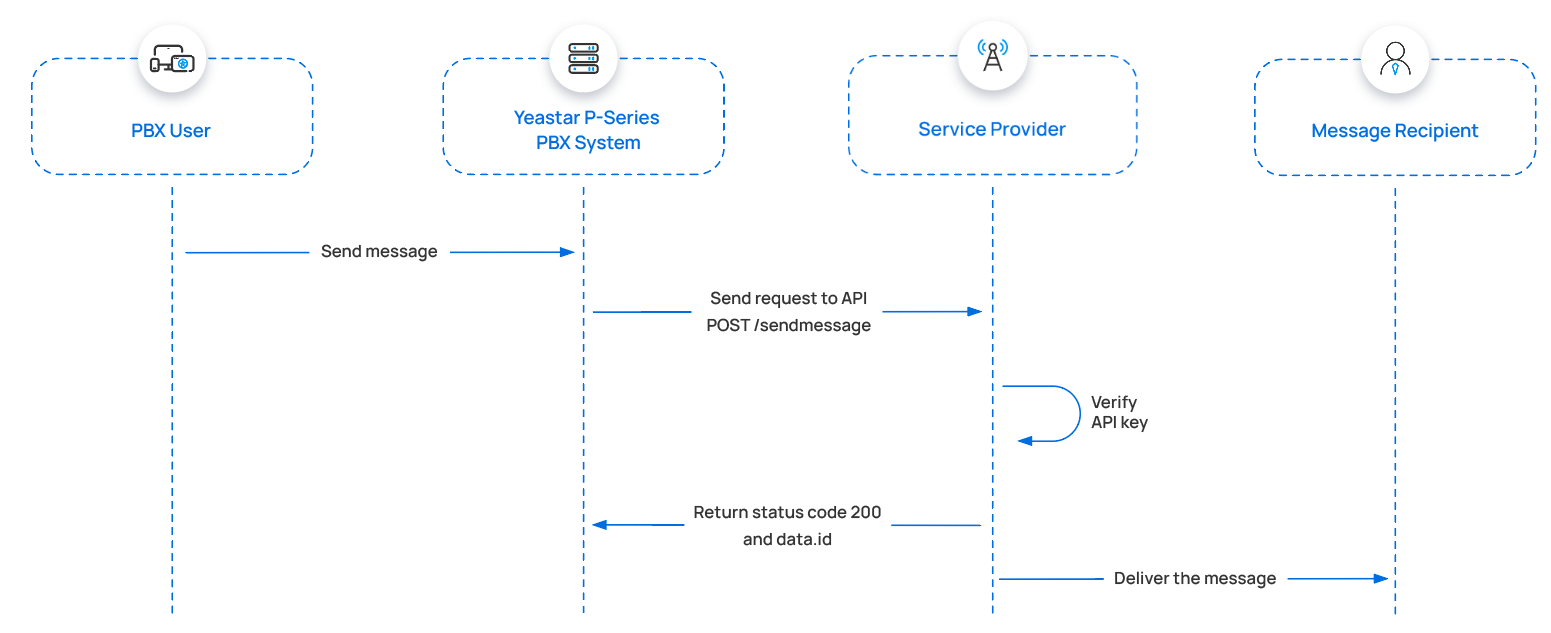
- A Cloud Voice user sends a message.
- Cloud Voice calls the provider’s send-message API.
- The provider validates the API key.
- If the key is valid, the provider returns status
200and adata.idcarrying the message’s unique ID. - The provider delivers the message to the recipient.
Request sent by Cloud Voice
Section titled “Request sent by Cloud Voice”-
Method:
POST -
URL: the API address for sending messages, for example
https://service-provider.example.com/sendmessage -
Headers:
Parameter Type Description Content-Type String Content type of the payload. Value: application/json.Authorization String The API key, in the format Bearer {api_key}. -
Body:
Parameter Type Description from String Sender’s phone number, in E.164 format (for example, +8618012121222).to String Recipient’s phone number, in E.164 format (for example, +8618012121223).text String Text content of the message. media_urls Array<String>URL(s) pointing to the message’s media content.
Send an SMS message:
POST /sendmessage HTTP/1.1Host: service-provider.example.comContent-Type: application/jsonAuthorization: Bearer {api_key}
{    "from": "+8618012121222",    "text": "Hello, World!",    "to": "+8618012121223"}
Send an MMS message:
POST /sendmessage HTTP/1.1Host: service-provider.example.comContent-Type: application/jsonAuthorization: Bearer {api_key}
{    "from": "+8618012121222",    "to": "+8618012121223",    "media_urls": ["https://pbx.example.com/api/chat/70dee7e2f95041ca890f222ace06c2dc"]}
Response returned by the provider
Section titled “Response returned by the provider”The provider replies in JSON.
Success: return status 200 and a data.id with the unique message ID:
HTTP/1.1 200 OK{ "data": { "id": "b301ed3f-1490-491f-995f-6e64e69674d4" }}Failure: return the error using the same code / title / detail format:
HTTP/1.1 400 Bad Request{ "errors": [ { "code": "10001", "title": "Invalid 'to' address", "detail": "The 'to' address should be a single valid number." } ]}Troubleshooting
Section titled “Troubleshooting”If a message cannot be delivered, Cloud Voice shows an error on the sender’s Cloud Voice App. Use the error code and response body to find the cause.
Error codes defined by Cloud Voice:
| Error code | Error message | Description |
|---|---|---|
| 10001 | channel.ErrInvalidPhoneNumber | Invalid phone number. |
| 10002 | channel.ErrInvalidParam | Invalid parameter in the request. |
| 10003 | channel.ErrUnsupportMedia | Resource type not supported (MMS). |
| 10004 | channel.ErrAuthFail | Authentication failed. |
| 10005 | channel.ErrAuthFail | No permission. |
| 10006 | channel.ErrTooManyRequest | Too many requests. |
| 10007 | channel.ErrServiceUnavailable | Service unavailable on the recipient’s platform. |
| 10008 | channel.ErrExceedsSizeLimit | File size exceeds the limit. |
The prompt shown to the user and what triggers it:
| Error prompt | Trigger |
|---|---|
| Failed to send | The provider returns no data.id; or returns 404 (service not found); or delivery fails and the provider returns error details in the format above; or delivery fails with no error body, or a body that is not valid JSON. |
| Authentication Failed | The provider returns 401, or error code 10004 or 10005. |
| Recipient Platform Service Unavailable | The provider returns 403, or error code 10007. |
| Invalid Phone Number | The provider returns error code 10001. |
| Invalid Parameter | The provider returns error code 10002. |
| This type of message is not supported due to the restriction of the recipient platform. | The provider returns error code 10003. |
| Too frequent operations. Please try again later. | The provider returns error code 10006. |
| The file size exceeds the limit of the recipient’s platform. | The provider returns error code 10008. |
Receive messages from the provider
Section titled “Receive messages from the provider”Cloud Voice receives inbound messages through a phone number that the provider hosts. When someone messages that number, the provider posts the message to the Cloud Voice webhook URL.
How it works
Section titled “How it works”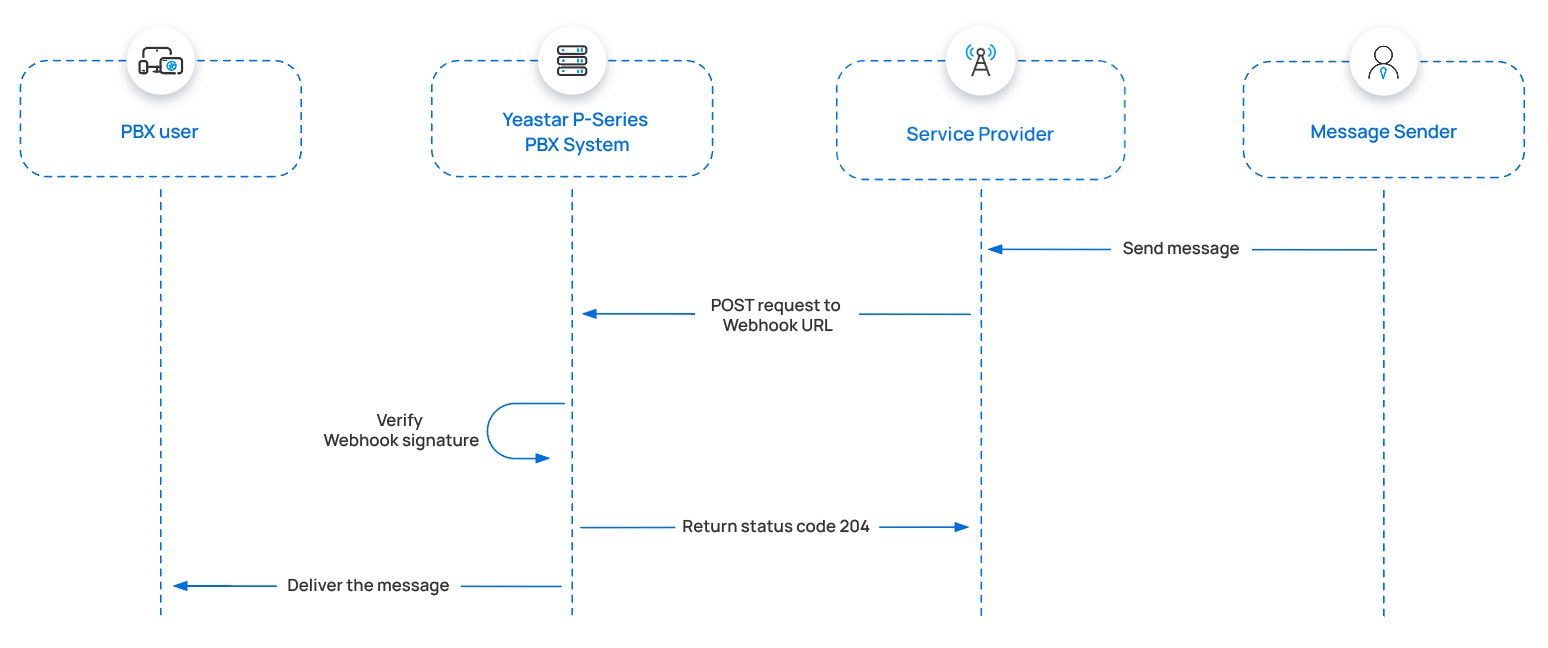
- An external sender sends a message.
- The provider posts a request to the Cloud Voice webhook URL, with the inbound message in the body and a SHA256 signature in the header.
- Cloud Voice verifies the signature: using the provider’s Secret, it recomputes a SHA256 signature over the received body and compares it with the header value. If they match, the request is valid and Cloud Voice returns status
204. - Cloud Voice delivers the message to the user.
Request sent by the provider
Section titled “Request sent by the provider”-
Method:
POST -
URL: the webhook URL that Cloud Voice provides, for example
https://pbx.example.com/api/v1.0/webhook/general/429ced149ff9437695be795aff38407b -
Headers:
Parameter Type Description Content-Type String Content type of the payload. Value: application/json.X-Signature-256 String The webhook signature, in the format sha256={signature}, where the signature is the lowercase SHA256 of the body computed with the Secret. -
Body (only mandatory fields are listed; the provider may add more):
Parameter Required Type Description data.event_type Yes String Event type. Value: message.received.data.payload.id Yes String Message ID. Maximum 255 characters, and must be different every time. data.payload.from.phone_number Yes String Sender’s phone number, in E.164 format. data.payload.to.phone_number Yes String Recipient’s phone number, in E.164 format. data.payload.text Yes String Text content of the message. Provide either data.payload.textordata.payload.media.data.payload.media Yes Array<media>Information and URL for the message’s media content. Provide either data.payload.textordata.payload.media.data.payload.received_at Yes String Time the message was received, in ISO 8601 format YYYY-MM-DDTHH:MM:SS.mmm+/-HH:MM(for example,2019-12-09T20:16:07.588+08:00).data.payload.record_type Yes String Record type. Value: message.The
mediaobject:Parameter Required Type Description content_type No String Type of the media file. sha256 No String SHA256 value of the media file. size No Integer File size. url Yes String URL pointing to the media file.
A webhook request that delivers an inbound message looks like this:
POST /api/v1.0/webhook/general/429ced149ff9437695be795aff38407b HTTP/1.1Host: pbx.example.comContent-Type: application/jsonX-Signature-256: sha256={signature}
{    "data": {        "event_type": "message.received",        "id": "b301ed3f-1490-491f-995f-6e64e69674d4",        "occurred_at": "2019-12-09T20:16:07.588+00:00",        "payload": {            "direction": "inbound",            "from": {                "carrier": "T-Mobile USA",                "line_type": "long_code",                "phone_number": "+8618012121222"            },            "id": "84cca175-9755-4859-b67f-4730d7f58aa3",            "media": [                {                    "content_type": "image/png",                    "sha256": null,                    "url": "https://media.example.com/mms/image.png"                }            ],            "received_at": "2019-12-09T20:16:07.503+00:00",            "record_type": "message",            "text": "Hello from Cloud Voice!",            "to": [                {                    "carrier": "Cloud Voice",                    "line_type": "Wireless",                    "phone_number": "+8618012121223"                }            ],            "type": "SMS/MMS"        },        "record_type": "event"    }}
Response returned by Cloud Voice
Section titled “Response returned by Cloud Voice”Cloud Voice returns an HTTP status code:
| Status code | Description |
|---|---|
| 204 | Success. |
| 400 | Bad request, returned when the signature is incorrect. |
Set up the SMS channel in Cloud Voice
Section titled “Set up the SMS channel in Cloud Voice”Once the provider has implemented its side of the integration, an administrator adds the SMS channel in Cloud Voice.
Limitations
Section titled “Limitations”| Item | Limit |
|---|---|
| Supported message types | Determined by the provider. |
| File size | 100 MB maximum. |
| File retention period | 72 hours. |
Before you start
Section titled “Before you start”Collect the following details.
From the provider:
- API address for sending messages
- (Optional) API address for verifying authentication
- Message sending rate limit
From the provider’s customer portal:
- API key
- (Optional) Secret
- The phone number used to send and receive messages
Procedure
Section titled “Procedure”-
In the Cloud Voice admin portal, go to Messaging > Message Channel.
-
Click Add and select SMS.
-
On the Authentication tab, complete the fields.
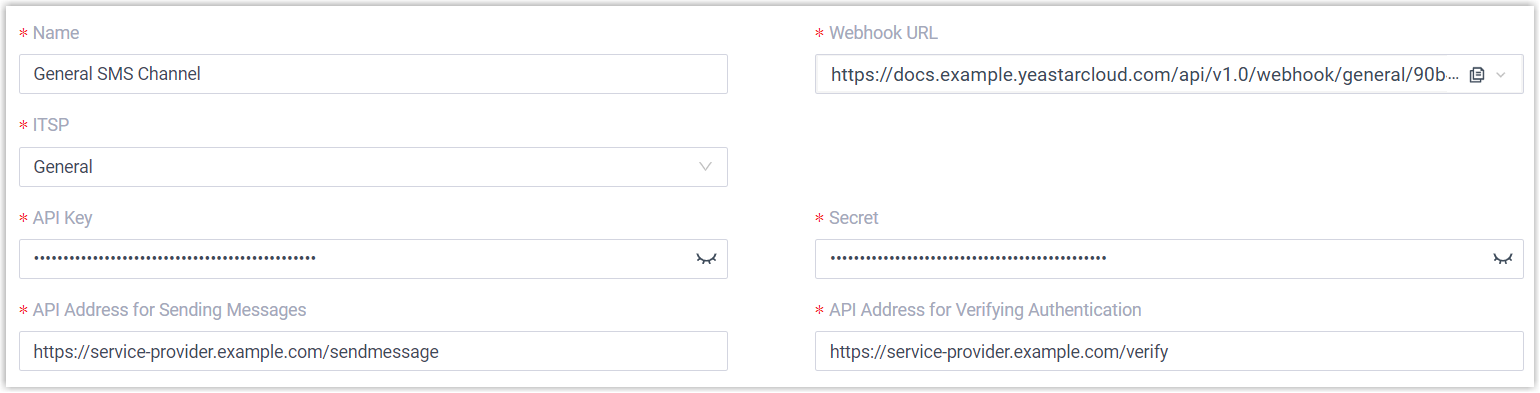
- Name: a label that helps you recognize the channel.
- ITSP (Internet Telephony Service Provider): select General.
- API Key: the API key from the provider’s customer portal.
- Secret: optional; enter it if the provider issued one for verification.
- API Address for Sending Messages: the provider’s send endpoint, for example
https://service-provider.example.com/sendmessage. - API Address for Verifying Authentication: optional; the provider’s verification endpoint, for example
https://service-provider.example.com/verify. - Webhook URL: copy this URL, then use it to configure the messaging webhook for the phone number in the provider’s customer portal.
-
On the Messaging Settings tab, set the sending rate, session behavior, and one or more number-routing rules (all described below). Save each rule as you add it.
-
Click Save to create the channel.
The Messaging Settings tab includes the following options.
Message Sending Rate
Set how many messages per second Cloud Voice may send. If more messages are ready than the rate allows, Cloud Voice holds the extras in a queue and releases them at the configured rate.
Session settings
| Setting | Description |
|---|---|
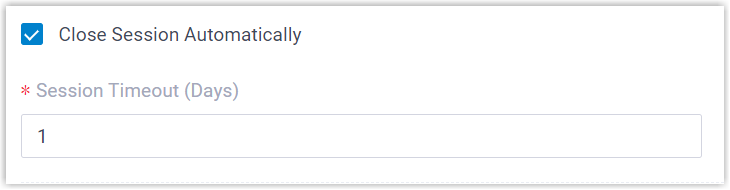
| Close Session Automatically | Select the checkbox to close sessions that have been inactive for a set period, then enter the number of days in the Session Timeout (Days) field. |
| Allow the Creation of Duplicate Active Sessions | Select the checkbox to allow a new session even when an active one already exists for the same sender and recipient. When enabled, if a user starts such a session in the Cloud Voice App while a matching active session already exists, a prompt appears; if the user continues, the existing session leaves the previous handler’s list and moves to the new user, along with its complete chat history. |
Number routing
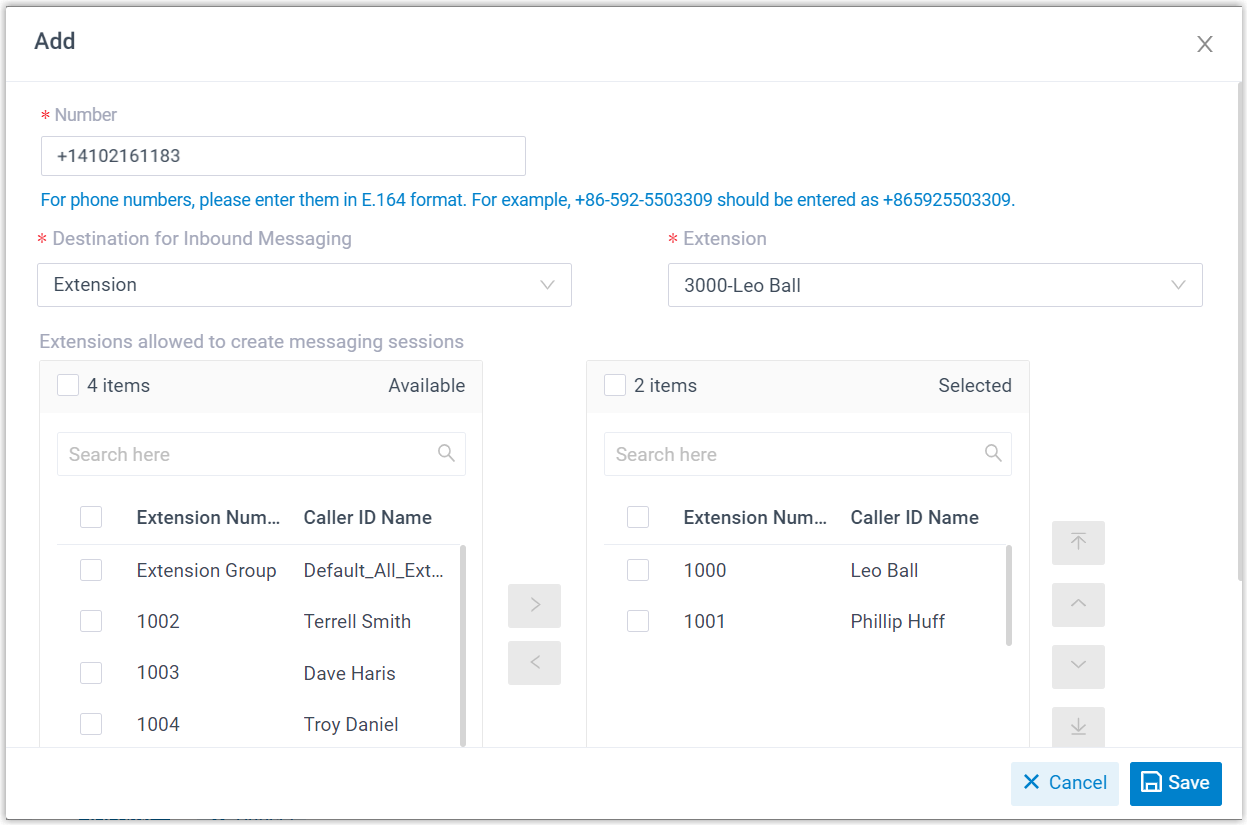
In the Number section, click Add to create a message-routing rule.
-
Number: enter the purchased phone number, or an alphanumeric sender ID (a short text name shown to the recipient as the sender instead of a number).
-
Destination for Inbound Messaging: choose where inbound messages for this number go.
Option Description Extension Choose an extension. Only that user receives inbound messages from the number. Message Queue Choose a queue. Every agent in the queue sees the inbound message that starts a new session, but only the agent who picks it up receives and answers the follow-up messages in that session. Third-Party Message Analytics Platform (Transmitted via API) Inbound messages are automatically forwarded to a third-party analytics platform through the API for further processing. -
Extensions allowed to create messaging sessions: select the extensions that may start a message conversation with customers.
-
Click Save to add the rule.
Result
Section titled “Result”-
The channel is created and appears in the Messaging list with a status of
.
-
Cloud Voice tracks how many messages the channel sends and receives. The Total column counts every outbound message, both successful and failed.

What to do next
Section titled “What to do next”Send a text message to the number configured on the channel and confirm that the assigned user receives it in the Cloud Voice App.
Question about this page?
Ask the AI assistant. It starts from this page, then searches the rest of the docs.
Ask Cloud Voice AI
Answers are AI-generated from the docs and may contain mistakes. Verify with the linked pages.