
Transfer a Call
As a queue manager, you can redirect any active call shown on the Queue Panel to a different agent or send it straight to an extension’s voicemail. This page walks through both options.
Before you begin
Section titled “Before you begin”Sending members’ active calls elsewhere requires the Call distribution management (Redirect, Transfer, Drag and Drop operation) permission. Ask your system administrator to grant it if you don’t already have it.
Transfer a call to an agent
Section titled “Transfer a call to an agent”Use this when a caller should speak to a specific agent (for example, the right skill set or a person who already knows the account).
-
In the Cloud Voice App (Web or Desktop), open Call Center Console > Queue Panel.
-
On the Active Calls panel, move your pointer over the call you want to move.
-
Hand the call off to an extension in either of these ways:
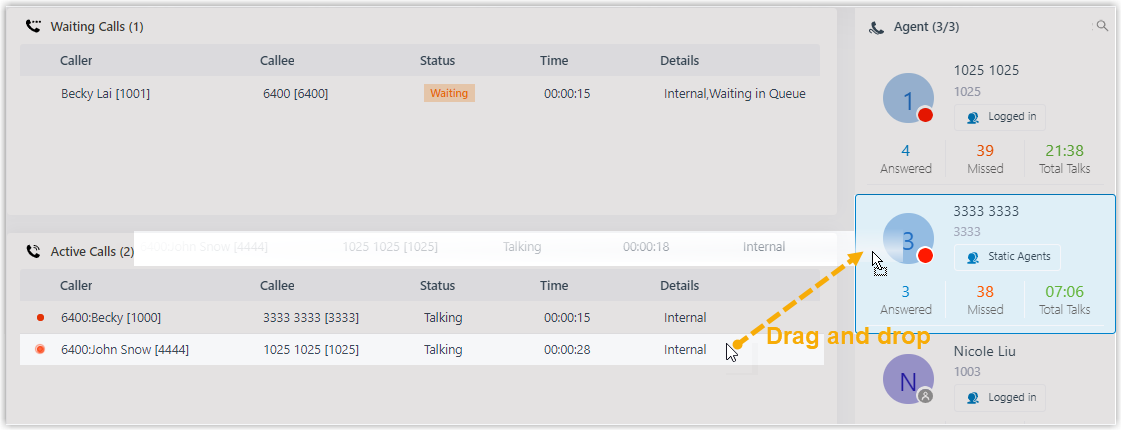
Drag and drop
Drag the call onto the extension you want in the Agents panel. That agent’s phone rings as an incoming call.
Right-click menu
Right-click the call, choose Transfer, and pick who should receive it. In the window that opens, type the target extension number and click the transfer icon
 . The call is routed to that extension and rings as an incoming call.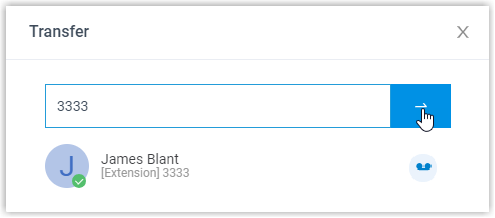
Transfer a call to an extension’s voicemail
Section titled “Transfer a call to an extension’s voicemail”Use this when the right person is unavailable and the caller wants to leave a message rather than keep waiting.
-
In the Cloud Voice App (Web or Desktop), open Call Center Console > Queue Panel.
-
On the Active Calls panel, move your pointer over the call you want to move.
-
Right-click the call and choose Transfer.
-
In the window that opens, type an extension number to look up the user.
-
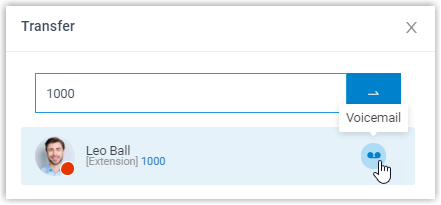
In the matching results, click the voicemail icon
 next to that user.
The call is sent to that extension’s voicemail, where the caller can leave a message.
Question about this page?
Ask the AI assistant. It starts from this page, then searches the rest of the docs.
Ask Cloud Voice AI
Answers are AI-generated from the docs and may contain mistakes. Verify with the linked pages.