
Disconnect Microsoft Entra ID Integration
Your phone system can be tied to only one directory at a time. So before you connect Cloud Voice to a different directory, you must first take down the existing Microsoft Entra ID (Azure Active Directory) link. Follow the steps below to end the current integration.
Procedure
Section titled “Procedure”-
Sign in to the PBX web portal and open Integrations > Collaboration.
-
Locate the Disconnect button in the upper-right corner of the integration page and click it.
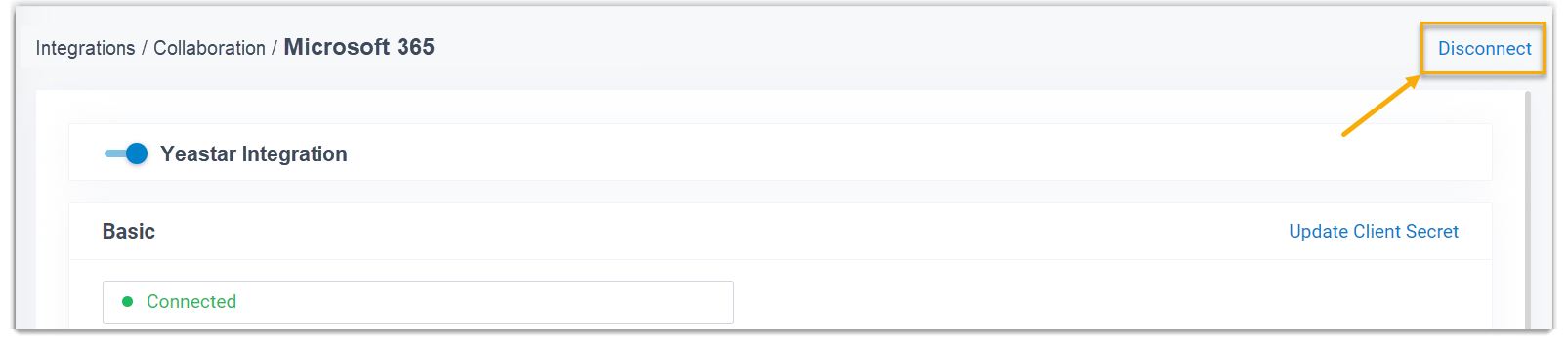
-
In the confirmation window that appears, choose how the previously synced data should be handled, then confirm.
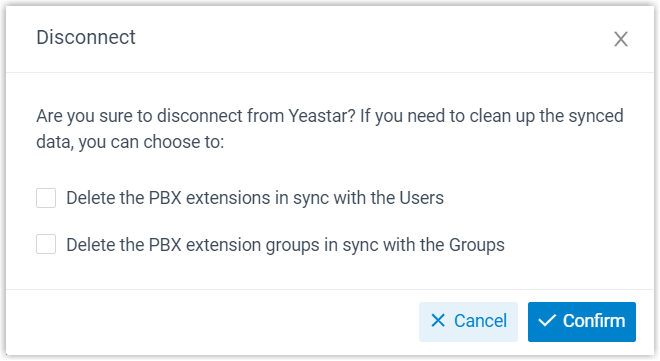
a. Decide what happens to the PBX records that were kept in sync with the directory’s users and groups:
Option What it does Delete the PBX extensions in sync with the Users Selected: those extensions are deleted. Cleared: the extensions are retained and are managed entirely within the PBX from then on. Delete the PBX extension groups in sync with the Groups Selected: those extension groups are deleted. Cleared: they are retained and are managed entirely within the PBX from then on. b. Click Confirm.
Result
Section titled “Result”The connection to Microsoft Entra ID is removed, and the phone system is free to be linked to another directory.
Question about this page?
Ask the AI assistant. It starts from this page, then searches the rest of the docs.
Ask Cloud Voice AI
Answers are AI-generated from the docs and may contain mistakes. Verify with the linked pages.