
Disconnect Red Hat SSO Integration
An SSO (Single Sign-On) integration lets your users sign in to Cloud Voice with the same account they use in an external directory, such as Red Hat. Cloud Voice can sync users from only one directory at a time, so before you switch to a different directory you must first disconnect the Red Hat SSO integration that is currently in place. Follow the steps below to remove it.
Disconnect the integration
Section titled “Disconnect the integration”-
Sign in to the PBX web portal and open Integrations > Collaboration.
-
On the integration page, click Disconnect in the top-right corner.
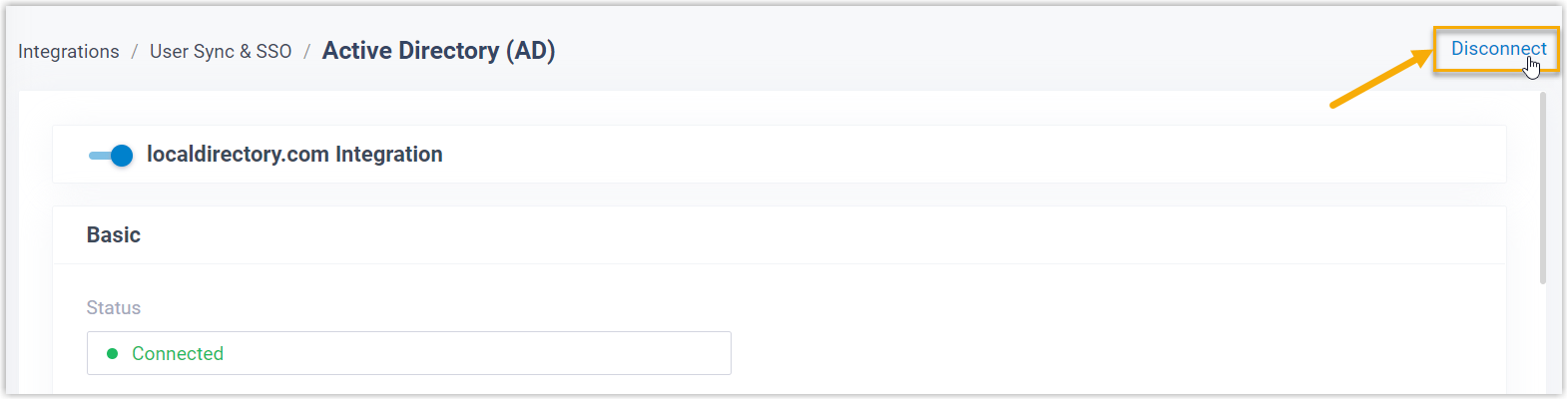
-
A confirmation window opens. Set the options you need, then confirm:
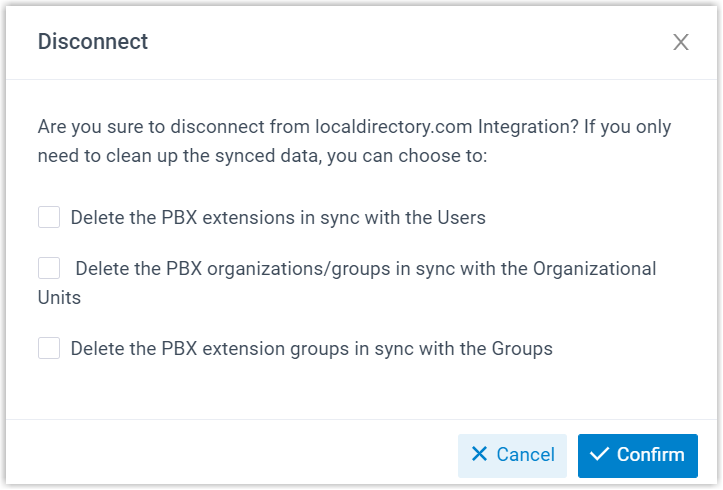
- To also remove the PBX extensions that were created for the synced users, select Delete the PBX extensions in sync with the Users. Leave this checkbox clear to keep those extensions in place.
- Click Confirm.
Once you confirm, the Red Hat SSO integration is disconnected and you are free to set up a new directory integration.
Question about this page?
Ask the AI assistant. It starts from this page, then searches the rest of the docs.
Ask Cloud Voice AI
Answers are AI-generated from the docs and may contain mistakes. Verify with the linked pages.