
Synchronize Active Directory Organizational Units to Cloud Voice
You control which Active Directory (AD) organizational units flow into Cloud Voice, and whether each one lands as a Cloud Voice organization or as an extension group. This page walks through defining that rule.
How much can be synced
Section titled “How much can be synced”The volume of AD organizational units Cloud Voice can absorb is capped by how many organizations and extension groups your account is allowed to create. Those ceilings scale with your extension count:
| Maximum number of extensions (N) | N ≤ 50 | 50 ≤ N ≤ 200 | N > 200 |
|---|---|---|---|
| Maximum organizations | 50 | 200 | 500 |
| Maximum extension groups | 63 | 63 | 63 |
Before you begin
Section titled “Before you begin”Make sure you have already connected Cloud Voice to Active Directory.
Configure the rule
Section titled “Configure the rule”-
Sign in to the Cloud Voice management portal and open Integrations > Collaboration.
-
Find the Organizational Unit Synchronization section and toggle the switch on.

-
Choose one of the two approaches below and complete its settings.
Mirror organizational units
Copy the organizational units straight from Active Directory, preserving their nested hierarchy.
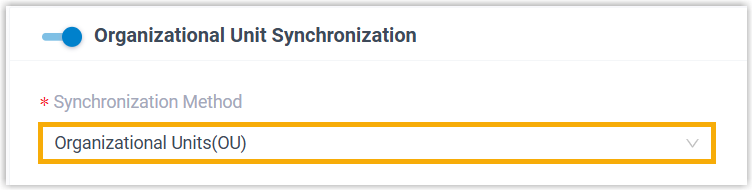
a. Set Synchronization Method to Organizational Units(OU).
b. Use the Synchronize for drop-down list to define which AD organizational units get pulled in.
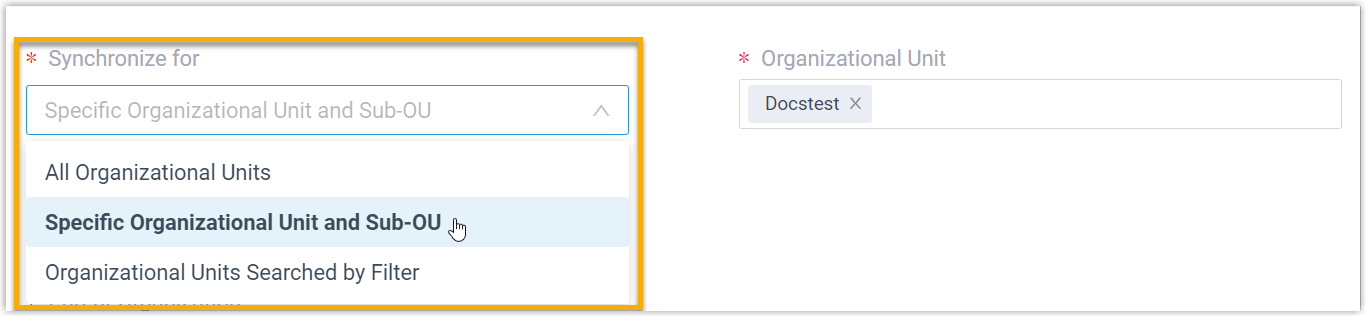
Option What it does All Organizational Units Brings in every organizational unit in the connected directory. Specific Organizational Unit and Sub-OU Brings in the organizational unit(s) you pick, along with their sub-OUs. Choose them from the Organizational Unit drop-down list. Organizational Units Searched by Filter Brings in only the organizational units that match a filter you supply. Enter an LDAP search filter in the Search Filter for Organizational Unit field. For example, (&(objectCategory=organizationalUnit)(ou=sales*))finds units whose name begins with “sales”.c. In the Synchronize to field, pick the type of object the organizational units become.

Option What it does Organization Maps the AD organizational units and their sub-OUs to Cloud Voice organizations. Set a name in the Company Name field, and use Parent Organization to place the synced units under an existing organization. Extension Group Maps only the lowest-level organizational units to Cloud Voice extension groups. Synchronize based on a user object property
Group organizational units by the value of a chosen user attribute instead of the directory tree.
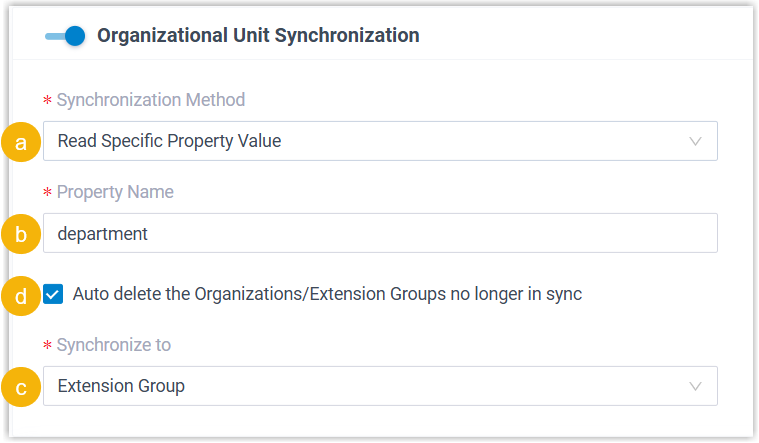
a. Set Synchronization Method to Read Specific Property Value.
b. Type the attribute name into the Property Name field.
c. In the Synchronize to field, pick the type of object the organizational units become.
Option What it does Organization Maps the AD organizational units and their sub-OUs to Cloud Voice organizations. Set a name in the Company Name field, and use Parent Organization to place the synced units under an existing organization. Extension Group Maps only the lowest-level organizational units to Cloud Voice extension groups. d. To have Cloud Voice clear out organizations or extension groups that leave the sync scope, select Auto delete the Organizations/Extension Groups no longer in sync.
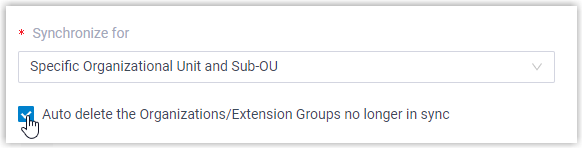
- Selected: they are deleted on the next synchronization.
- Cleared: they stay and become fully managed by Cloud Voice.
-
Click Save.
Result
Section titled “Result”Your custom rule for AD organizational units is now in place. On each run, Cloud Voice issues LDAP queries against Active Directory according to the rule and pulls the matching organizational units, plus any updates, into your account. Once a synchronization finishes:
-
The outcome appears in the Organizational Unit Synchronization section.

-
Any Cloud Voice organization or extension group tied to an AD organizational unit is flagged with a
 label and cannot be deleted.
 -
You cannot edit those organizations by hand, nor rename the linked extension groups or change their membership.
Question about this page?
Ask the AI assistant. It starts from this page, then searches the rest of the docs.
Ask Cloud Voice AI
Answers are AI-generated from the docs and may contain mistakes. Verify with the linked pages.