
Cloud Voice TA FXO Gateway Integration
Many sites still have analog phone lines from the local phone company (the PSTN, or Public Switched Telephone Network) wired in. When you want your Cloud Voice hosted PBX (Private Branch Exchange, the system that routes calls for your organization) to place and answer calls over those physical lines, you can bridge them onto the platform with a TA-series FXO gateway. This guide follows a complete, worked example that connects a TA810 FXO gateway to Cloud Voice and extends eight FXO trunks onto the PBX. A trunk is simply a line that carries calls between the PBX and the outside world.
Example environment
Section titled “Example environment”Every procedure in this guide refers back to a single worked example. The equipment, firmware, and addressing shown below are the values used throughout. Swap in your own wherever they differ.
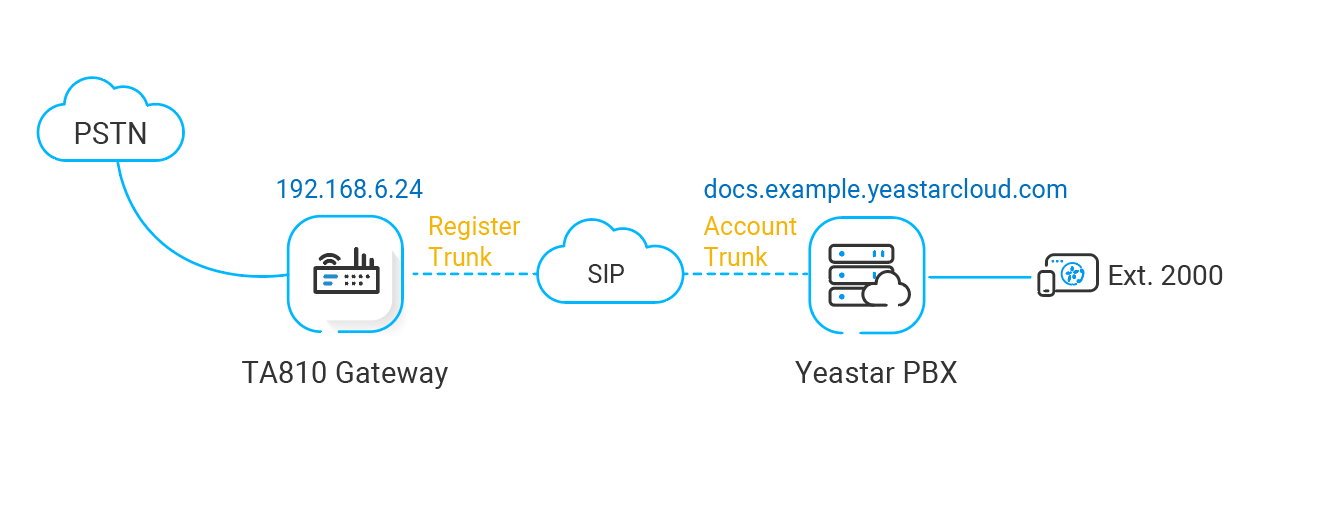
| Equipment | Firmware version | Address |
|---|---|---|
| Cloud Voice hosted PBX | 84.10.0.30 | voice.example.com |
| Cloud Voice TA810 FXO Gateway | 41.19.0.25 | 192.168.6.24 (LAN) |
What this guide covers
Section titled “What this guide covers”Complete the tasks in order. The first brings the gateway and the PBX together; the remaining two set up call routing so the new trunks can carry traffic in each direction.
- Connect Cloud Voice and the TA810 gateway, register the gateway with the PBX and bring up eight FXO trunks.
- Make outbound calls through the extended FXO trunks, add the outbound routes that send calls out over the analog lines.
- Receive inbound calls through the extended FXO trunks, add the inbound routes that deliver calls arriving on the analog lines.
Question about this page?
Ask the AI assistant. It starts from this page, then searches the rest of the docs.
Ask Cloud Voice AI
Answers are AI-generated from the docs and may contain mistakes. Verify with the linked pages.