
TE Gateway Integration Guide
Many sites still hand off calls over a digital E1/T1/PRI span rather than over the internet. When you want your Cloud Voice hosted PBX (Private Branch Exchange, the phone system that switches calls for your organization) to carry traffic on one of those spans, a TE-series gateway bridges the physical trunk onto the platform and presents it to the PBX as a standard SIP trunk. This guide follows a complete example that joins a TE100 gateway to Cloud Voice and extends a single E1/T1/PRI trunk onto the phone system.
How the integration works
Section titled “How the integration works”The gateway terminates the E1/T1/PRI span and registers to Cloud Voice. From then on the extended trunk behaves like any other trunk on the PBX: calls follow your routing rules, and the gateway simply converts between the digital span and SIP in both directions.
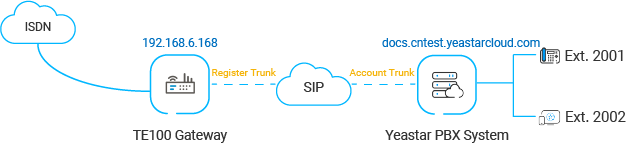
Reference environment
Section titled “Reference environment”Every procedure in this guide refers back to the setup below. Your firmware versions and addresses will differ, but the workflow is the same, so substitute your own values wherever they appear.
| Equipment | Firmware version | IP address / domain |
|---|---|---|
| Cloud Voice | 84.10.0.30 | pbx.example.com |
| TE100 Gateway | 61.0.0.7 | 192.168.6.168 |
In this guide
Section titled “In this guide”Work through the topics in order. The first brings the gateway and the PBX together; the remaining two set up routing so the extended trunk can carry calls in each direction.
- Connect Cloud Voice and the TE100 Gateway: register the gateway with the PBX and bring up one E1/T1/PRI trunk.
- Make outbound calls through the extended E1/T1/PRI trunk: add the outbound route that sends calls out over the extended trunk.
- Receive inbound calls through the extended E1/T1/PRI trunk: add the inbound route that delivers calls arriving on the extended trunk.
Question about this page?
Ask the AI assistant. It starts from this page, then searches the rest of the docs.
Ask Cloud Voice AI
Answers are AI-generated from the docs and may contain mistakes. Verify with the linked pages.