
Flip an Active Call between Devices
Call Flip lets you hand off a call that is already in progress from the Cloud Voice App for Dynamics 365 to any other device where your extension is signed in. The transfer happens mid-conversation, so neither you nor the other party experiences a break in the call.
Before you begin
Section titled “Before you begin”Your extension must be registered on at least two devices. Call Flip has nowhere to send the call unless a second device is available to receive it.
Flip the call
Section titled “Flip the call”-
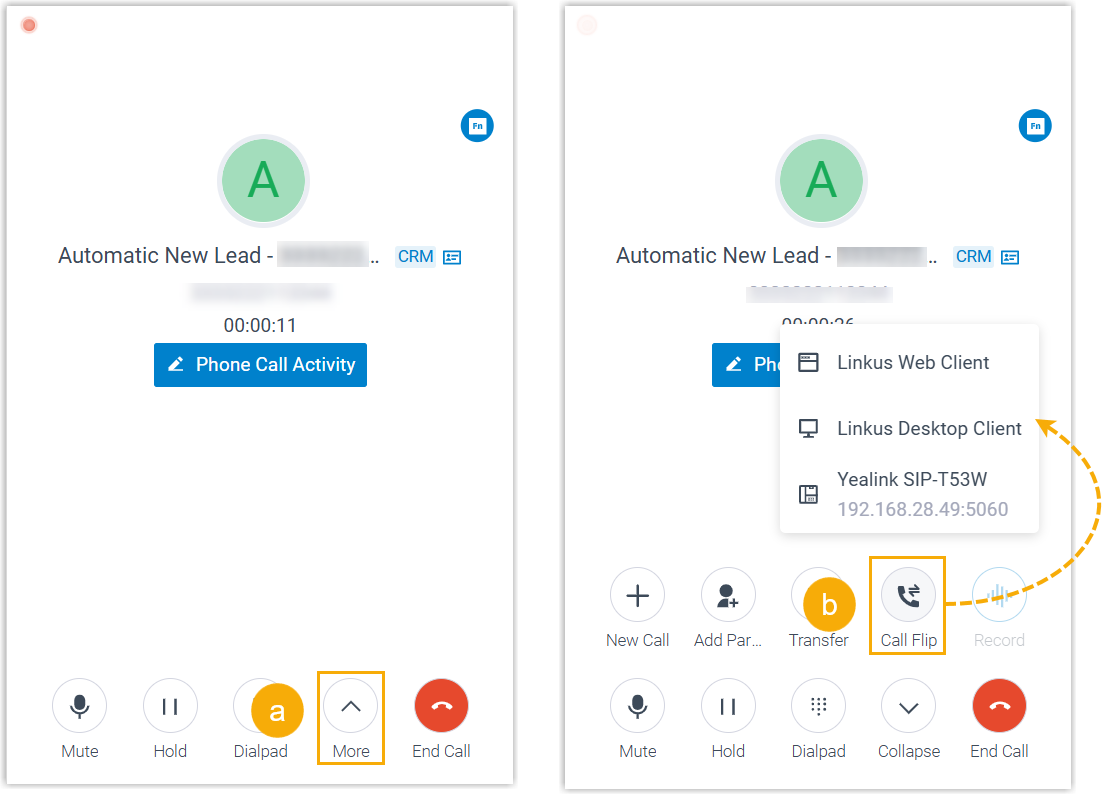
While the call is connected, open the More menu and select Call Flip.
Every other device where your extension is currently registered appears in the list.
-
Choose the device you want to send the call to.
Cloud Voice rings your extension on that device. The original call stays connected the whole time, so the other party keeps talking on the current device until you answer on the new one.
-
Answer the incoming call on the device you picked.
The conversation moves from the Cloud Voice App for Dynamics 365 to that device, and the call continues uninterrupted.
Question about this page?
Ask the AI assistant. It starts from this page, then searches the rest of the docs.
Ask Cloud Voice AI
Answers are AI-generated from the docs and may contain mistakes. Verify with the linked pages.