
Set up Communication Between Hikvision Door Station and Indoor Station
Once both Hikvision endpoints are registered to Cloud Voice, a short round of configuration turns them into a working door-entry intercom: a visitor at the door can ring the indoor station, you can answer with video, and you can release the door from the indoor unit.
Before you begin
Section titled “Before you begin”Both devices must already exist as extensions on your Cloud Voice system. If you have not registered them yet, complete these steps first:
Step 1. Point the door station’s call button at the indoor station
Section titled “Step 1. Point the door station’s call button at the indoor station”The door station needs to know which extension to dial when someone presses its call button. You define that number in the door station’s own configuration, not in Cloud Voice.
-
Sign in to the iVMS-4200 client and open Device Management > Device. Next to your DS-KD8003 door station, click the remote configuration icon to open its Configuration page.

-
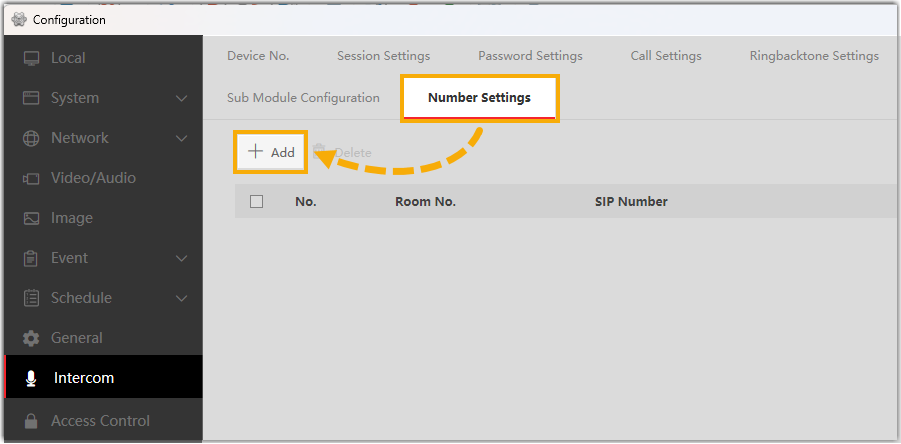
Go to Intercom > Number Settings and click Add to register the indoor station as an intercom target.
-
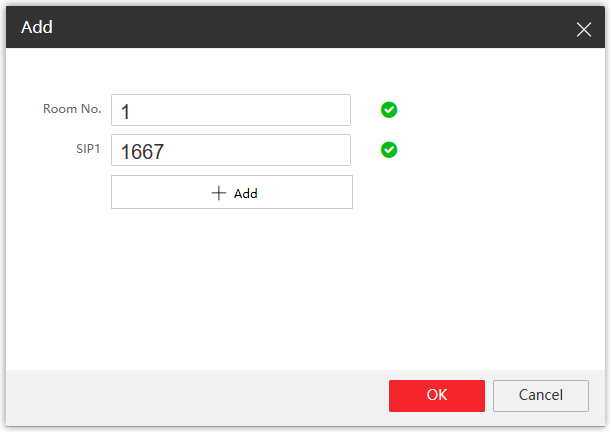
In the dialog that opens, describe the indoor station:
- Room No.: The room number where the indoor station is installed. This is a label the door station uses to identify the unit.
- SIP1: The SIP extension number assigned to the DS-KH6320 indoor station. This is the field that actually routes the call. In this example, enter
1667.
-
Click OK.
Step 2. Match the codecs on both sides
Section titled “Step 2. Match the codecs on both sides”A codec (coder/decoder) is the format used to compress and carry the audio and video of a call. Both ends of a call must offer at least one codec in common, so set video to H.264 and audio to G.711 u-law in both the door station and Cloud Voice.
On the Hikvision door station
Section titled “On the Hikvision door station”-
On the Configuration page, open Video/Audio.
-
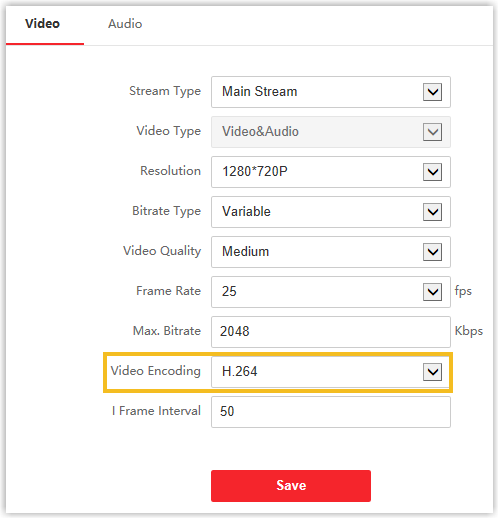
On the Video tab, set Video Encoding to H.264.
-
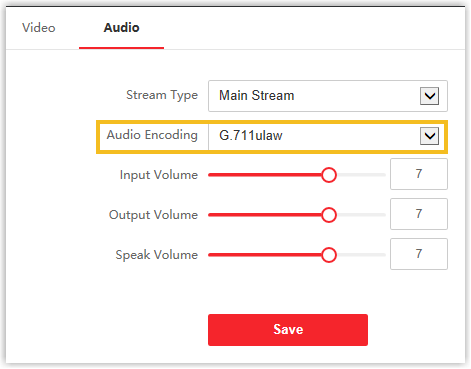
On the Audio tab, set Audio Encoding to G.711ulaw.
-
Click Save.
On Cloud Voice
Section titled “On Cloud Voice”-
Open the Cloud Voice management portal and go to PBX Settings > SIP Settings > Codec.
-
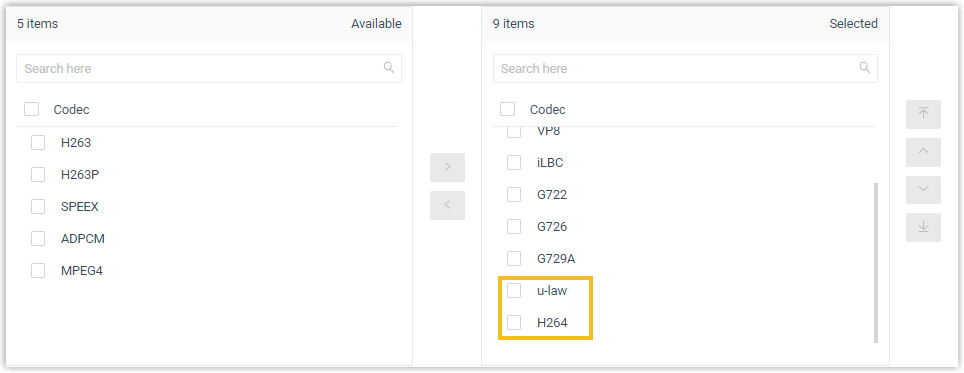
Move u-law and H264 from the Available list into the Selected list.
-
Click Save, then Apply.
What you get
Section titled “What you get”- When a visitor presses the call button on the door station, the call rings through to the indoor station, where you can answer and see the visitor on video.
- While the call is connected, tap the unlock key on the indoor station to open the door.
Question about this page?
Ask the AI assistant. It starts from this page, then searches the rest of the docs.
Ask Cloud Voice AI
Answers are AI-generated from the docs and may contain mistakes. Verify with the linked pages.