
Interconnect Two Cloud Voice Systems
When a business runs a separate phone system at each site, the calls that staff make between those sites are treated as ordinary outbound calls and add up on the phone bill. Interconnecting the two Cloud Voice systems removes that cost: once the systems are linked, a call from one office to another travels between the phone systems as an internal extension call, no matter how far apart the sites are.
This page describes a worked example so you can see how the pieces fit together before you configure it.
Scenario
Section titled “Scenario”A company has its headquarters in New York and a branch office in Los Angeles. Each site runs its own Cloud Voice system. The company wants employees at either site to reach colleagues at the other by dialing an extension, with no charge for the call.
The offices in this example use these extension ranges:
| Office | Extension range |
|---|---|
| Headquarters (New York) | 1000 to 1200 |
| Branch office (Los Angeles) | 2000 to 2050 |
Network layout
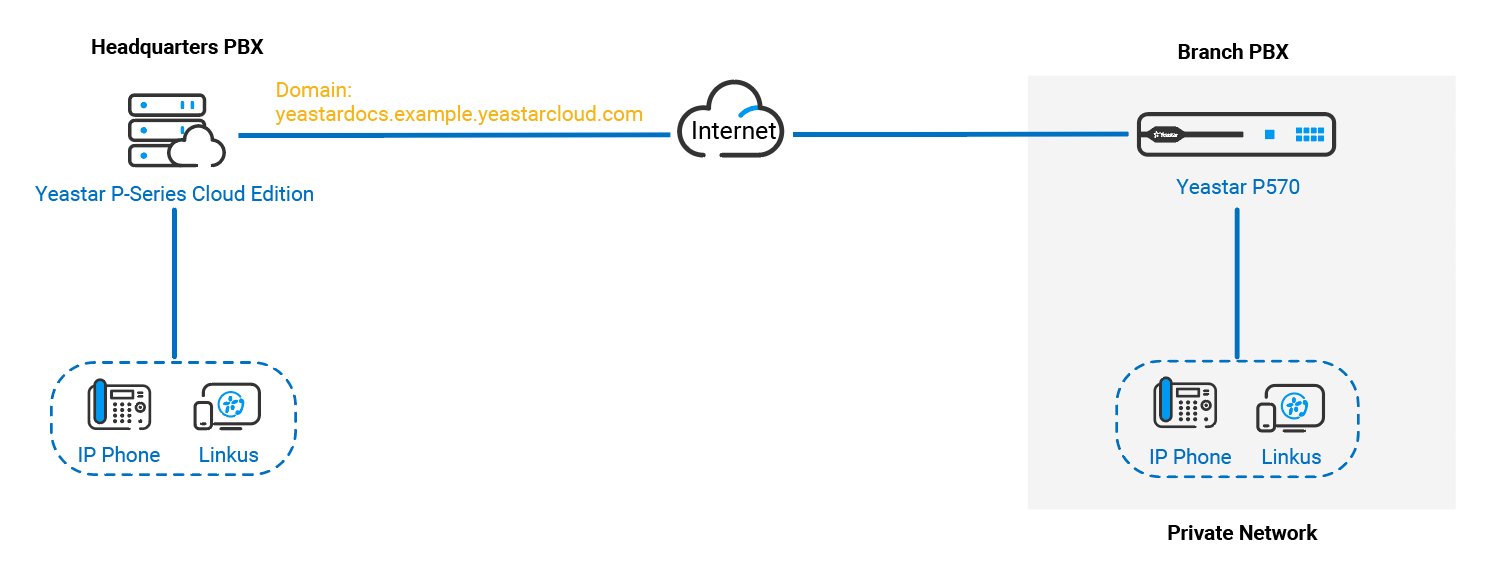
Section titled “Network layout”The way each system reaches the network shapes how you connect them. In this example:
| Office | Network |
|---|---|
| Headquarters | The system is reachable from the public internet at its own domain name, for example hq.example.com. |
| Branch office | The system sits on a private network and cannot reach the public internet on its own. |
Because only the headquarters system has a public address, the two systems are joined by pointing the branch office at the headquarters domain name. That public address is a fully qualified domain name (FQDN): the complete, internet-reachable name of the system. The branch office system uses it to find and connect to headquarters. The diagram below shows how a call crosses between the two sites:
Set up the connection
Section titled “Set up the connection”For the step-by-step configuration on both systems, see Connect Two Cloud Voice Systems.
Question about this page?
Ask the AI assistant. It starts from this page, then searches the rest of the docs.
Ask Cloud Voice AI
Answers are AI-generated from the docs and may contain mistakes. Verify with the linked pages.