
Pause Google Workspace Synchronization
When the Google Workspace integration is active, changes made to users in Google Workspace flow into your phone system and overwrite the matching extension data. If you want to freeze that data for a while (for example, during a directory cleanup or a staged rollout), you can put synchronization on hold instead of removing the integration. Pausing keeps the connection and its settings in place, so you only stop the flow of updates.
Pause the synchronization
Section titled “Pause the synchronization”-
Sign in to the PBX web portal and open Integrations > Collaboration. The Google Workspace connection is managed from this Collaboration page.
-
Under User Synchronization, toggle the switch off.

-
Click Save.
-
In the confirmation dialog, choose how to handle the linked extensions, then complete the action:
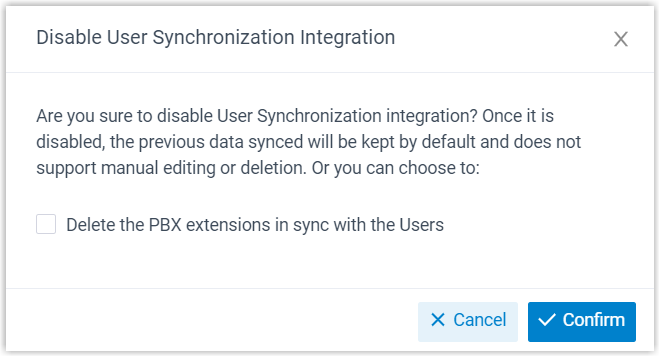
a. To remove the PBX extensions tied to the synced users, tick Delete the PBX extensions in sync with the Users. Leave this box unticked if you only want to pause: the extensions then stay in place and continue working.
b. Click Confirm.
What happens next
Section titled “What happens next”- User synchronization stops.
- Your existing User Synchronization configuration is preserved but becomes read-only while sync is paused.
- If you kept the linked extensions, they are locked for the duration of the pause: you cannot edit their user details and you cannot delete them.
Question about this page?
Ask the AI assistant. It starts from this page, then searches the rest of the docs.
Ask Cloud Voice AI
Answers are AI-generated from the docs and may contain mistakes. Verify with the linked pages.