
Control Door Access via Cloud Voice App
Once your Akuvox intercom devices are registered with Cloud Voice extensions, you can extend door control to the Cloud Voice App. With the right ringing and preview settings in place, an extension user can take a visitor’s call, watch a live video feed from the door phone, and release the door lock without leaving the app. This page walks through that setup.
Before you start
Section titled “Before you start”- To preview live video in the Cloud Voice App, your PBX must be on the Ultimate Plan.
- Both Akuvox devices, the door phone and the indoor monitor, must already be linked to your PBX. You can do this in either of two ways:
- The Cloud Voice App must be signed in on the same extension that the indoor monitor uses.
Step 1, Ring the app alongside the indoor monitor
Section titled “Step 1, Ring the app alongside the indoor monitor”Set up simultaneous ringing on the extension assigned to the Akuvox indoor monitor. This lets the user pick up visitor calls and unlock the door from the Cloud Voice App.
-
Sign in to the PBX web portal and open Extension and Trunk > Extension.
-
Find the extension registered on the Akuvox indoor monitor and click the edit icon next to it.
-
Open the Presence tab on the extension’s configuration page.
-
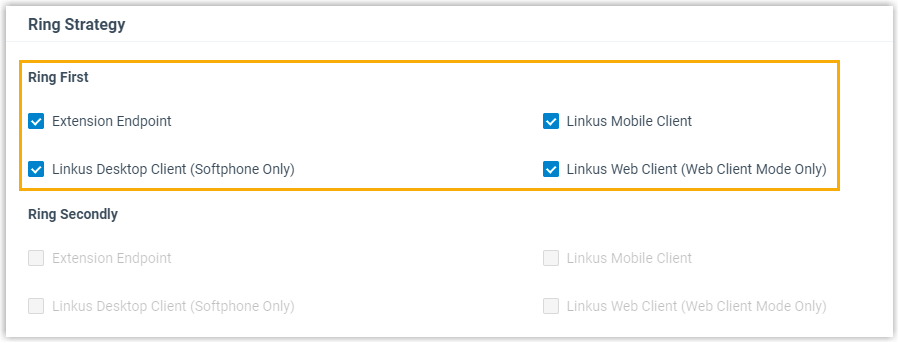
Under Ring Strategy, tick the endpoints you want to ring at the same time.
-
Click Save, then Apply.
Step 2, Turn on live video preview
Section titled “Step 2, Turn on live video preview”Enable video preview on the extension assigned to the Akuvox door phone so the called user can see the door camera feed in the Cloud Voice App.
-
Sign in to the PBX web portal and open Extension and Trunk > Extension.
-
Find the extension registered on the Akuvox door phone and click the edit icon next to it.
-
Open the Features tab on the extension’s configuration page.
-
Scroll to the Door Phone Application section and set the following:

-
Set Video Preview to Enabled.
-
Optionally, set Auto Preview to Enabled.
-
-
Click Save, then Apply.
What the user experiences
Section titled “What the user experiences”-
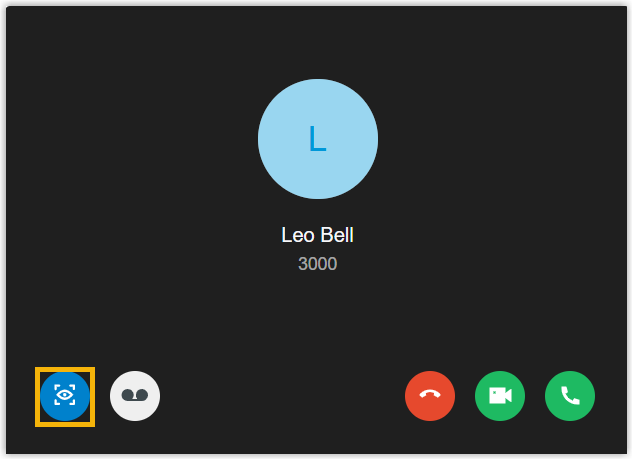
When a visitor calls the indoor monitor from the door phone, the monitor and the linked Cloud Voice App ring together. Before answering, the user can tap the live-video icon in the incoming-call pop-up or screen to see the feed from the door phone.
-
While on the call, the user unlocks the door by sending DTMF code
0from the Cloud Voice App. DTMF (Dual-Tone Multi-Frequency) is the tone a phone sends when a keypad key is pressed, so this is simply pressing 0 during the call.
Question about this page?
Ask the AI assistant. It starts from this page, then searches the rest of the docs.
Ask Cloud Voice AI
Answers are AI-generated from the docs and may contain mistakes. Verify with the linked pages.