
Disable Google Workspace Integration
When you need to pause the Google Workspace integration, for example while working through a problem, you can disable it rather than remove it entirely. Disabling keeps all of your integration settings in place, so you can turn the connection back on later without reconfiguring it.
Disable the integration
Section titled “Disable the integration”-
Sign in to the PBX (Private Branch Exchange, your phone system) web portal and open Integrations > Collaboration.
-
At the top of the integration page, switch the toggle off.
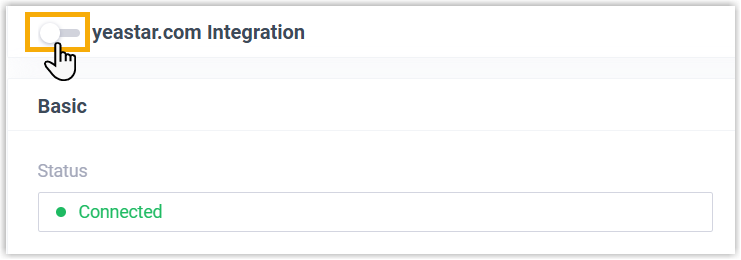
-
Click Save.
-
A confirmation window opens. Choose how to handle the synced extensions, then confirm.
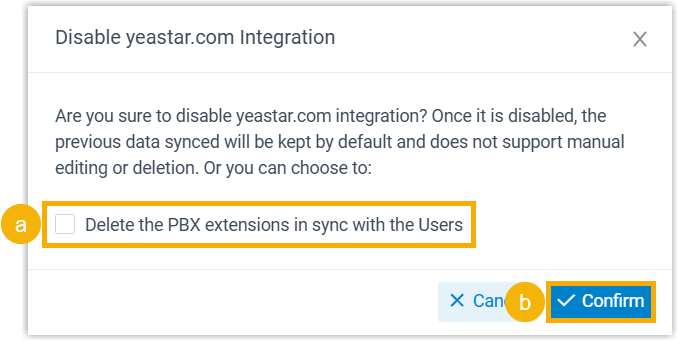
- To remove the PBX extensions tied to the synced users, select Delete the PBX extensions in sync with the Users. Leave it clear to keep those extensions.
- Click Confirm.
What happens next
Section titled “What happens next”-
The Status changes to Disable, confirming the integration is suspended.

-
Your integration settings are preserved but become read-only while the integration is off.
-
Synced users can no longer sign in to the Cloud Voice App with their Google credentials until you re-enable the integration.
Question about this page?
Ask the AI assistant. It starts from this page, then searches the rest of the docs.
Ask Cloud Voice AI
Answers are AI-generated from the docs and may contain mistakes. Verify with the linked pages.