
Integrate Cloud Voice with Microsoft Teams
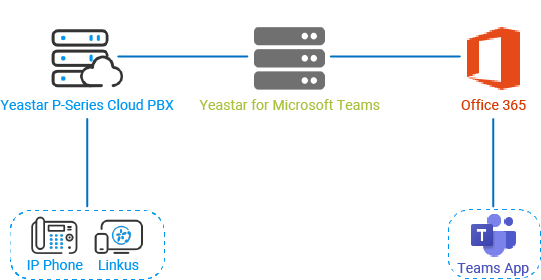
Cloud Voice integrates with Microsoft Teams by linking each Teams user to a SIP (Session Initiation Protocol, the standard used to set up voice calls) extension on your phone system. Once a user is linked, Teams behaves as a softphone registered to Cloud Voice: you keep your existing phone numbers and SIP devices, place and answer calls without leaving Teams, and gain access to PBX features such as IVR (Interactive Voice Response, the automated “press 1 for sales” menus) menus, call queues, and call routing.
How the integration works
Section titled “How the integration works”Teams users authenticate against Microsoft 365, while call traffic is handled by your Cloud Voice system through its assigned domain name. The connector maps each Teams user to a SIP extension, so calls made or received in Teams flow through the PBX like any other extension. Examples throughout this guide refer to the domain name assigned to your own Cloud Voice system.
Prerequisites
Section titled “Prerequisites”Confirm all of the following before you start the integration. The integration will not work until every item is in place.
Microsoft 365
Section titled “Microsoft 365”- Administrator access to the Microsoft 365 admin center.
- A Microsoft 365 plan that supports calling. Depending on the plan, you may need to add a voice license before Teams can place PBX calls:
| Microsoft 365 plan | What you need |
|---|---|
| Microsoft 365 Business Basic | One of the following: a Common Area Phone license, a Phone System license, or the Microsoft 365 Business Voice add-on. |
| Microsoft 365 Business Standard | Same as above. |
| Microsoft 365 Business Premium | Same as above. |
| Office 365 E1 | Same as above. |
| Office 365 E3 | Same as above. |
| Microsoft 365 E3 | Same as above. |
| Office 365 E5 | No additional license required. |
| Microsoft 365 E5 | No additional license required. |
Cloud Voice for Microsoft Teams license
Section titled “Cloud Voice for Microsoft Teams license”Contact IZT to purchase and activate the Cloud Voice for Microsoft Teams license.
Cloud Voice
Section titled “Cloud Voice”Administrator access to your Cloud Voice system.
Question about this page?
Ask the AI assistant. It starts from this page, then searches the rest of the docs.
Ask Cloud Voice AI
Answers are AI-generated from the docs and may contain mistakes. Verify with the linked pages.