
Disconnect Active Directory Integration
Cloud Voice pairs with one directory service at a time. Before you can connect a different directory, you first have to break the existing link to Active Directory (AD, the Microsoft service that stores your users, organizational units, and groups). When you disconnect, you also decide what happens to the extensions, organizations, and groups that AD created inside the PBX (Private Branch Exchange, the phone system) while the two were syncing.
Disconnect the integration
Section titled “Disconnect the integration”-
Sign in to the PBX web portal and open Integrations > Collaboration.
-
In the upper-right corner of the integration page, click Disconnect.
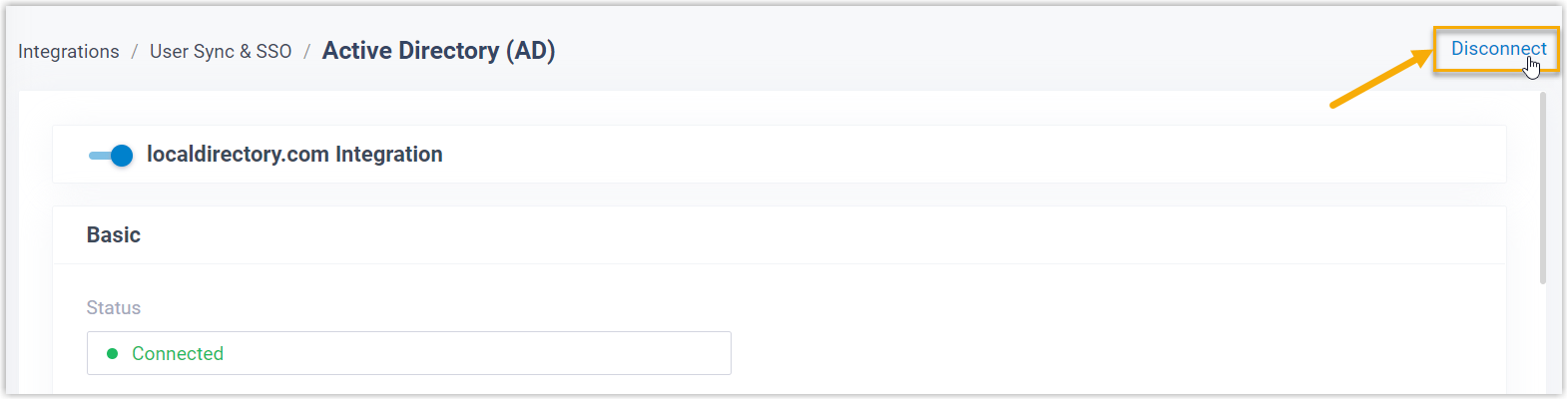
-
In the window that appears, choose what to do with the synced data, then confirm.
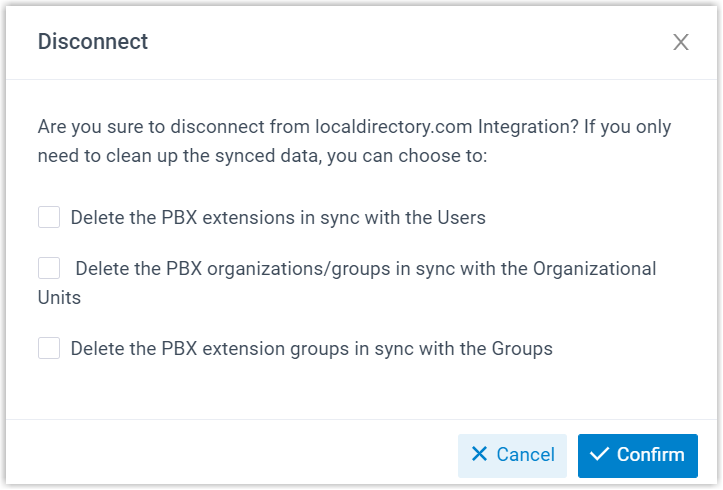
a. Decide whether to remove the PBX records that were kept in sync with your AD users, organizational units, and groups. Each of the three options below is independent, so you can select any combination:
Option What happens Delete the PBX extensions in sync with the Users Select it to delete those extensions. Leave it unselected to keep them, after which the PBX manages them on its own. Delete the PBX organizations/groups in sync with the Organizational Units Select it to delete the matching organizations and extension groups. Leave it unselected to keep them under full PBX management. Delete the PBX extension groups in sync with the Groups Select it to delete those extension groups. Leave it unselected to keep them under full PBX management. b. Click Confirm.
Result
Section titled “Result”Cloud Voice is no longer integrated with Active Directory. Any records you chose to keep now remain in the PBX and are managed there directly.
Question about this page?
Ask the AI assistant. It starts from this page, then searches the rest of the docs.
Ask Cloud Voice AI
Answers are AI-generated from the docs and may contain mistakes. Verify with the linked pages.