
Set up Contact Synchronization from Zoho CRM
Once your Zoho CRM (Customer Relationship Management) connection is in place, Cloud Voice can pull contacts from Zoho into a phonebook of your choosing. The sync runs in one direction only, so Zoho CRM remains the source of truth and the resulting phonebook mirrors it.
Before you begin
Section titled “Before you begin”Finish connecting Cloud Voice to Zoho CRM first. This procedure assumes the integration is already active.
Turn on contact sync
Section titled “Turn on contact sync”-
Sign in to the Cloud Voice management portal and open Integrations > CRM.
-
On the CRM integration page, switch on Synchronize Contacts Automatically.
-
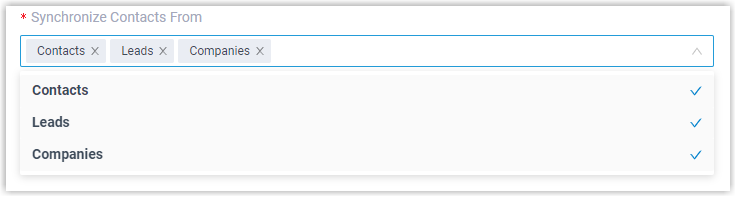
Open the Synchronize Contacts From drop-down and choose which contact types you want brought over from Zoho CRM.
-
Open the Synchronize to Phonebook drop-down and pick an existing empty phonebook, or create a new one to hold the imported Zoho CRM contacts.

-
Use the Always Query CRM option to decide whether Cloud Voice looks up contacts in Zoho CRM in real time.

- Enabled: Cloud Voice queries Zoho CRM live for contact details, and the associated extension users can search CRM contacts as they dial from the Cloud Voice App.
- Disabled: Cloud Voice only reaches out to Zoho CRM when no match is found in your company contacts.
-
Click Save.
What happens next
Section titled “What happens next”Go to Contacts > Phonebooks and you will see the linked phonebook marked with a CRM label:


From then on, whenever an extension user takes an inbound call from one of the selected Zoho CRM contact types, or dials out to such a contact, Cloud Voice looks the contact up and copies the matched record into the linked phonebook automatically.
The phonebook does not bulk-import your entire Zoho CRM address book in one pass. A record only lands in the phonebook after Cloud Voice sees a matching call, so the list fills in gradually as calls come and go.
Question about this page?
Ask the AI assistant. It starts from this page, then searches the rest of the docs.
Ask Cloud Voice AI
Answers are AI-generated from the docs and may contain mistakes. Verify with the linked pages.