
Synchronize Groups from Microsoft Entra ID to Cloud Voice
When Cloud Voice is connected to Microsoft Entra ID, you can choose which directory groups flow into your phone system and become extension groups. This page walks through defining that group synchronization rule and explains how the resulting extension groups behave.
Before you begin
Section titled “Before you begin”The integration between Cloud Voice and Microsoft Entra ID must already be in place. Which setup guide applies depends on your phone system’s firmware version:
- Firmware 84.22.0.138 or later: follow Integrate Cloud Voice with Microsoft Entra ID.
- Firmware earlier than 84.22.0.138: follow Integrate Cloud Voice with Microsoft Entra ID (Legacy).
Define the group synchronization rule
Section titled “Define the group synchronization rule”-
Sign in to the Cloud Voice management portal and open Integrations > Collaboration.
-
Scroll to the Group Synchronization section and turn the switch on.

-
Open the Synchronize for drop-down list and choose which groups to pull from Microsoft Entra ID.
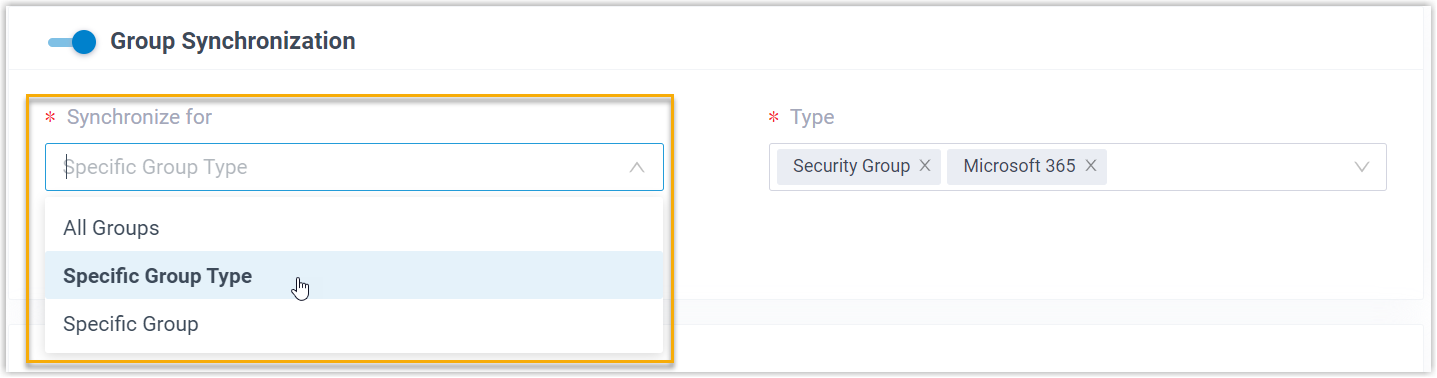
Option What it syncs All Groups Brings in every group from your Microsoft Entra ID directory. Specific Group Type Brings in only the group types you pick. After choosing this option, select one or more values in the Type drop-down: Security Group (all security groups in your directory) or Microsoft 365 (all Microsoft 365 groups in your directory). Specific Group Brings in a hand-picked set of groups. Search for and select the groups you want in the Group drop-down list. If you later narrow or change which groups are synced, use the Auto delete the Extension Groups no longer in sync option to decide what happens to extension groups that fall out of scope.
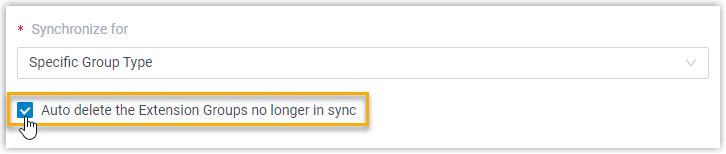
- Selected: the orphaned extension groups are removed on the next synchronization.
- Cleared: the extension groups stay in place and are then managed entirely by Cloud Voice.
-
Click Save.
What happens next
Section titled “What happens next”Your custom group synchronization rule is now saved. On each run, Cloud Voice queries Microsoft Entra ID against the rule and pulls in the matching groups along with any updated details. Once a synchronization completes:
-
You can review the outcome in the Group Synchronization section.

-
Extension groups that map to Microsoft Entra ID groups are tagged with a Microsoft label
 and cannot be deleted from Cloud Voice.
 -
You cannot edit the name or membership of a Microsoft Entra ID-linked extension group directly in Cloud Voice.
Question about this page?
Ask the AI assistant. It starts from this page, then searches the rest of the docs.
Ask Cloud Voice AI
Answers are AI-generated from the docs and may contain mistakes. Verify with the linked pages.