
Disable Active Directory Integration
When you need to pause directory syncing during a fix or investigation, you can switch the whole Active Directory (AD) integration off rather than removing it. Active Directory is Microsoft’s directory service that stores your organization’s user accounts and groups. Suspending the integration stops synchronization while preserving your existing settings, so you can turn it back on later without rebuilding the connection.
Suspend the integration
Section titled “Suspend the integration”-
Sign in to the PBX (Private Branch Exchange, your phone system) web portal and open Integrations > Collaboration.
-
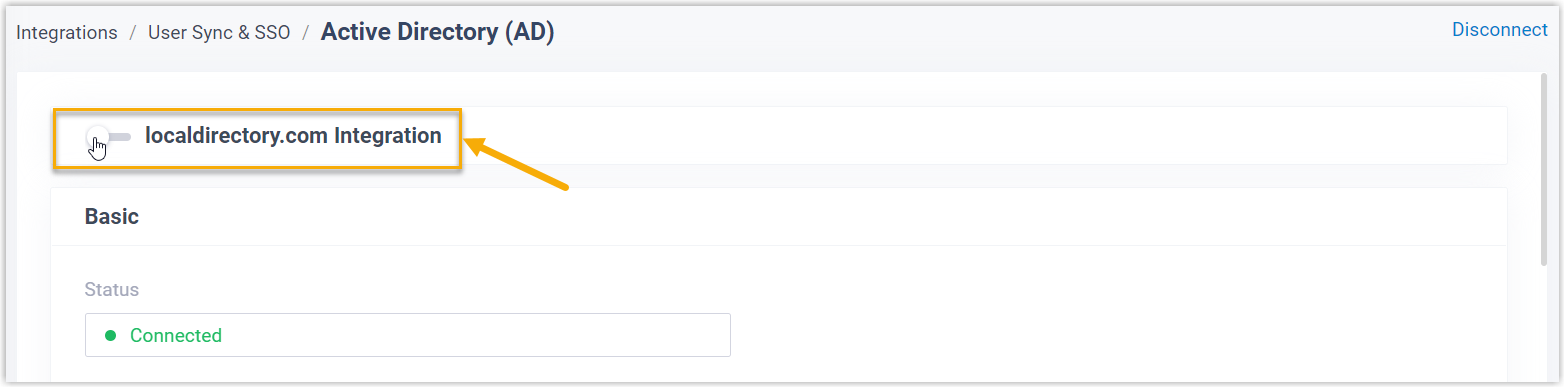
At the top of the integration page, toggle the switch to the off position.
-
Click Save.
-
In the confirmation dialog, choose how the PBX should treat the data it previously synced from Active Directory, then confirm.
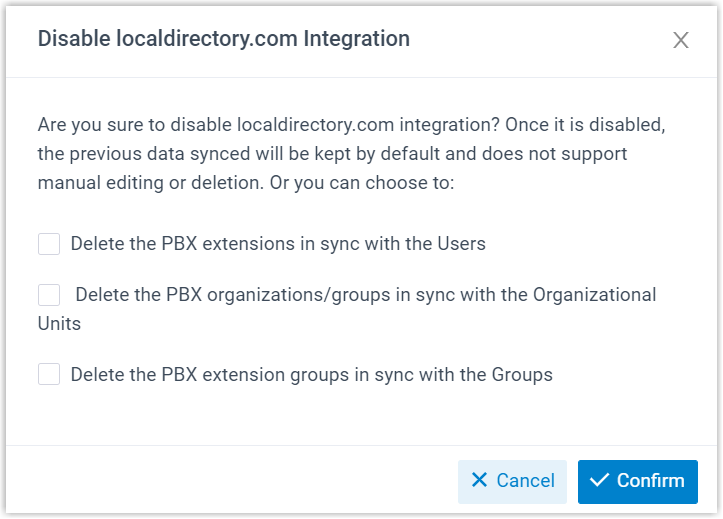
a. For each category below, decide whether to delete the PBX records tied to your synced AD users, organizational units (OUs), and groups.
Option Effect Delete the PBX extensions in sync with the Users Selected: the matching extensions are removed. Cleared: the extensions stay, but you can no longer edit their user details or delete them. Delete the PBX organizations/groups in sync with the Organizational Units Selected: the matching organizations and extension groups are removed. Cleared: they stay, but you can no longer edit their details or delete them. Delete the PBX extension groups in sync with the Groups Selected: the matching extension groups are removed. Cleared: they stay, but you can no longer change their name or membership, or delete them. b. Click Confirm to apply your choice.
What happens next
Section titled “What happens next”-
The Status field shows “Disable”, confirming the integration is fully suspended.

-
Your integration configuration is kept but becomes read-only while suspended.
-
Synced users can no longer sign in to the Cloud Voice App with their Active Directory domain accounts until you re-enable the integration.
Question about this page?
Ask the AI assistant. It starts from this page, then searches the rest of the docs.
Ask Cloud Voice AI
Answers are AI-generated from the docs and may contain mistakes. Verify with the linked pages.