
Disconnect Bitrix24 CRM Integration
Cloud Voice supports a single active CRM (Customer Relationship Management) connection at a time. Before you can link a different CRM account, remove the Bitrix24 integration that is currently in place.
Disconnect the integration
Section titled “Disconnect the integration”-
Sign in to the Cloud Voice management portal and open Integrations > CRM.
-
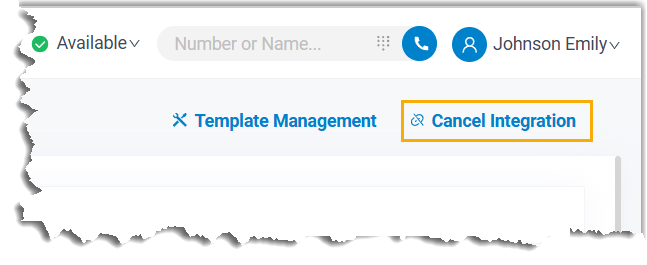
In the upper-right corner of the page, select Cancel Integration.
-
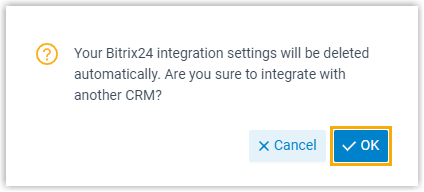
Confirm the action by selecting OK in the dialog that appears.
What happens next
Section titled “What happens next”- The Bitrix24 CRM connection is closed.
- Every setting tied to the integration is reset.
- Contacts and the phonebook that were synced stay on Cloud Voice, and you can edit them freely from this point on.
Question about this page?
Ask the AI assistant. It starts from this page, then searches the rest of the docs.
Ask Cloud Voice AI
About
Answers are AI-generated from the docs and may contain mistakes. Verify with the linked pages.