
Configure Number Matching in Dynamics 365
Number matching controls how the integration links the external party on a call to a contact record in your Dynamics 365 CRM (Customer Relationship Management system). The external party is the caller on an inbound call or the number you dial on an outbound call. Getting this rule right means each call is tied to the correct contact, so the integration can show who is on the line and log the call activity against the right record. This page explains how to choose between matching the entire number or only its trailing (last few) digits.
Procedure
Section titled “Procedure”-
Sign in to the Cloud Voice App for Dynamics 365 plugin, then click the preferences icon.

-
Open the Dynamics Integration tab.
-
Under Number Match, pick the behavior you want. The rule you choose applies to both inbound and outbound calls.
-
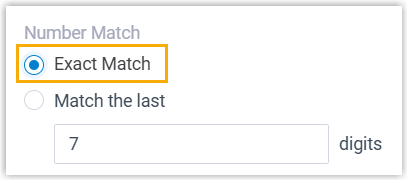
Exact Match: compares the caller’s or callee’s complete number against your CRM records and returns only records whose number is identical.
-
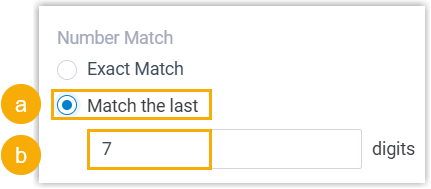
Match the last {{x}} digits: enter how many trailing digits to compare. Dynamics 365 then runs a looser (fuzzy) search, checking only that many final digits of the external number against your CRM records.
-
-
Click Save.
Question about this page?
Ask the AI assistant. It starts from this page, then searches the rest of the docs.
Ask Cloud Voice AI
Answers are AI-generated from the docs and may contain mistakes. Verify with the linked pages.