
Automatic Reset of Time Condition
A time condition is a rule that sends inbound calls (calls arriving from outside your system) to different destinations depending on the current period, such as business hours, outside business hours, or holidays. A destination is wherever the call is sent, for example a specific extension, a ring group, or an auto attendant (a phone menu that callers navigate, also called an IVR, short for Interactive Voice Response).
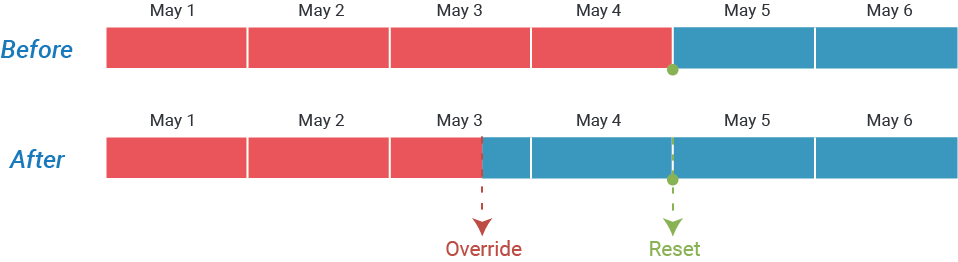
Sometimes you need to change the active period by hand. For example, you close early for a staff meeting, so you override the schedule to outside business hours so callers reach voicemail instead of a ringing desk. This is called an override. Once applied, an override stays in effect until it is cleared.
If you do not clear the override yourself, Cloud Voice clears it for you: the system automatically resets the time condition when the next period begins. Depending on your schedule, that next period can be the start of business hours, outside business hours, or a holiday. Once the reset happens, calls follow the configured schedule again.
The diagrams below walk through the most common scenarios so you can see exactly when an override ends and normal routing resumes.
How to read the diagrams
Section titled “How to read the diagrams”Each diagram plots a timeline of periods and marks the moment an override is applied and the moment it is automatically cleared. The symbols below appear across the examples.
| Symbol | Meaning |
|---|---|
 | Business hours |
 | Outside business hours |
 | Time Period 1 |
 | Time Period 2 |
 | Holidays |
 | Scheduled switch (the next hop of the time condition). At each period boundary in your time condition, Cloud Voice moves incoming calls to the destination you configured for that period. |
 | Manual override of the time condition |
 | Automatic reset of the time condition |
Global or custom business hours
Section titled “Global or custom business hours”When your time condition is built on business hours and outside business hours, an override forces one of those two states. The system holds it until the next scheduled boundary, then clears it.
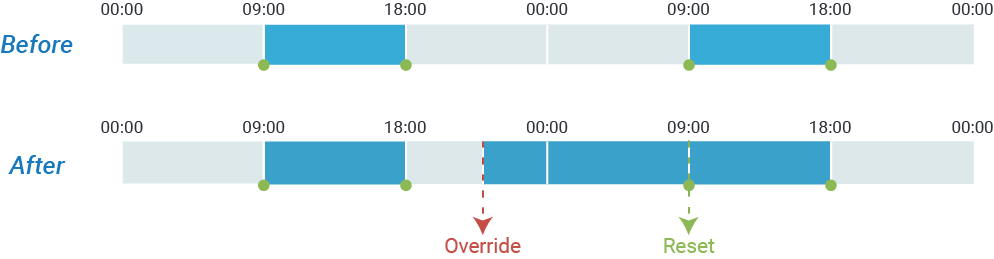
Example 1: Override to business hours
The override forces the business-hours destination. At the next period boundary, Cloud Voice clears the override and resumes the normal schedule.
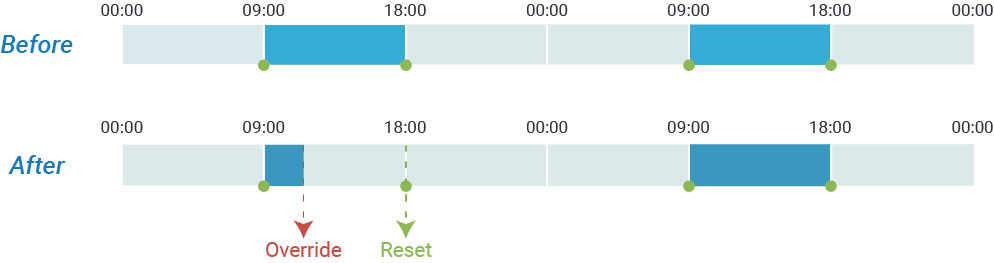
Example 2: Override to outside business hours
The override forces the outside-business-hours destination and is automatically reset when the next period starts.
Custom time periods
Section titled “Custom time periods”When your time condition uses custom time periods (your own named blocks of time rather than the standard business-hours split), an override forces a specific period. It is cleared automatically once the next period begins.
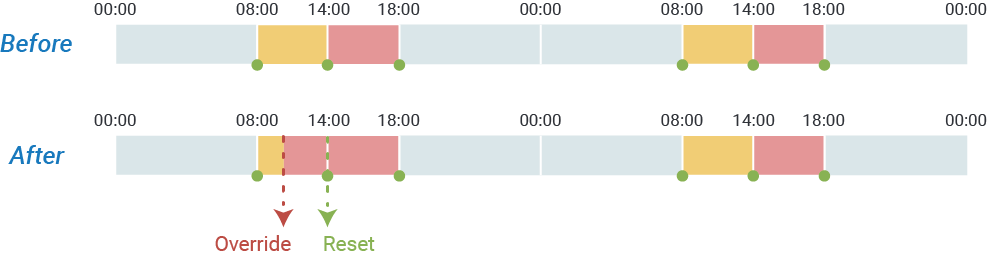
Example 1: Override to Time Period 2
The override forces the destination for Time Period 2. Cloud Voice resets it at the next boundary and returns to the schedule.
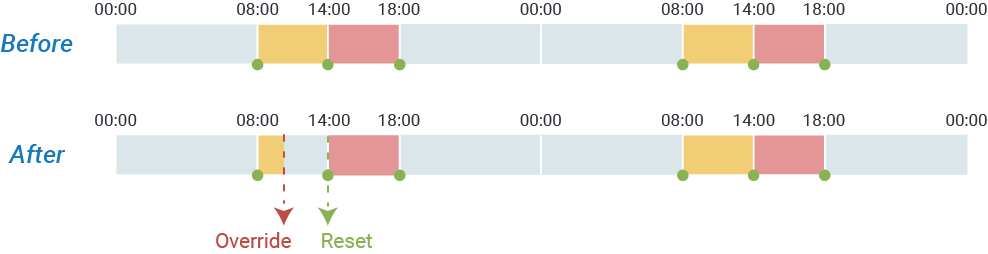
Example 2: Override to outside business hours
The override forces the outside-business-hours destination and is reset automatically at the start of the next period.
Holidays
Section titled “Holidays”When your time condition includes holidays, an override can force a holiday or non-holiday state. Cloud Voice resets it at the next holiday or non-holiday boundary, whichever comes first.
Example: Override to non-holiday
The override forces the non-holiday destination. At the next period boundary, the system clears the override and resumes following the schedule.
Question about this page?
Ask the AI assistant. It starts from this page, then searches the rest of the docs.
Ask Cloud Voice AI
Answers are AI-generated from the docs and may contain mistakes. Verify with the linked pages.