
Upload an Image File for Auto Provisioning
Cloud Voice keeps a shared library of images that you can push to phones during auto provisioning (the process where the phone system automatically sends settings and files to the phones for you, instead of configuring each phone by hand). Once an image is in the library, you can assign it as a wallpaper, screensaver, or boot logo for supported IP phones. This page covers how to add an image to the repository and lists the dimensions and file formats each phone model expects.
Before you begin
Section titled “Before you begin”Confirm the following before you upload:
- Platform firmware: Your Cloud Voice system must be running firmware
84.21.0.66or later. - File format: The image must be a
.jpg,.jpeg,.bmp,.png, or.dobfile. - File size: 5 MB maximum.
- Dimensions and format per model: Each phone model accepts a specific resolution and file type. Check the Image specification reference below, or confirm the exact requirements with your phone vendor.
Upload an image
Section titled “Upload an image”-
Sign in to the Cloud Voice management portal and go to Auto Provisioning > Resource Repository > Image File.
-
Click Add.
-
Fill in the dialog that opens.
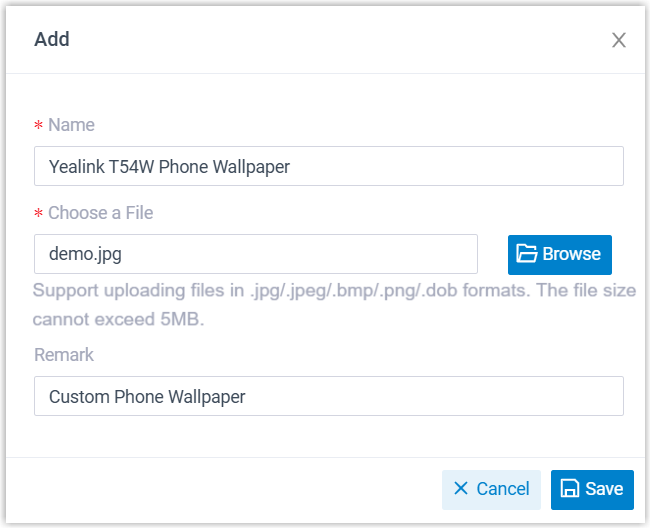
- Name: A label that helps you recognize the image in the library. Including the resolution or target phone model in the name makes the right file easy to pick when you assign it later.
- Choose a File: Click Browse and pick the image you want to upload.
- Remark: Optional note for your own reference.
-
Click Save.
The image is added to Cloud Voice and appears in the image list.
What to do next
Section titled “What to do next”Assign the image to a phone by following Configure display settings for a provisioned phone.
Image specification reference
Section titled “Image specification reference”Use the tables below to match an image to the resolution and format your phone model supports. Specifications are grouped by phone vendor: Yealink, Snom, and Fanvil. In the tables, px means pixels and MP means megapixels (the total pixel count, width times height). The .dob format is listed only for the smaller, low-resolution Yealink models; color screens use JPG, PNG, or BMP.
Yealink phones
Section titled “Yealink phones”| Phone model | Resolution | Format |
|---|---|---|
| EXP50 / EXP43 | ≤ 4.2 MP | JPG / PNG / BMP / JPEG |
| T57W / T54W / T53C / T48U / T48S / T48G / CP925 / CP935W / Video Phone / Conference Phone | ≤ 2.0 MP | JPG / PNG / BMP / JPEG |
| T46U / T46S / T46G / T33P / T33G / T29G | ≤ 1.8 MP | JPG / PNG / BMP / JPEG |
| T33P / T33G / T52S | 320 × 240 px (≤ 4.2 MP) | PNG |
| T56A / T58 / T58W | 1024 × 600 px | PNG |
| CP860 | 192 × 64 px | DOB |
| T42G / T41P / CP860 / CP920 | 248 × 120 px, 2-level grayscale | DOB |
| T27G / T43U / T53 / T53W | 236 × 82 px, 2-level grayscale | DOB |
| T19(P) E2 / T21(P) E2 / T23G / T23P | 132 × 64 px, 2-level grayscale | DOB |
| T30P / T31P / T31G | 132 × 64 px, 2-level grayscale | DOB |
| T40G / T40P / T41S / T41U / T42S / T42U | 132 × 64 px, 2-level grayscale | DOB |
Snom phones
Section titled “Snom phones”| Phone model | Resolution | Format |
|---|---|---|
| D385 / D785 / D812 | 480 × 272 px | PNG |
| D713 / D735 / D765 | 320 × 240 px | PNG |
| D717 | 426 × 240 px | PNG |
| D862 / D865 | 1280 × 720 px | PNG |
Fanvil phones
Section titled “Fanvil phones”| Phone model | Resolution | Boot logo | Wallpaper | Screensaver |
|---|---|---|---|---|
| A32 | 1280 × 800 px | Static logo (U-Boot): BMP (24-bit, vertically flipped), 654 × 258 px, max ≤ 1024 × 600 px. Animated logo: PNG (black background), max ≤ 1024 × 600 px. | / | / |
| A32i / A320 / A320i | 1280 × 800 px | Static logo (U-Boot): BMP (24-bit, vertically flipped and rotated 90° clockwise), 654 × 258 px, max ≤ 1024 × 600 px. Animated logo: PNG (black background), max ≤ 1024 × 600 px. | / | / |
| H6W | 320 × 480 px | JPG (24-bit, converted from 24-bit BMP) | BMP (24-bit) | PNG (32-bit) |
| H5 | 480 × 320 px | JPG (16-bit, converted from 16-bit BMP) | BMP (16-bit) | / |
| H5W | 480 × 320 px | JPG (16-bit, converted from 16-bit BMP) | BMP (16-bit) | / |
| i504W | 1024 × 600 px | JPG (24-bit, converted from 24-bit BMP) | BMP (24-bit) | PNG (32-bit) |
| i506W | 1280 × 800 px | JPG (24-bit, converted from 24-bit BMP and pre-rotated 90° clockwise) | BMP (24-bit) | PNG (32-bit) |
| i67 | 600 × 1024 px | JPG (24-bit, converted from 24-bit BMP) | BMP (24-bit) | PNG (32-bit) |
| i68 | 800 × 1280 px | JPG (24-bit, converted from 24-bit BMP) | BMP (24-bit) | PNG (32-bit) |
| V62 | 192 × 64 px | BMP (1-bit) | / | / |
| V61G / V61W | 320 × 240 px | JPG (24-bit, pre-rotated 90° clockwise from a 320 × 240 source) | BMP (24-bit) | PNG (32-bit) |
| V62G / V62W / V62 Pro | 320 × 240 px | BMP (24-bit, pre-rotated 90° clockwise from a 320 × 240 source) | BMP (24-bit) | PNG (32-bit) |
| V63 | 320 × 240 px | JPG (24-bit, pre-rotated 90° clockwise from a 320 × 240 source) | BMP (24-bit) | PNG (32-bit) |
| V64 | 480 × 320 px | JPG (24-bit, pre-rotated 90° clockwise from a 320 × 240 source) | BMP (24-bit) | PNG (32-bit) |
| V65 | 480 × 272 px | JPG (24-bit) | BMP (24-bit) | PNG (32-bit) |
| V66 / V66 Pro | 1024 × 600 px | / | BMP (24-bit) | / |
| V67 | 1024 × 600 px | Static logo (U-Boot): BMP (24-bit, vertically flipped), 654 × 258 px, max ≤ 1024 × 600 px. Animated logo: PNG (black background), max ≤ 1024 × 600 px. | PNG or JPG | PNG (210 × 56 px or 1024 × 600 px) |
| X1SP | 128 × 48 px | BMP (1-bit) | / | / |
| X301 / X301G / X301W | 128 × 48 px / 132 × 64 (for V2) | BMP (1-bit) | / | / |
| X3SP / X3S | 132 × 64 px | BMP (1-bit) | / | / |
| X3SG Pro / X3SW / X303 / X303W / X305 | 320 × 240 px | JPG (24-bit, pre-rotated 90° clockwise from a 320 × 240 source) | BMP (16-bit R5G6B5) | PNG (32-bit) |
| X3U | 320 × 240 px | JPG (24-bit) | BMP (16-bit R5G6B5) | / |
| X3U Pro / X4U / X4U-V2 | 320 × 240 px | JPG (24-bit, pre-rotated 90° clockwise from a 320 × 240 source) | BMP (24-bit) | PNG (32-bit) |
| X5U-V2 | 480 × 320 px | JPG (24-bit, pre-rotated 90° clockwise from a 480 × 320 source) | BMP (24-bit) | PNG (32-bit) |
| X6U-V2 / X210-V2 | 480 × 272 px | JPG (24-bit) | BMP (24-bit) | / |
| X7 | 800 × 480 px | / | BMP (24-bit) | / |
| X7-V2 | 1024 × 600 px | / | BMP (24-bit) | / |
| X7A | 1024 × 600 px | Static logo (U-Boot): BMP (24-bit, vertically flipped), 654 × 258 px, max ≤ 1024 × 600 px. Animated logo: PNG (black background), max ≤ 1024 × 600 px. | PNG or JPG | PNG (210 × 56 px or 1024 × 600 px) |
Question about this page?
Ask the AI assistant. It starts from this page, then searches the rest of the docs.
Ask Cloud Voice AI
Answers are AI-generated from the docs and may contain mistakes. Verify with the linked pages.