
Voice Prompt Overview
A voice prompt is a recorded audio message that Cloud Voice plays to callers. Some prompts ask the caller to key in information using Dual-Tone Multi-Frequency (DTMF) tones, the sounds a phone keypad makes when a button is pressed. Others simply give instructions or guide the caller to the right destination.
Prompt types
Section titled “Prompt types”Cloud Voice works with several kinds of voice prompt, each suited to a different purpose.
System prompt
Section titled “System prompt”System prompts ship with Cloud Voice and deliver standard instructions to callers, such as asking a caller to key in a password before they are admitted to a meeting. You can keep the built-in prompts as they are, replace them with a set downloaded from the online library, or upload your own recordings. See Change System Prompt and Customize System Prompt.
Music on hold
Section titled “Music on hold”Music on Hold (MoH) is the audio that fills the silence for callers who have been placed on hold. You can play the bundled music or build a playlist of your own. See Set up a Custom MoH Playlist.
Custom prompt
Section titled “Custom prompt”A custom prompt is a message tailored to your business and used in a specific call scenario, for example telling a caller that their call is being forwarded to another destination. You can record one from a phone or upload a file you have already prepared. See Record a Custom Prompt and Upload a Custom Prompt.
Custom ringtone
Section titled “Custom ringtone”A custom ringtone can be used as a distinctive ringtone in the Cloud Voice App for the members of IVRs (Interactive Voice Response menus), queues, and ring groups. A personalized ringtone lets agents recognize at a glance where an incoming call is coming from. See Upload a Custom Ringtone.
Prompt preferences
Section titled “Prompt preferences”System-wide prompt behavior is controlled from the PBX (Private Branch Exchange) admin console under PBX Settings > Voice Prompt > Prompt Preferences. These settings decide which audio callers hear in common situations such as being on hold, reaching a busy line, or having a call fail.
Music on Hold: The playlist played to a caller who is on hold. The playlists offered here are the same ones you define under Music on Hold.
Music on Hold for Call Forwarding: What the caller hears while on hold during call forwarding:
- Music on Hold: plays your Music on Hold selection.
- Ringing Tone: plays a ringing tone instead.
Invalid Phone Number Prompt: Played when the dialed number is not valid. The available choices come from your Custom Prompt entries.
Busy Line Prompt: Played when the trunk (the line that connects Cloud Voice to your phone service provider and carries calls to and from the outside world) is already in use. The available choices come from your Custom Prompt entries.
Call Failure Prompt: Played when a call cannot be sent out. The available choices come from your Custom Prompt entries.
Event Notification Prompt: Played when the system places a call to notify someone that a particular event has occurred. The available choices come from your Custom Prompt entries.
Play Call Forwarding Prompt: Whether to let the caller know that the current call is about to be forwarded.
Play Call Waiting Prompt: Played when a caller is waiting to be connected to an extension user who is already on a call. What follows depends on who is calling:
- An internal (extension) caller hears “Sorry! Please hold on, the number you dialed is busy now.”, followed by a ringing tone.
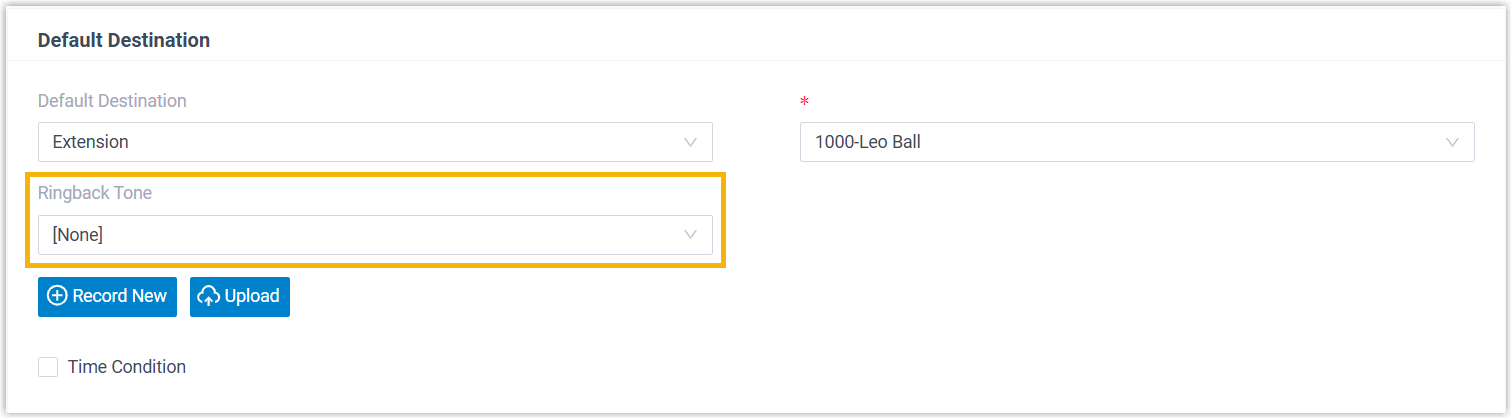
- An external caller hears the same message, then either a ringing tone or a ringback tone. Which one plays depends on whether a ringback tone is configured for the inbound route that delivered the call, under Call Control > Inbound Route > Default Destination > Ringback Tone.
Question about this page?
Ask the AI assistant. It starts from this page, then searches the rest of the docs.
Ask Cloud Voice AI
Answers are AI-generated from the docs and may contain mistakes. Verify with the linked pages.