
Route Inbound Calls based on Caller ID
A caller-ID-based inbound route tells Cloud Voice to look at the caller ID (the phone number a call is coming from) and send that call to a destination you pick for the matching number pattern. It gets callers to the right party without making them work through a phone menu first. The example below sets up a single published phone number that fans out to different teams based on where each caller is calling from.
Example scenario
Section titled “Example scenario”Company ABC is a consulting firm that serves customers in several cities. It advertises a single countrywide toll-free number, 400-661-8815, and staffs separate teams to cover different regions. When a customer calls the toll-free number, the call should reach the team that owns their region.
The two teams and the caller area codes they cover are:
| Team | Region | Area codes |
|---|---|---|
| Team-A | Fujian | 0591, 0592, 0593, 0594, 0595, 0596, 0597, 0598, 0599 |
| Team-B | Guangdong | 0660, 0662, 0663, 0668 |
Because every Fujian area code begins with 059 and every listed Guangdong area code begins with 066, you can match each region with a single caller ID pattern.
Build the inbound routes
Section titled “Build the inbound routes”Create two inbound routes that share the same trunk but match different caller ID patterns and point to different destinations.
Inbound route for Team-A
Section titled “Inbound route for Team-A”-
Under Name, type something that identifies the route to you later.
-
Leave DID Pattern empty so the route places no restriction on which of your numbers the caller dialed. With this blank, the route decides purely on caller ID.
-
For Caller ID Pattern, choose Caller ID Matching Settings, click Add, and enter a pattern or a complete caller ID.
For this scenario, enter
059.to match every incoming caller ID that begins with 059. See DID Pattern and Caller ID Pattern for how the special characters work.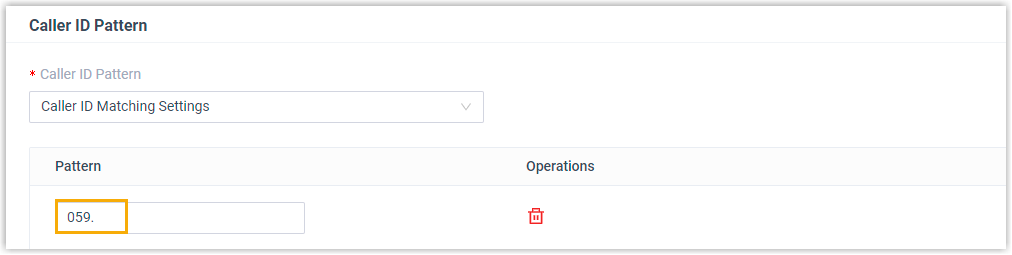
-
Set Trunk to the trunk that carries the incoming calls.
-
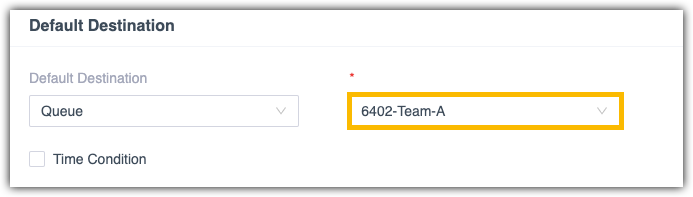
Configure the Default Destination. Here the call should always go to the same place, so route it to the Team-A queue and skip time-based routing:
- Default Destination: the queue for Team-A.
- Time Condition: leave it unselected.
-
Leave Fax Detection at its default settings.
Inbound route for Team-B
Section titled “Inbound route for Team-B”-
Under Name, type an identifying name for the route.
-
Leave DID Pattern empty.
-
For Caller ID Pattern, choose Caller ID Matching Settings, click Add, and enter the pattern.
For this scenario, enter
066.to match every incoming caller ID that begins with 066. See DID Pattern and Caller ID Pattern for details.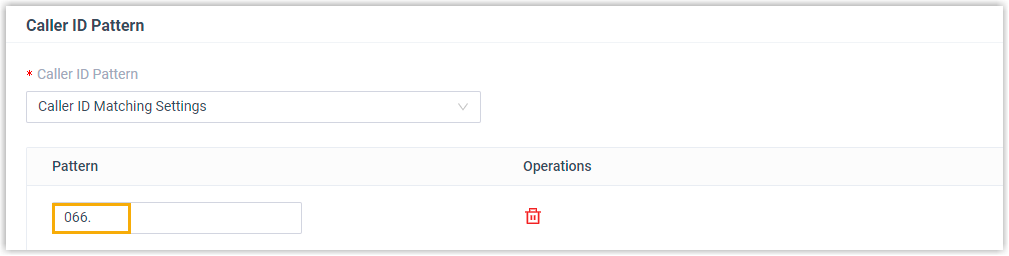
-
Set Trunk to the trunk that carries the incoming calls. In this example, select the siptrunk trunk, which serves the number 400-661-8815.
-
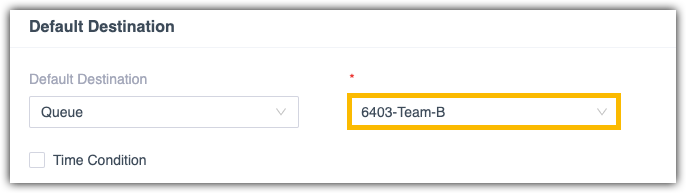
Configure the Default Destination so calls always reach Team-B:
- Default Destination: the queue for Team-B.
- Time Condition: leave it unselected.
-
Leave Fax Detection at its default settings.
Result
Section titled “Result”Both teams share the toll-free number, but callers land with the right team based on their area code:
- A caller from Fujian who dials 400-661-8815 is answered by Team-A.
- A caller from Guangdong who dials 400-661-8815 is answered by Team-B.
Question about this page?
Ask the AI assistant. It starts from this page, then searches the rest of the docs.
Ask Cloud Voice AI
Answers are AI-generated from the docs and may contain mistakes. Verify with the linked pages.