
Park and Retrieve a Call
Parking a call sets it aside in a shared holding spot instead of ending or transferring it. The caller waits on hold while anyone in the office can pick the call back up from their own phone. This is handy when the caller needs someone who is away from their desk: park the call, find the right person, and have them retrieve it from wherever they are. From the Operator Panel you can park active calls and retrieve parked ones with a few clicks.
Before you begin
Section titled “Before you begin”To park active calls belonging to members of your extension group, your account needs the Call parking operations (Park, Retrieve) permission.
Park a call
Section titled “Park a call”-
On the Inbound & Internal Calls panel or the Outbound Calls panel, move your pointer over the active call you want to park.
-
Choose how you want the parking number assigned, automatically by the system, or by picking a specific spot yourself.
Option A, Let the system assign a parking number
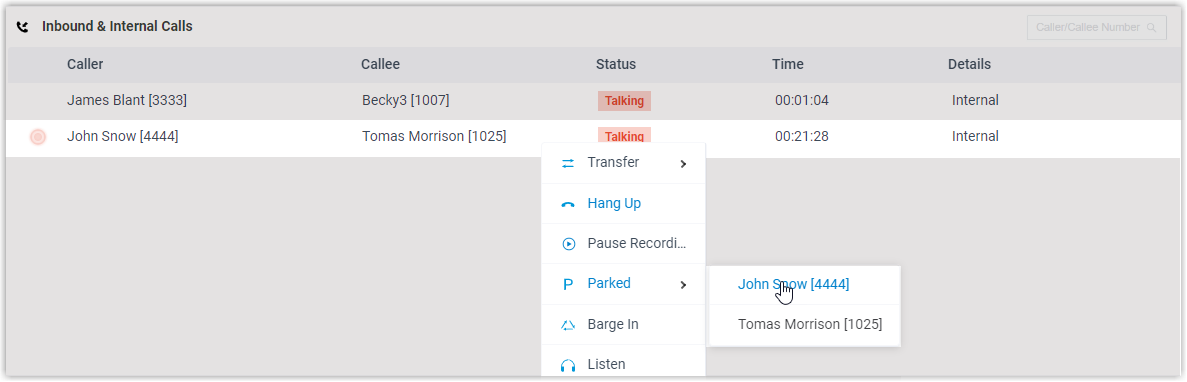
- Right-click the call and choose Parked.
- Select the party you want to park.
The call lands on the next free parking number. The caller is placed on hold, and the system announces which parking number the call is on so it can be retrieved from any phone.
Option B, Park on a specific parking number
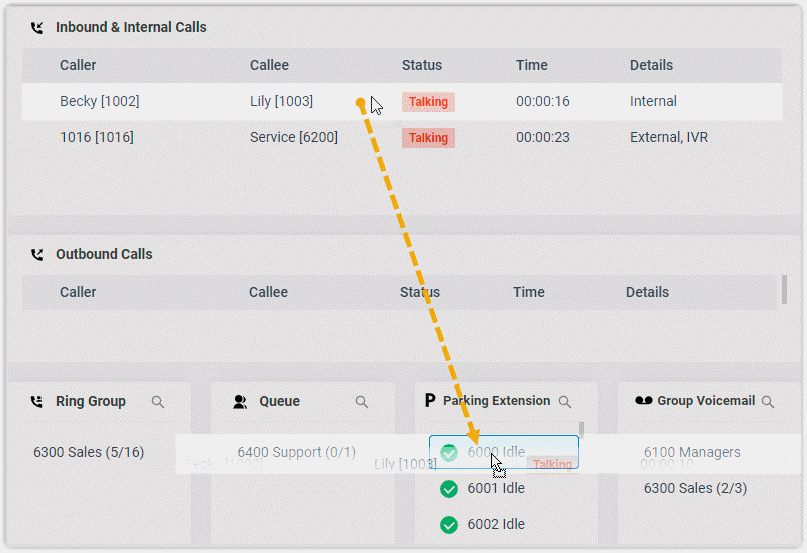
Drag the call and drop it onto the parking number you want in the Parking Extension list. This list shows the parking spots set up on the system.
The call is parked on that number, the caller goes on hold, and the system announces the parking number so it can be retrieved from any phone.
Retrieve a parked call
Section titled “Retrieve a parked call”-
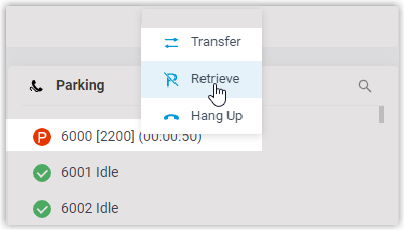
On the Inbound & Internal Calls panel or in the Parking Extension list, move your pointer over the parked call.
-
Right-click the call and choose Retrieve.
The system sends the parked call to your extension.
-
Answer the call to reconnect with the caller.
Question about this page?
Ask the AI assistant. It starts from this page, then searches the rest of the docs.
Ask Cloud Voice AI
Answers are AI-generated from the docs and may contain mistakes. Verify with the linked pages.