
Park a Call
Call parking puts an active call on hold at a shared parking number instead of on a single handset. Because the call is held centrally rather than on one phone, anyone can pick it up from another phone. This is useful when the current agent needs to hand a caller off but does not yet know exactly who will take over. This page walks through parking a call from the Queue Panel.
Before you start
Section titled “Before you start”Parking an agent’s active call requires the Call parking operation permission. Ask your system administrator to grant it if you do not already have it.
Park an active call
Section titled “Park an active call”-
Open the Cloud Voice App (Web or Desktop) and go to Call Center Console > Queue Panel.
-
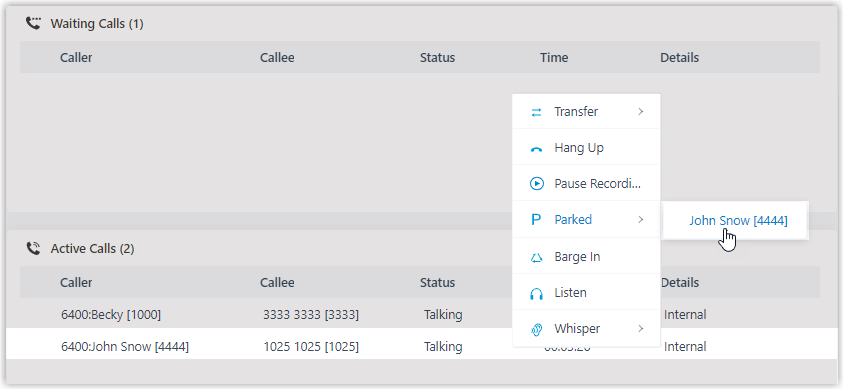
In the Active Calls panel, move your pointer over the answered call you want to park.
-
Right-click the call and choose Parked.
-
Choose which party on the call to park (the parked party).
The call is placed on the next free parking number. That party is put on hold, and Cloud Voice plays a prompt announcing which parking number the call is on so the other party knows where it can be retrieved.
Question about this page?
Ask the AI assistant. It starts from this page, then searches the rest of the docs.
Ask Cloud Voice AI
Answers are AI-generated from the docs and may contain mistakes. Verify with the linked pages.