
Control the Mobile App from the Web App
CTI (Computer Telephony Integration) mode links the Cloud Voice App running in your browser to the Cloud Voice App running on your phone. Once they are connected, the browser becomes a visual control surface for dialing, recording, hanging up, and other call actions, while the call audio itself stays on your phone. The two apps must be signed in to the same extension.
When to use this
Section titled “When to use this”CTI mode is helpful whenever the computer you dial from is a poor place to carry the audio. A common case: you keep a CRM (Customer Relationship Management) system on your office computer and place click-to-dial calls through the Cloud Voice App in the browser, but that CRM can only be reached from inside the office network. When you remote into that office computer from elsewhere and dial, the audio travels over the office connection rather than your own, so an unreliable remote session can degrade call quality.
Instead, sign in to the Cloud Voice App on your phone with the same extension, then remote into the office computer and switch the browser app into CTI mode. You still dial and manage calls from the browser, but the audio now flows through your phone directly, sidestepping the remote link and keeping the audio clear.
Before you begin
Section titled “Before you begin”Confirm that your system and apps meet these minimums:
| Item | Requirement |
|---|---|
| Cloud Voice system | Firmware 84.22.0.134 or later. |
| Cloud Voice App (mobile) | iOS version 5.24.13 or later; Android version 5.24.7 or later. The mobile app must be signed in to the same extension as the browser app. |
Connect the mobile app to the web app
Section titled “Connect the mobile app to the web app”-
Sign in to the Cloud Voice App in your browser.
-
In the top-right corner, click
 , then choose Mobile Client from the list.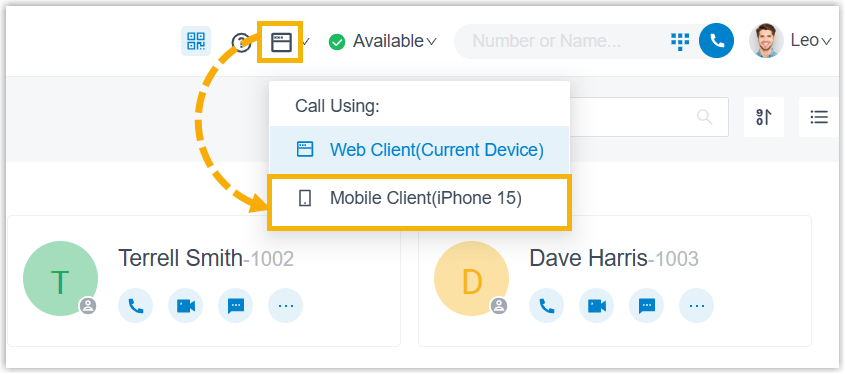
What you can control
Section titled “What you can control”With CTI mode on, you can drive these actions on the connected mobile app straight from the browser:
- Make or end a call
- Reject a call
- Blind transfer a call (send the call to someone else without speaking to them first)
- Record a call
- Hold or resume a call
- Flip a call (move an in-progress call to another device)
- Transcribe a call (turn the call audio into text)
Question about this page?
Ask the AI assistant. It starts from this page, then searches the rest of the docs.
Ask Cloud Voice AI
Answers are AI-generated from the docs and may contain mistakes. Verify with the linked pages.