
Update Read Status of Inbound Faxes
Every fax delivered to your extension arrives with an unread indicator in the Cloud Voice App. Opening a fax for preview or downloading it clears that indicator automatically, but you can also set the status by hand whenever it helps you keep your inbox organized. Any change you make is reflected everywhere you use the Cloud Voice App.
Change the read status
Section titled “Change the read status”-
Sign in to the Cloud Voice App and open Fax Management > Fax.
-
(Optional) To narrow the list to received faxes only, set Fax Direction to Receive at the top of the list.

-
Tick the checkbox beside each fax you want to update, click Mark as, and choose the read status you want to apply.
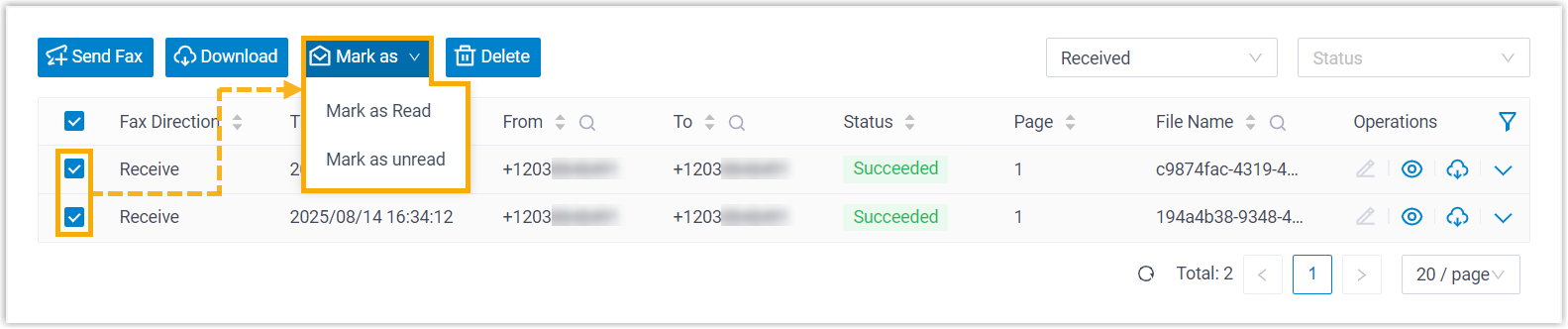
The selected faxes take on the new read status right away, and the change carries over to your other Cloud Voice App sessions.
Question about this page?
Ask the AI assistant. It starts from this page, then searches the rest of the docs.
Ask Cloud Voice AI
Answers are AI-generated from the docs and may contain mistakes. Verify with the linked pages.