
Continue an Active Call on the Cloud Voice App
Call Switch lets you pick up a call that is already running on one device and continue it on the Cloud Voice App, with no break in the conversation. Say you are on a customer call at your desk phone and something pulls you away, you can pass the call to your phone and keep talking as you walk.
Before you begin
Section titled “Before you begin”Confirm the following before you try to switch a call:
- Your app is on a supported version:
- iOS: 4.9.5 or later
- Android: 4.9.6 or later
- Your extension is registered (signed in) on at least two devices, for example your desk phone and the Cloud Voice App.
- A call is currently active on one of your other devices.
Move the call to your phone
Section titled “Move the call to your phone”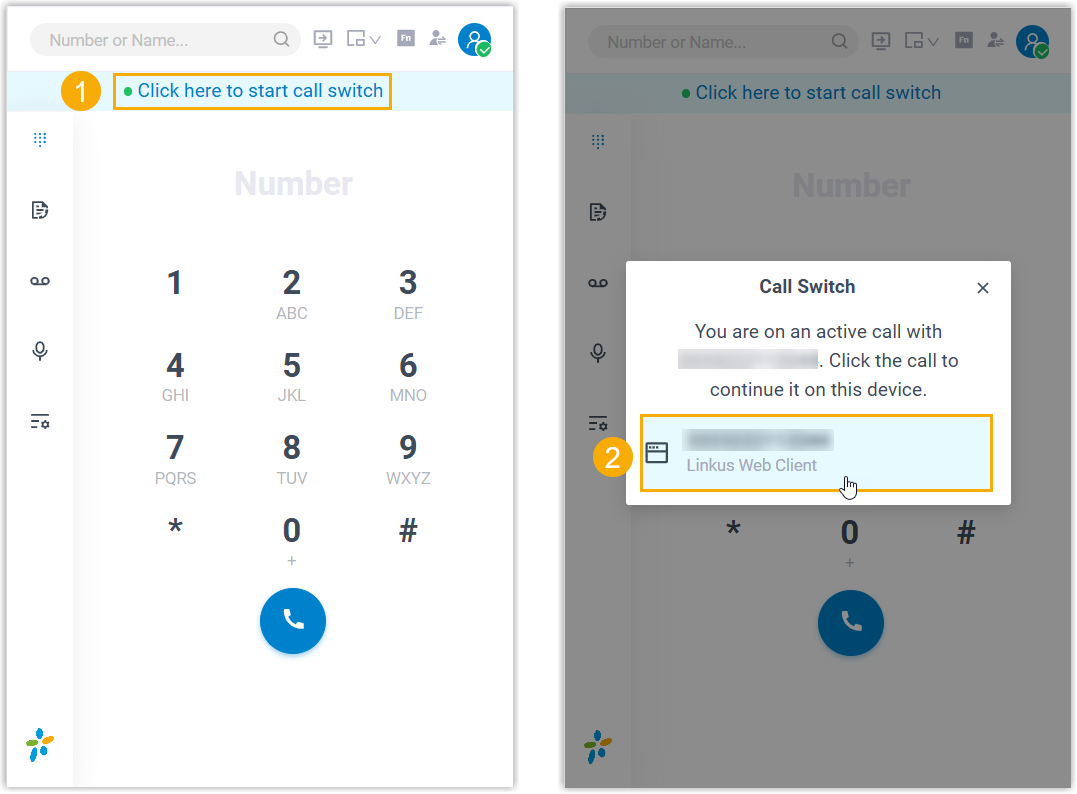
- Open the Cloud Voice App. At the top of the screen, tap Touch here to start call switch. The call currently active on your other device appears.
- Tap that call.
The conversation moves off the original device and onto the Cloud Voice App, and you can carry on talking without interruption.
Question about this page?
Ask the AI assistant. It starts from this page, then searches the rest of the docs.
Ask Cloud Voice AI
About
Answers are AI-generated from the docs and may contain mistakes. Verify with the linked pages.