
Forward an Incoming Call to Voicemail
When you can’t take a call, you don’t have to let it ring out. The Cloud Voice App lets you route a ringing call directly to your voicemail from the incoming-call pop-up, so the caller can leave a message right away instead of being cut off.
Before you begin
Section titled “Before you begin”- Your system must be running firmware version 84.20.0.128 or later.
- The Cloud Voice App must be turned on for your extension. You enable it under the Ring Strategy settings.
Send the call to voicemail
Section titled “Send the call to voicemail”How you reach the pop-up depends on whether the Cloud Voice App is already open in front of you.
When the app is open
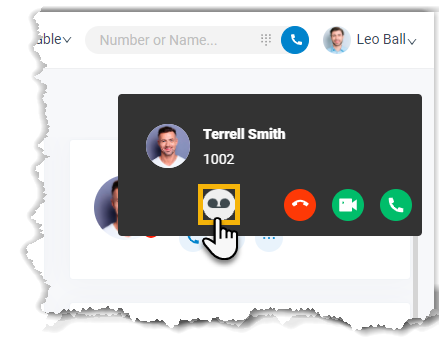
Section titled “When the app is open”When a call comes in and you’re already viewing the Cloud Voice App, the incoming-call pop-up appears. Click the voicemail icon  on the pop-up to divert the call.
When the app is in the background
Section titled “When the app is in the background”If a call arrives while the Cloud Voice App is minimized or open in another tab, your browser shows a push notification instead.
-
Click the notification.
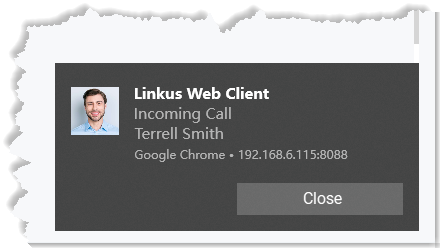
This brings you back to the Cloud Voice App and the incoming-call pop-up.
-
Click the voicemail icon
on the pop-up.
Result
Section titled “Result”The call stops ringing and goes to your voicemail, where the caller can record a message.
Question about this page?
Ask the AI assistant. It starts from this page, then searches the rest of the docs.
Ask Cloud Voice AI
Answers are AI-generated from the docs and may contain mistakes. Verify with the linked pages.