
Access Call Quality Monitoring Report
The Call Quality Monitoring Report grades a single call and shows the network and audio measurements that shaped that grade. Use it when you want to understand why a call sounded the way it did, for example when someone reports choppy or delayed audio. This page walks through opening the report in the Cloud Voice App and explains what each metric means.
Open the report
Section titled “Open the report”-
Sign in to the Cloud Voice App and go to Calls > Call Logs.
-
Open the report for the call you want to inspect:
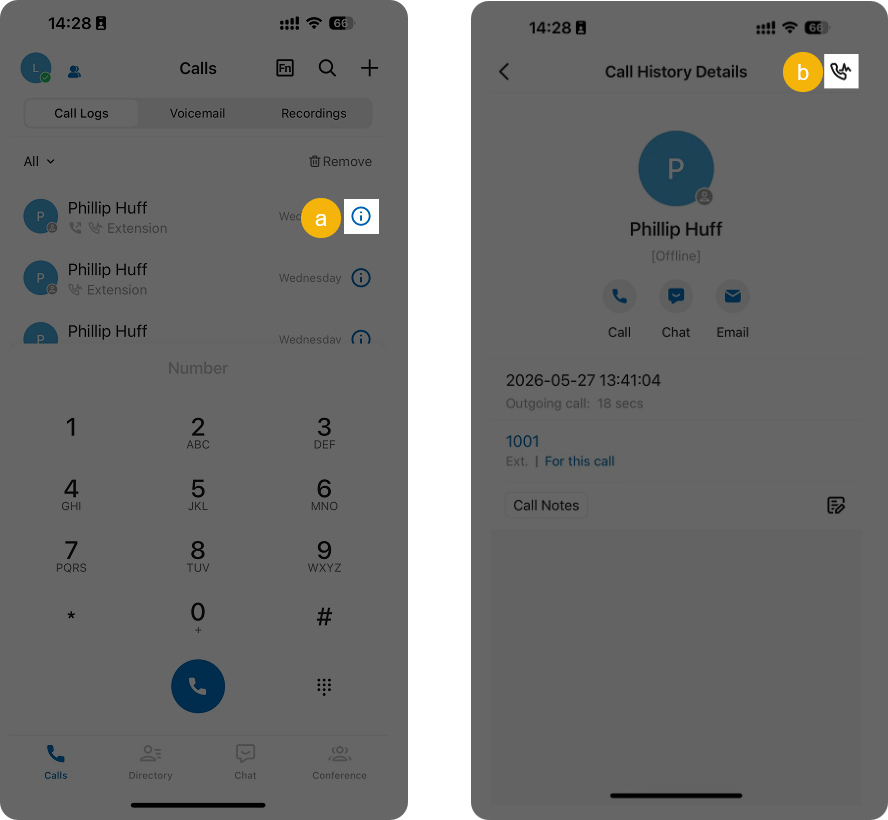
- Tap the information icon
 next to that call log.
 - In the top-right corner, tap the call quality icon
 .
.
- Tap the information icon
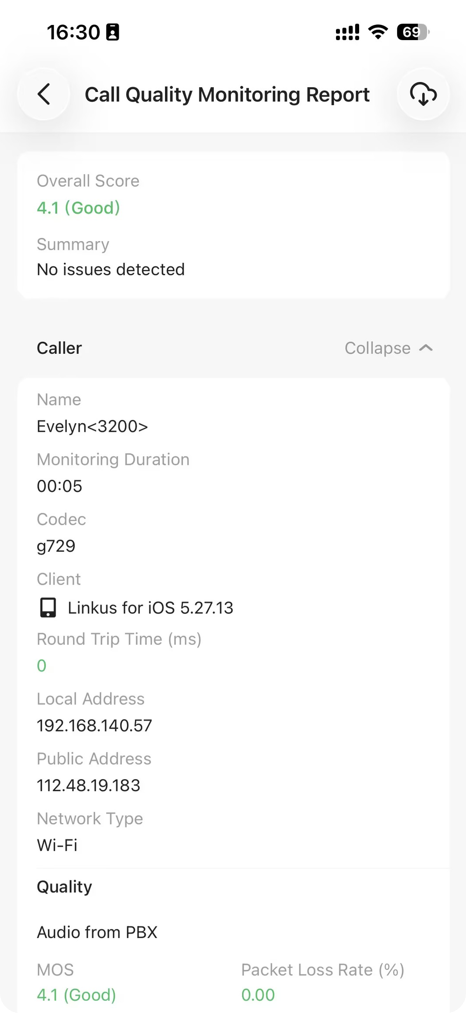
The report opens on its own page.
What the report shows
Section titled “What the report shows”The report opens with an overall assessment, then breaks the call into the two endpoints and the two audio directions.
Overall
Section titled “Overall”| Metric | Meaning |
|---|---|
| Overall Score | The combined call quality score and its rating. |
| Summary | A short summary of how the call performed. |
Caller & Callee
Section titled “Caller & Callee”These fields describe each party on the call and the connection each one used. An IP (Internet Protocol) address is the numeric address a device uses to send and receive data on a network.
| Metric | Meaning |
|---|---|
| Name | The party’s name and number. |
| Monitoring Duration | How long call quality was measured. |
| Codec | The codec (the format used to compress and encode the audio) the call used. |
| Client | The client the party called from. |
| Round Trip Time (ms) | The round-trip time for audio packets to travel to the far end and back, in milliseconds. |
| Local Address | The local IP address the client used during the call. |
| Public IP Address | The public IP address the client used during the call. |
| Network Type | The type of network connection the client was on. |
Audio from PBX & Audio to PBX
Section titled “Audio from PBX & Audio to PBX”These fields measure the audio stream in each direction: inbound from the PBX (Private Branch Exchange, the phone system that routes the call) and outbound to the PBX.
| Metric | Meaning |
|---|---|
| MOS | The Mean Opinion Score (MOS) for audio quality:
|
| Packet Loss Rate (%) | The share of audio packets that were lost. |
| Jitter Buffer (ms) | The buffer used to smooth out variation in packet arrival timing. |
| Latency (ms) | The network transmission delay. |
Question about this page?
Ask the AI assistant. It starts from this page, then searches the rest of the docs.
Ask Cloud Voice AI
Answers are AI-generated from the docs and may contain mistakes. Verify with the linked pages.