
Download Fax Data
Every fax you send or receive in the Cloud Voice App is recorded as a log entry, and the underlying document is stored alongside it. You can pull this data out whenever you need it: grab a batch of logs together with their fax files, or save a single document on its own.
Download logs together with their fax files
Section titled “Download logs together with their fax files”-
Sign in to the Cloud Voice App and open Fax Management > Fax.
-
Optional: Use the filters above the list to find the entries you want.
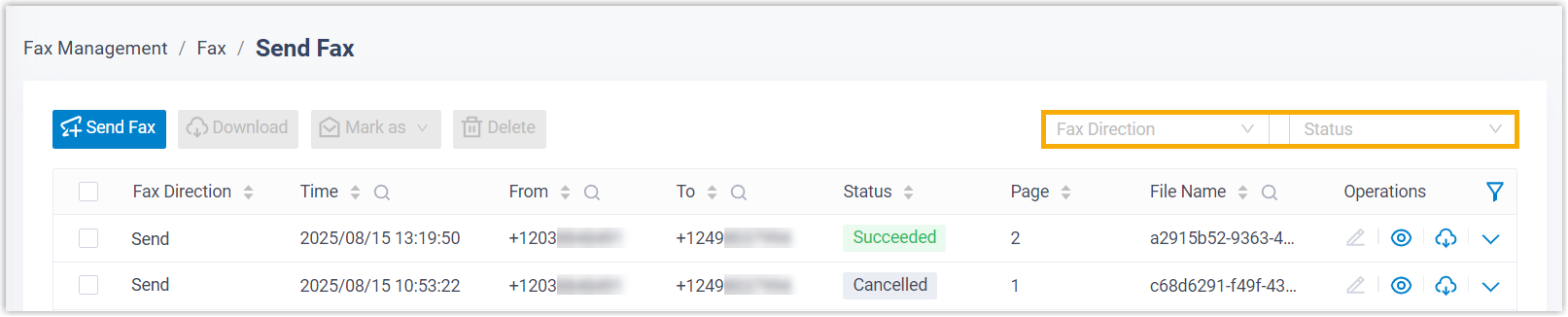
Filter What it does Fax Direction Choose Send or Receive to show only outbound or inbound faxes. Status Restrict the list to faxes with a particular status. -
Tick the checkbox next to each log you want, then click Download.

The export arrives as a
.ziparchive. Inside you’ll find a.csvfile holding the log details plus a.pdffor each fax document.
Download a single fax file
Section titled “Download a single fax file”-
Sign in to the Cloud Voice App and open Fax Management > Fax.
-
Optional: Use the filters above the list to locate the log whose document you need.
Filter What it does Fax Direction Choose Send or Receive to show only outbound or inbound faxes. Status Restrict the list to faxes with a particular status. -
Click the download icon
 on the row for that log.
The document is saved on its own as a
.pdffile.
Question about this page?
Ask the AI assistant. It starts from this page, then searches the rest of the docs.
Ask Cloud Voice AI
Answers are AI-generated from the docs and may contain mistakes. Verify with the linked pages.