
Forward an Incoming Call to Voicemail
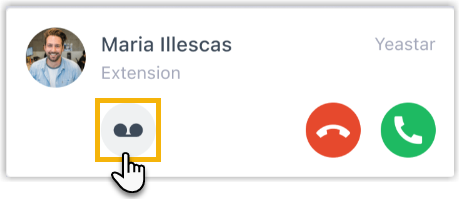
When a call comes in that you cannot take right now, you can send it straight to your voicemail box instead of letting it keep ringing. The Cloud Voice App puts this control right on the incoming call pop-up, so the caller reaches your greeting immediately and can leave a message.
Before you start
Section titled “Before you start”Confirm that all of the following are true, or the voicemail button may not appear:
- Desktop app version: The Cloud Voice App (desktop) is running version 1.16.4 or later.
- Phone system firmware: Your phone system is on firmware 84.20.0.128 or later. Firmware is the software that runs on the phone system server; an administrator can check or upgrade it for you.
- The app is a ring destination: The Cloud Voice App is included in your Ring Strategy, so incoming calls actually reach the desktop.
Send the call to voicemail
Section titled “Send the call to voicemail”- Wait for a call to reach your extension. When one arrives, the incoming call pop-up appears on your screen.
- On that pop-up, click the voicemail button.

Result
Section titled “Result”The call stops ringing and the caller is routed to your voicemail box, where they can leave a message for you.
Question about this page?
Ask the AI assistant. It starts from this page, then searches the rest of the docs.
Ask Cloud Voice AI
About
Answers are AI-generated from the docs and may contain mistakes. Verify with the linked pages.