
Set up Auto Answer for Paging/Intercom Calls
When auto answer is turned on, paging and intercom calls connect on their own the moment they arrive, so you never have to reach for the answer button. Follow the steps below to switch the feature on in the Cloud Voice App.
Before you start
Section titled “Before you start”Your phone system must be running firmware version 84.17.0.16 or newer. If it is on an older build, the Auto Answer Paging/Intercom Call option will not appear.
Turn on auto answer
Section titled “Turn on auto answer”-
Sign in to the Cloud Voice App web client and open Preferences > Features.
-
Under Call, tick Auto Answer Paging/Intercom Call, then adjust the related options to suit how you work.
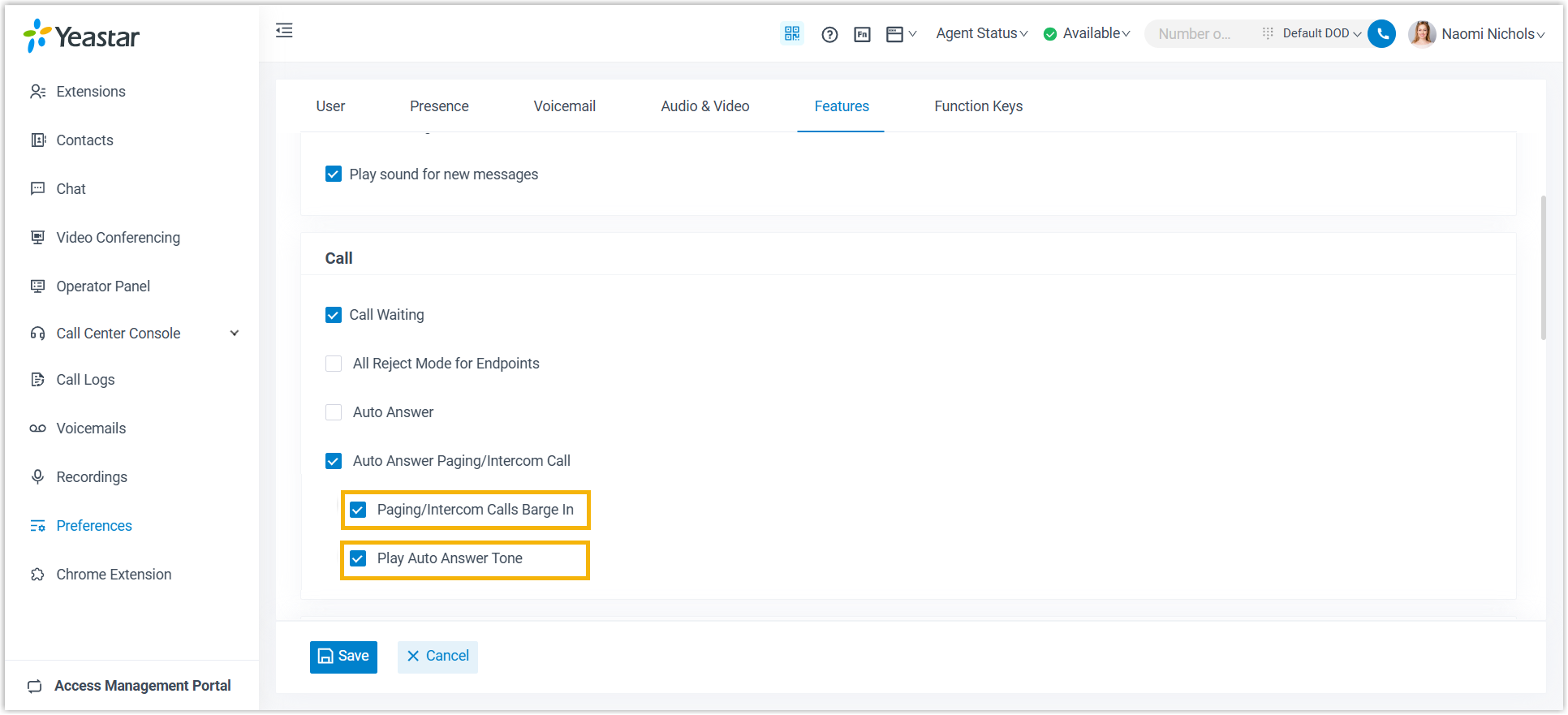
- Paging/Intercom Calls Barge In: Turn this on to have a paging or intercom call answered automatically even while you are already connected on another call.
- Play Auto Answer Tone: Turn this on to hear a short beep whenever a paging or intercom call is picked up for you. The tone is your signal that a new call just went live on your device.
-
Click Save.
What happens next
Section titled “What happens next”From now on, paging and intercom calls are answered without any action from you.
Question about this page?
Ask the AI assistant. It starts from this page, then searches the rest of the docs.
Ask Cloud Voice AI
Answers are AI-generated from the docs and may contain mistakes. Verify with the linked pages.